
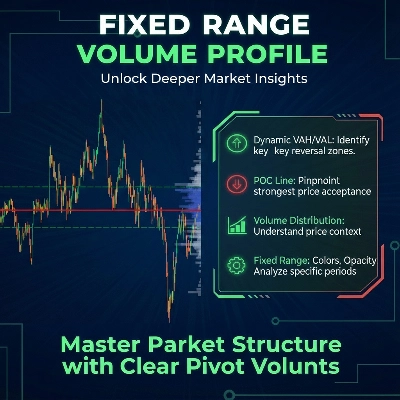
Fixed Range Volume Profile
Indikator
5 pembelian
Versi 1.0, Jan 2026
Windows, Mac
4.0
Ulasan: 2
Sejak 26/09/2025
18
Penjualan
Deskripsi
Cara Menggunakan Fixed Range Volume Profile (FRVP)
- Aktifkan Indikator: Seret dan jatuhkan Indikator FRVP ke grafik yang Anda inginkan dari menu cTrader Automate atau Indicators.
- Pilih Alat Analisis: Temukan Alat Gambar Persegi Panjang standar di toolbar cTrader (biasanya di sisi kanan atau kiri platform).
- Tentukan Rentang Anda: Klik dan seret persegi panjang di atas aksi harga dan periode waktu spesifik yang ingin Anda analisis.
- Inisialisasi Profil: Setelah menggambar, klik dan dorong persegi panjang sedikit. "Jabat tangan" antara gambar dan indikator ini memicu perhitungan volume, langsung menghasilkan histogram, POC, dan garis Area Nilai.
- Sesuaikan Secara Dinamis: Anda dapat menyeret tepi persegi panjang untuk memperluas rentang waktu atau memindahkannya ke kaki harga yang berbeda; profil volume akan otomatis menghitung ulang untuk mencerminkan area baru.
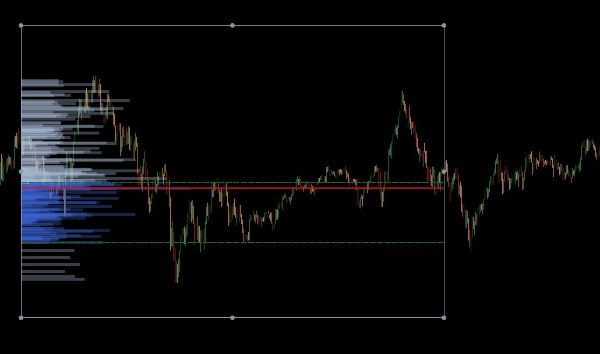
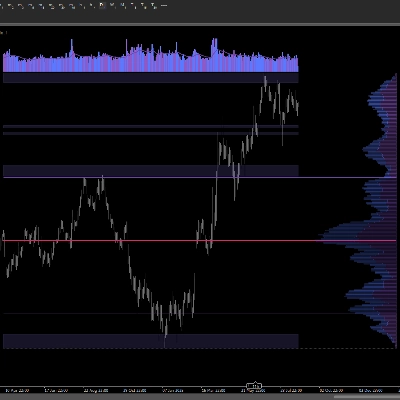
Fixed Range Volume Profile (FRVP) untuk cTrader adalah alat analisis canggih yang dirancang untuk mengidentifikasi level harga penting dengan menghitung distribusi volume selama rentang waktu dan harga tertentu. Berbeda dengan indikator volume standar yang berhubungan dengan waktu, indikator ini fokus pada kepadatan harga untuk mengungkap sentimen pasar.
Fitur Utama
- Pemilihan Rentang Dinamis: Indikator secara otomatis menghitung dan memperbarui setiap kali Anda menggambar atau memindahkan persegi panjang standar pada grafik cTrader Anda.
- Identifikasi Level Kunci:
-
- Point of Control (POC): Menyoroti level harga dengan volume perdagangan tertinggi, bertindak sebagai "magnet" untuk aksi harga.
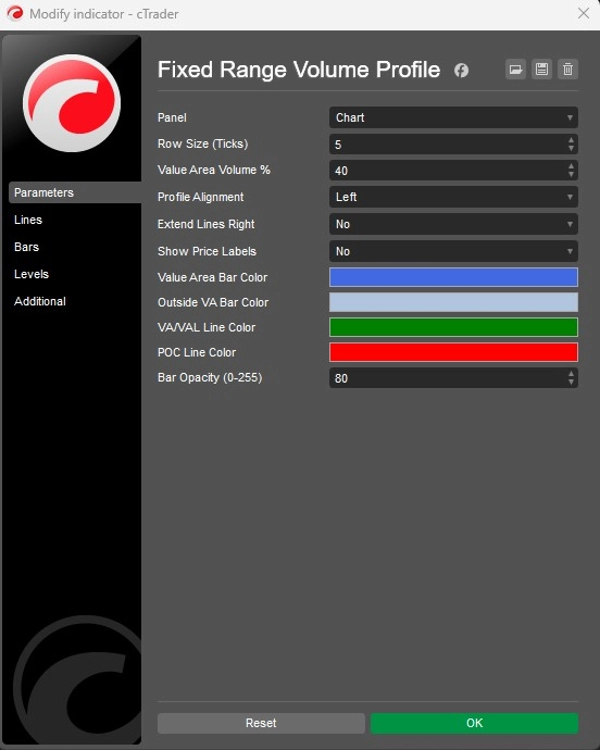
- Value Area High/Low (VAH/VAL): Menentukan batas di mana persentase volume tertentu (default 40%) diperdagangkan.
- Tata Letak yang Dapat Disesuaikan:
-
- Penjajaran: Pilih untuk menampilkan histogram volume dari sisi Kiri atau Kanan kotak.
- Granularitas: Sesuaikan Ukuran Baris (default 5 ticks) untuk mengontrol detail batang volume.
- Visual: Kontrol penuh atas warna batang (Area Nilai vs. Luar), opasitas, dan visibilitas label harga.
Aplikasi Strategis
- Dukungan & Resistensi: High Volume Nodes (HVN) sering bertindak sebagai dukungan atau resistensi yang kuat, sementara Low Volume Nodes (LVN) mewakili area "tipis" di mana harga dapat bergerak cepat.
- Konfirmasi Tren: Gunakan fitur Extend Right untuk melihat bagaimana level volume historis berinteraksi dengan aksi harga saat ini saat berkembang.
Ringkasan
AI summary
The Fixed Range Volume Profile (FRVP) indicator for cTrader analyzes volume distribution within a user-defined price and time range using a standard rectangle drawing tool. By selecting and adjusting this rectangle on the chart, the indicator dynamically calculates and displays a volume histogram along with key levels: Point of Control (POC), which marks the price with the highest traded volume, and Value Area High/Low (VAH/VAL), defining the volume concentration boundaries. Users can customize the histogram’s alignment, granularity (row size), colors, opacity, and price label visibility. The indicator supports dynamic range adjustments by dragging the rectangle edges, automatically recalculating volume data. Strategically, it helps identify support and resistance zones through high and low volume nodes and offers trend confirmation by extending volume levels into current price action. The FRVP is applicable across various markets including Forex, cryptocurrencies, commodities, indices, and stocks, and supports symbols such as BTCUSD, EURUSD, GBPUSD, XAUUSD, and NAS100. It integrates with cTrader’s drawing tools and provides a detailed volume-based perspective on price action beyond standard time-based volume indicators.
Profil indikator
Kategori indikator
Volume
Tipe output
Visualisasi
Persyaratan data
Hanya batang
Volume
Ulasan pelanggan
4.0
Ulasan: 2
5 | 0 % | |
4 | 100 % | |
3 | 0 % | |
2 | 0 % | |
1 | 0 % |
Diskusi
Pertanyaan umum
Forex
Signal
Scalping
Indices
Commodities
Crypto
Stocks
Produk-produk yang tersedia melalui cTrader Store, termasuk bot trading, indikator, dan plugin, disediakan oleh pengembang pihak ketiga serta hanya ditujukan untuk akses teknis dan informasi. cTrader Store bukan broker dan tidak menyediakan saran investasi, rekomendasi pribadi, atau jaminan apa pun tentang kinerja di masa mendatang.





![Logo "Session Volume Profile (SVP) [Iridio Capital]"](https://cdn.ctrader.com/image/webp/b058beb7-b143-45f3-87d0-8c524c00b203_61552)

![Logo "Gaussian Channel [Iridio Capital]"](https://cdn.ctrader.com/image/webp/2c4f9ca9-4e9b-476d-b5a6-787c8095032b_61546)
Harga
Sejak 26/09/2025
18
Penjualan