

LookPosOrderIndicator
Indicator
1 purchases
Version 1.0, Oct 2025
Windows, Mac
4.3
Reviews: 3

1
Sales
Description
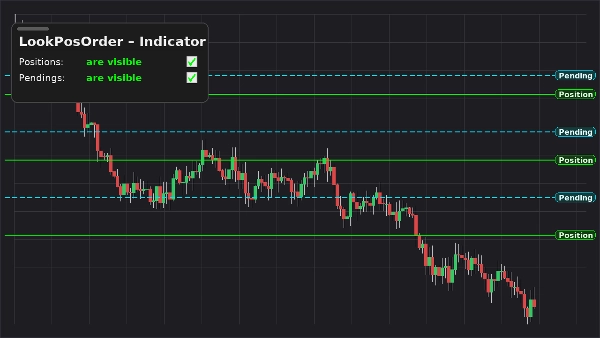
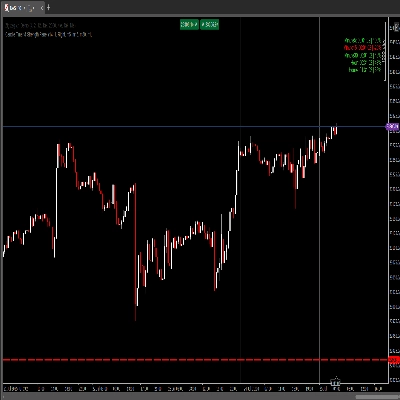
LookPosOrder (Indicator) keeps you safe and fast: it adds a floating, draggable panel on your chart to show or hide Positions and Pending Orders—and raises a fixed, top-center warning banner whenever hidden items exist for the current symbol.
What it does
- On-chart panel with two toggles:
- Positions: are visible / are hidden
- Pendings: are visible / are hidden
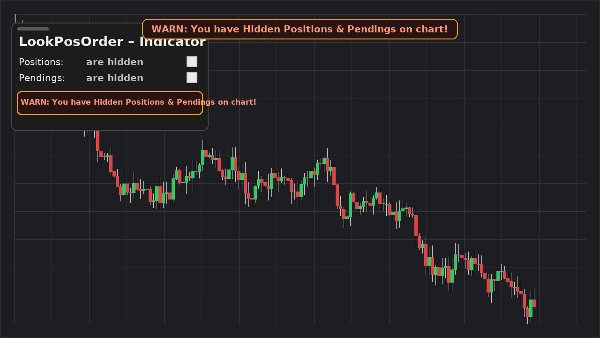
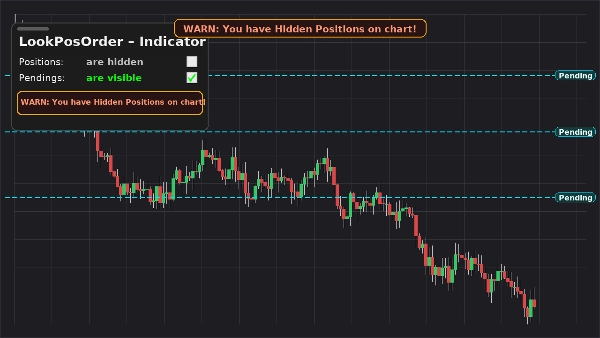
- Fixed on-chart warning (does not move when you pan/zoom) if hidden items exist.
- Same inline warning inside the panel.
- Per-symbol awareness: only warns when the active symbol actually has items hidden.
- Remembers your preferences per symbol.
Why traders love it
- Avoid mistakes: don’t forget you’ve hidden orders/positions.
- Instant toggling: no more drilling into chart menus.
- Clean overlay: draggable, compact, and responsive.
Key Features
- On-chart, draggable control panel
- One-click toggles for Positions and Pending Orders
- Fixed warning banner when hidden items exist
- Inline warning inside the panel
- Per-symbol awareness
- Works alongside native Display Settings (auto-syncs if you change them elsewhere)
Requirements
- cTrader 5.4.9 or later recommended
- Desktop platform
Installation
- Download the indicator file.
- Open cTrader → Automate → Indicators → Import.
- Add LookPosOrder – Indicator to your chart (overlay).
- Drag the panel where you like; use the two checkboxes to manage visibility.
How to Use
- Toggle Positions and Pendings from the floating panel.
- If something is hidden and exists for the current symbol, warnings appear:
- “WARN: You have Hidden Positions on chart!”
- “WARN: You have Hidden Pendings on chart!”
- “WARN: You have Hidden Positions & Pendings on chart!”
- The warning banner is fixed to the top center. Use the indicator parameter “Y offset Warning Text” to move it down if needed.
FAQ
Q: Does it modify my orders/positions?
A: No. It only toggles chart visibility (native Display Settings).
Q: Will it warn me for other symbols?
A: No. Warnings only appear when the current symbol has hidden items.
Q: What if I change visibility from the chart’s menu?
A: The indicator auto-syncs the panel and warnings.
Q: Performance impact?
A: Minimal—lightweight overlay and checks per symbol.
Support & Refund
- 14-day money-back guarantee if it doesn’t work as described for you.
Summary
AI summary
LookPosOrderIndicator is an on-chart tool for the cTrader desktop platform (version 5.4.9 or later) that provides a draggable control panel to toggle the visibility of open Positions and Pending Orders per trading symbol. It features two one-click toggles within a floating panel to show or hide these items directly on the chart. When any Positions or Pending Orders are hidden for the active symbol, a fixed warning banner appears at the top center of the chart, accompanied by inline warnings inside the panel, alerting the user to hidden items. The indicator remembers visibility preferences individually for each symbol and automatically syncs with native chart display settings if changed elsewhere. This lightweight overlay helps traders avoid overlooking hidden orders or positions by providing instant visual cues without modifying any orders or positions themselves. Installation involves importing the indicator into cTrader’s Automate section and adding it as an overlay on the chart, where the panel can be repositioned as needed. The indicator supports all symbols available in cTrader and integrates seamlessly with native display controls.
Indicator profile
Customer reviews
4.3
Reviews: 3
5 | 33 % | |
4 | 67 % | |
3 | 0 % | |
2 | 0 % | |
1 | 0 % |
Customer reviews
October 15, 2025
It is easier to trust when it helps avoid forced entries. Wrong settings can feel safe.
October 15, 2025
October 5, 2025
Discussion
FAQ
Signal
Indices
Commodities
GBPUSD
RSI
Bollinger
Fibonacci
Scalping
AI
XAUUSD
NAS100
MACD
BTCUSD
Forex
Breakout
EURUSD
NZDUSD
Martingale
ZigZag
Supertrend
Fair Value Gap
Crypto
Grid
Stocks
ATR
USDJPY
VWAP
Products available through cTrader Store, including trading bots, indicators and plugins, are provided by third-party developers and made available for informational and technical access purposes only. cTrader Store is not a broker and does not provide investment advice, personal recommendations or any guarantee of future performance.
More from this author






!["[Hamster-Coder] Moving Average MTF" logo](https://cdn.ctrader.com/image/webp/b11b98b1-194d-4b8e-b00e-d611826ad159_31226)


Price
1
Sales