Description
Session Volatility Radar — Volatility × Structure Cross-Analysis with an Adaptive Signal Engine
════════════════════════════════════════════════════════════════════════════════
PRODUCT OVERVIEW
Session Volatility Radar (SVR) is a professional cTrader indicator designed for 24-hour markets such as Forex, spot gold/silver, and continuous 7*24 markets like crypto.
SVR does not stop at "volatility is high/low." It cross-analyzes:
- Volatility regime (ATR / ATR-Mean)
- Structure regime (EMA side + confirmed fractal swing structure)
Then it maps that context to practical signal behavior:
Entry framework (trend-aware):
- Low Volatility + Trend → PB pullback-to-EMA entries
- Structure Breakout + Trend Context → BO breakout entries
- No Trend Context → no entry signal
Exit framework (independent monitors):
- HV: volatility spike exit
- REV: structure reversal exit (with optional N-bar confirmation)
- RES: HV + REV resonance exit (both must converge)
Same-bar reversal is supported: when exit and reverse-direction entry conditions occur on the same bar, both are signaled.
This two-axis model helps reduce one-dimensional decisions and keeps context visible in real time through the on-chart panel.
════════════════════════════════════════════════════════════════════════════════
WHY SVR IS DIFFERENT
1) Context first, then signal
Most tools report volatility only. SVR combines volatility and structure before signaling.
2) Session-native workflow
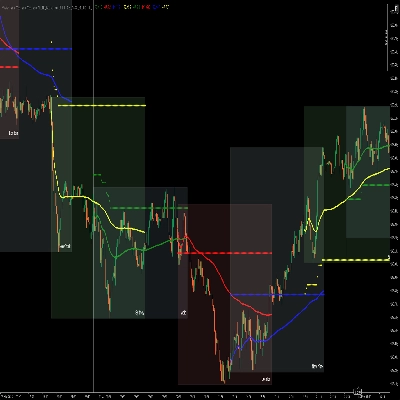
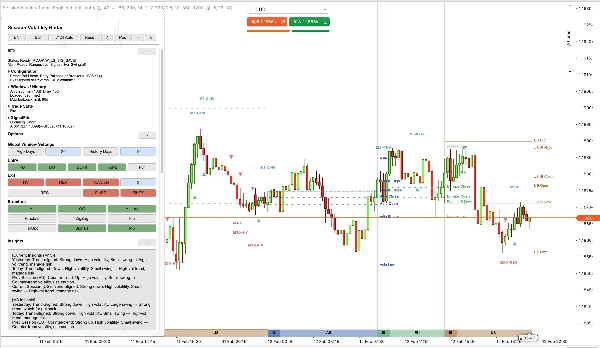
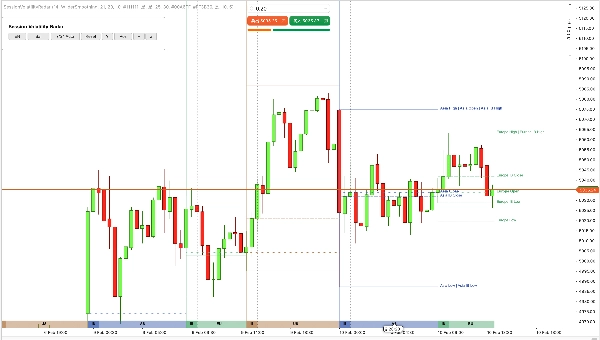
SVR overlays Asia / Europe / US / Weekend (WK) session bands with IB ranges directly on chart, plus session OHLC lines with text labels for the current trading day.
3) Adaptive, not fixed-threshold logic
Volatility and swing thresholds are recalculated automatically from recent data. Parameter defaults act as initial anchors and tuning inputs.
4) SignalFib is part of logic, not decoration
SignalFib can participate in entry filtering and exit logic (PB limit / retrace exit / extension exit), not just drawing.
5) Practical panel for live decision support
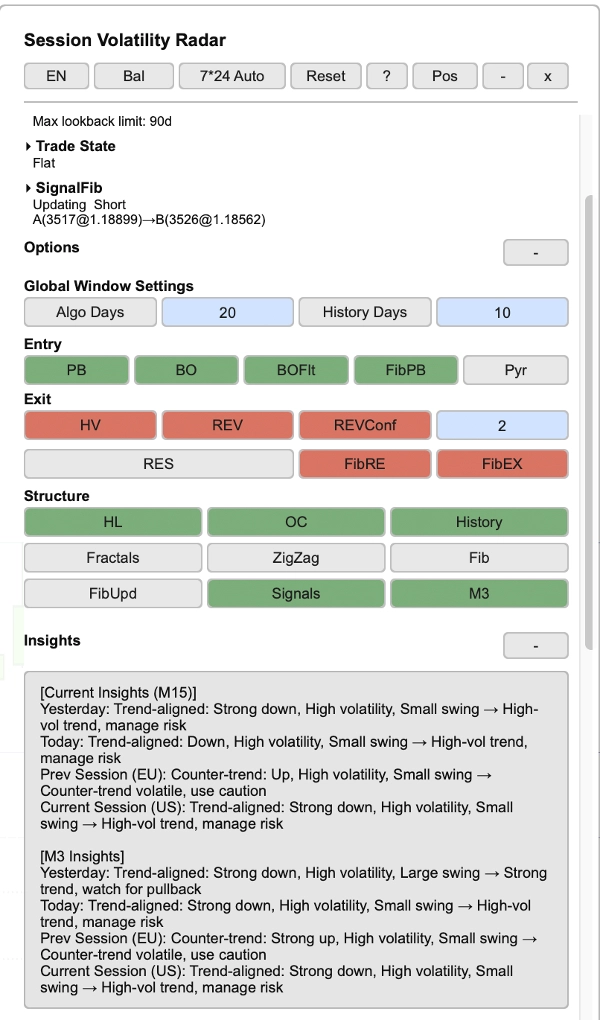
- Panel shows trade state (Long/Short/Flat), trend direction, configuration summary, session stats, SignalFib status, and market insights — with bilingual (Chinese / English) support, defaulting to English.
6) Automatic history management
SVR chain-loads history automatically toward the algorithm window target. If your broker/server cannot provide sufficient history, SVR will enter a visible degraded/frozen state (shown in the panel status line).
════════════════════════════════════════════════════════════════════════════════
KEY FEATURES
────────────────────────────────────────────────────────────────────────────────
1. VOLATILITY × STRUCTURE CROSS-ANALYSIS
SVR evaluates market state through two synchronized dimensions:
- Volatility dimension: ATR / ATR-Mean classification into low / normal / high volatility regimes.
- Structure dimension: EMA-side trend + confirmed fractal swing structure for breakout and reversal context.
Four adaptive presets (Conservative / Balanced / Aggressive / Custom) provide one-click sensitivity control. Custom mode defaults to Balanced and can be freely tuned. Presets control threshold sensitivity only; entry/exit switches are independently configurable.
────────────────────────────────────────────────────────────────────────────────
2. SESSION BANDS — INSTANT INTRADAY CONTEXT
SVR draws configurable session bands on the chart background:
- Asia session (AS): 9 hours
- Europe session (EU): 5.5 hours
- US session (US): 9.5 hours
- Weekend session (WK): 24 hours (when 7*24 mode is active)
Session alignment is anchored to a New York trading-day start (default: 18:00 NY) and mapped to chart time automatically. Sessions cover 24 hours from the trading-day start to the next trading-day start.
Each band supports configurable height and opacity. Band colors follow a built-in palette (theme-adjusted), with session Open / High / Low / Close reference lines and text labels for the current day.
Historical session display supports up to 90 trading days (historical days show lines only, no labels).
────────────────────────────────────────────────────────────────────────────────
3. INITIAL BALANCE (IB) — EARLY SESSION STRUCTURE
IB is calculated from a dedicated bars series derived from IB Block Size (default 30-minute bars) and is configurable by:
- IB Block Size (minutes), default: 30
- IB Block Count, default: 2
During the IB period, IB High/Low lines dynamically sync with session High/Low in real time. After the IB window closes, IB High/Low freeze at the opening range, an IB Close line is added, and all three IB lines continue extending to the session end for reference.
────────────────────────────────────────────────────────────────────────────────
4. SIGNAL ENGINE (ENTRY + EXIT)
Entry side:
- PB (pullback): low-volatility trend pullback entries toward EMA, with optional PB confirmation mode (Off / Basic / Strong)
- BO (breakout): structure breakout entries, with default high-volatility filter and body/ATR minimum filter
- Optional M3 (3-minute) signal projection to current timeframe, with same-bar deduplication
- Same-direction minimum spacing enforced (no consecutive same-direction entries)
PB confirmation note:
- In confirmation modes, PB can arm on one bar and confirm on the next; Fib PB Limit follows the armed pullback context for consistency.
Exit side:
- HV: exit on volatility spike
- REV: exit on reversal structure, with optional N-bar confirmation and cross filter mode (ATR Distance or EMA Side Only)
- RES: exit only when both HV and REV converge (mutual exclusion with standalone HV/REV)
- Fib exits: retrace exit and extension exit (evaluated independently and OR-ed with enabled exit modes; when RES is enabled, standalone HV/REV are disabled by design)
Same-bar reversal: when exit and reverse-direction entry both trigger on the same bar, both signals are annotated.
Optional controls include pyramiding (same-direction re-entry) and all Fib-based filters.
────────────────────────────────────────────────────────────────────────────────
5. SIGNALFIB — CALCULATION-ALIGNED FIBONACCI
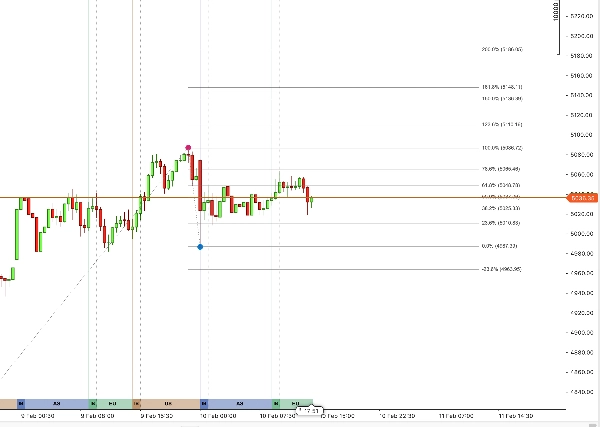
SignalFib is the single source of truth for signal calculation, with optional drawing on chart. It participates in:
- PB depth limiting (entry filter)
- Retracement-based exit
- Extension-based target exit
- Optional anchor updates via confirmed fractal ratchet (profit-protecting direction only)
Individual SignalFib level visibility switches (0%, 23.6%, 38.2%, 50%, 61.8%, 78.6%, 100%, extensions up to 200%, and negative extensions) are drawing-only toggles that do not affect signal calculation.
────────────────────────────────────────────────────────────────────────────────
6. INTERACTIVE PANEL + HISTORY MANAGEMENT
- Live panel with bilingual (Chinese / English) support, all sections collapsible
- Header buttons: preset cycling, language toggle, 7*24 mode cycling (Auto / Force On / Force Off), reset, help, position, minimize, close
- Button areas organized by function: entry selection, exit selection, structure/display toggles
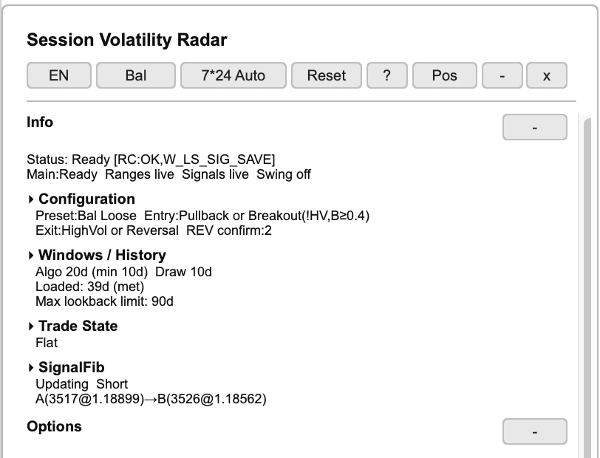
Info section:
- Status line: system readiness (Ready/Loading) and subsystem states
- Configuration summary: active preset, entry/exit modes, REV confirm bars
- Windows / History: algo window days, draw days, loaded history status, max lookback limit
- Trade State display (Long / Short / Flat), independent of entry/exit display switches
- SignalFib status: updating/frozen, direction, anchor points (A→B)
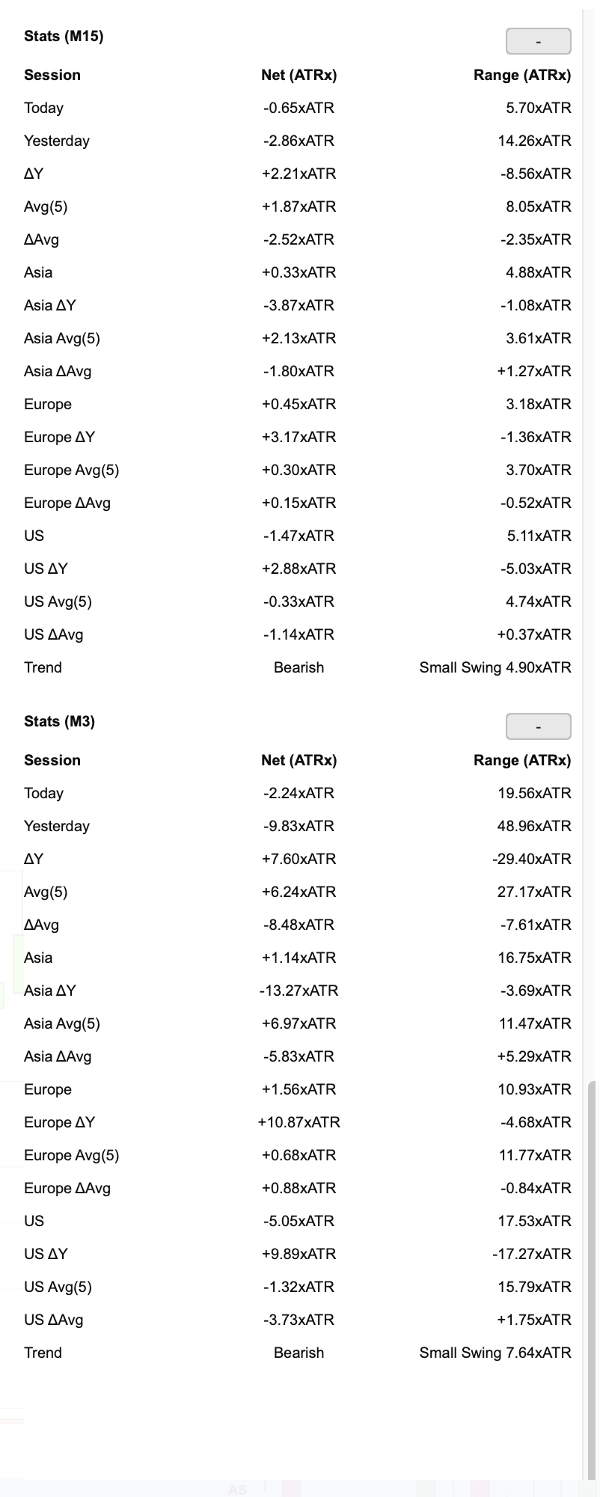
Stats tables:
- Session stats for main timeframe and M3 (when enabled): Today, Yesterday, ΔY, Avg, ΔAvg, per-session (Asia/Europe/US) with delta and average rows
- Columns: Net change (ATRx), Range (ATRx)
- Trend row: direction (Bullish/Bearish) + swing magnitude
Insights section (derived from stats data above):
- Contextual market interpretation for main timeframe and M3
- Covers: Yesterday, Today, Previous Session, Current Session
- Each insight combines trend alignment, volatility level, swing size → actionable guidance (e.g., "Strong trend, watch for pullback" or "Counter-trend volatile, use caution")
History:
- Automatic chain-loading of history toward the algorithm window target. If history cannot be fully obtained from broker/server, SVR will degrade/freeze and show the state in the panel status line.
- Signals/history are stored locally with automatic cleanup
- Panel state persistence saved locally on your device (no external data transfer)
════════════════════════════════════════════════════════════════════════════════
PARAMETERS (Overview)
────────────────────────────────────────────────────────────────────────────────
1. Algorithm Settings
- ATR Period — default: 14
- ATR MA Type — default: Wilder Smoothing
- EMA Period — default: 21
- ATR Mean Period (Vol) — default: 34
- Structure Lookback — default: 20
- Fractal Left/Right Bars — default: 20 / 2
- Structure Swing (ATRx) Threshold — default: 1.25
- Low Vol ATR/Mean — default: 1.1
- High Vol ATR/Mean — default: 1.25
- Low Vol Min Bars — default: 2
- Algo Window Days — default: 20 (up to 90)
────────────────────────────────────────────────────────────────────────────────
2. Signal Settings
- Allow Pullback Entry (PB) — default: ON
- PB Confirm Mode — default: Off (options: Off / Basic / Strong)
- Allow Breakout (BO) — default: ON
- BO Filter High Vol — default: ON
- BO Body/ATR Min — default: 0.4
- Allow Pyramiding — default: OFF
- Use M3 Signals — default: ON (auto-disabled if your chart timeframe is M3)
- Min Entry Spacing Bars — default: 2
- Exit On High Vol (HV) — default: ON
- Exit On Reversal (REV) — default: ON
- Exit On Resonance (RES) — default: OFF
- REV Confirm Enable — default: ON
- REV Confirm Bars — default: 2
- REV Cross Filter — default: ATR Distance (alternative: EMA Side Only)
- Enable Fib PB Limit — default: ON
- Fib PB Limit Level — default: 78.6%
- Enable Fib Retrace Exit — default: ON
- Fib Retrace Exit Level — default: 61.8%
- Enable Fib Extension Exit — default: ON
- Fib Extension Exit Level — default: 123.6%
- Enable Signal Fib Updates (FibUpd) — default: OFF
────────────────────────────────────────────────────────────────────────────────
3. Session Settings
- Show Session Bands — default: ON
- Session Band Height / Opacity — configurable
- Show IB — default: ON
- Show HL Lines / Show OC Lines — default: ON
- IB Block Size (min) / Count — default: 30 / 2
- Session band colors — built-in palette (theme-adjusted)
────────────────────────────────────────────────────────────────────────────────
4. Structure Settings
- Show Fractals — default: OFF
- Enable ZigZag — default: OFF
- Show Signal Fib — default: OFF
- Individual SignalFib level visibility switches (including extensions)
────────────────────────────────────────────────────────────────────────────────
5. Display Settings
- Language — Chinese / English, defaulting to English
- Drawing Theme — Light / Dark
- Market 7*24 Mode — Auto / Force On / Force Off
- Show Panel / Panel position / Panel text color
- Show Entry/Exit Signals — configurable
────────────────────────────────────────────────────────────────────────────────
6. History Settings
- Show History — default: ON
- History Days — default: 10 (up to 90)
- Average Days (Panel) — default: 5
════════════════════════════════════════════════════════════════════════════════
IMPORTANT NOTES
ADAPTIVE THRESHOLDS
Actual thresholds used by the signal engine are adaptive values derived from recent data. Parameter defaults are starting anchors only.
SESSION TIMING
Sessions follow a Forex-day anchor (18:00 New York open) and are auto-mapped to chart time. For continuous 7*24 markets (e.g., crypto), automatic detection is supported via Market 7*24 Mode (Auto / Force On / Force Off).
HISTORY LOADING
SVR automatically chain-loads history toward the algorithm window target. If history cannot be fully obtained from broker/server, SVR will degrade/freeze and show the state in the panel status line.
NON-REPAINTING SCOPE
Confirmed fractal swings and confirmed historical signals do not repaint. The still-forming bar and active in-progress state can update as new data arrives.
INDICATOR, NOT A BOT
SVR is an analytical indicator, not an automated trading robot (cBot). It does not place orders, manage positions, or execute risk controls for you.
TRIAL
A 7-day trial version is available in cTrader Store.
════════════════════════════════════════════════════════════════════════════════
SUPPORT
If you have questions or feedback, please contact us via cTrader Store.
Thank you for choosing Session Volatility Radar.