
Donchian Channel Pro
อินดิเคเตอร์
เวอร์ชัน 1.0, Aug 2025
Windows, Mac
4.6
รีวิว: 3
ตั้งแต่ 26/05/2025
506.86M
ปริมาณการเทรด
65.71K
Pips ที่ได้กำไร
17
การขาย
1.74K
ติดตั้งฟรี
คำอธิบาย
วิธีการเทรดโดยใช้กลยุทธ์ Donchian (Breakout)
- ซื้อ เมื่อราคาทะลุสูงสุดในช่วง N-ช่วงเวลา (บนสุด)
- ขาย เมื่อราคาทะลุต่ำสุดในช่วง N-ช่วงเวลา (ล่างสุด)
- ถือ ตำแหน่งในขณะที่แนวโน้มยังดำเนินอยู่; ออกเมื่อเกิดการทะลุในทิศทางตรงกันข้ามหรือผ่านการหยุดแบบ trailing stop
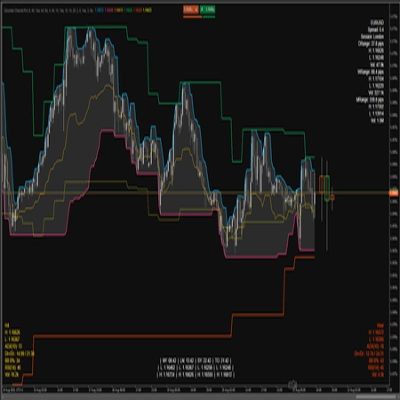
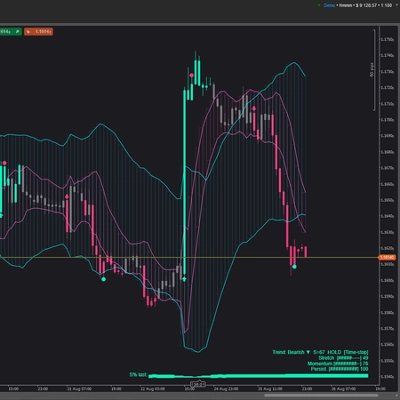
ตัวชี้วัดแสดงอะไรบนกราฟ
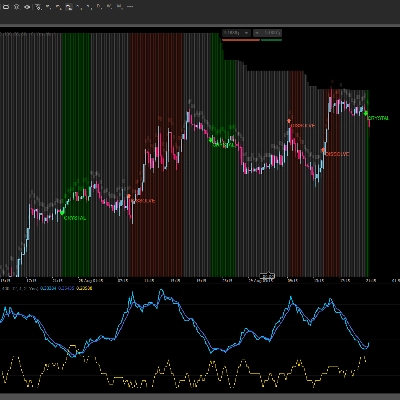
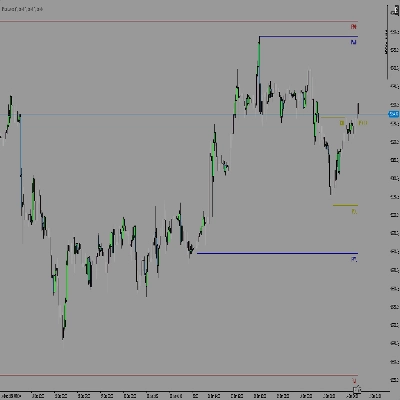
Donchian บนกรอบเวลาปัจจุบัน (TF):
- บนสุด: ราคาสูงสุดในช่วงแถบช่องบนสุด
- ล่างสุด: ราคาต่ำสุดในช่วงแถบช่องล่างสุด
- กลาง: จุดกึ่งกลางระหว่างบนสุดและล่างสุด
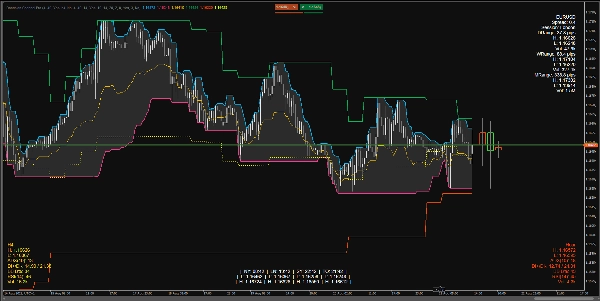
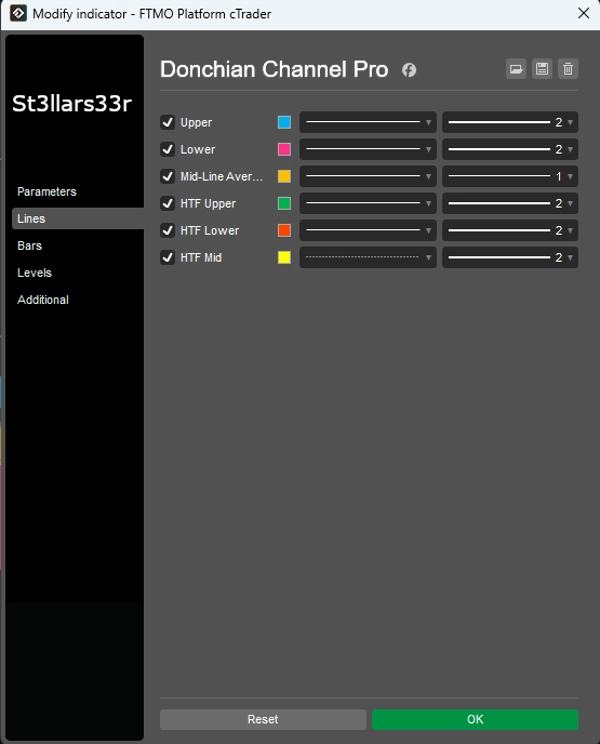
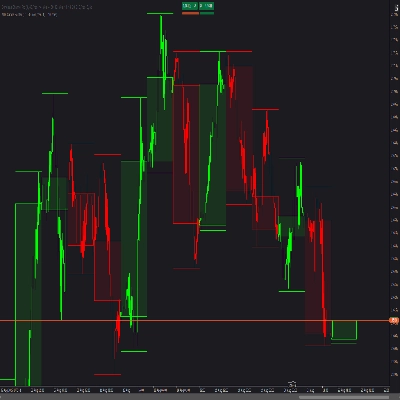
HTF Overlay: เส้น Donchian จากกรอบเวลาที่สูงกว่าซ้อนทับบนกราฟ:
- HTF บนสุด, HTF ล่างสุด, HTF กลาง
- HTF Candles HUD: สี่เหลี่ยมแทนแท่งเทียนกรอบเวลาที่สูงกว่า ติดตั้งที่ด้านขวาของแท่งสุดท้ายในกรอบเวลาปัจจุบัน
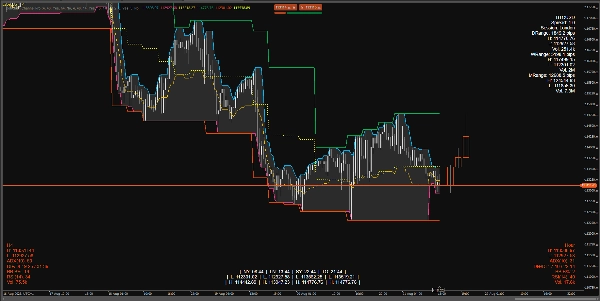
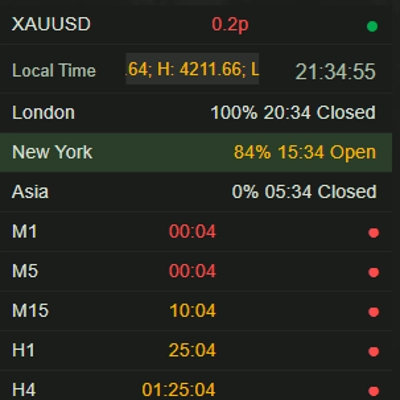
HUDs (Heads-Up Displays) ที่ด้านล่าง/บน:
- บนขวา: แผงข้อมูลสำหรับสัญลักษณ์ + ช่วงรายวัน/รายสัปดาห์/รายเดือน
- ล่างซ้าย: HTF HUD (เมตริกสำหรับกรอบเวลาที่สูงกว่า)
- ล่างขวา: Mid TF HUD (เมตริกสำหรับกรอบเวลาระดับกลาง)
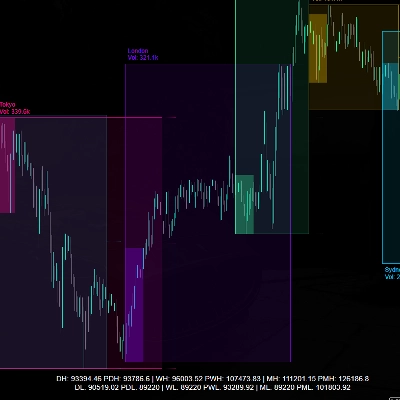
- ล่างกลาง: นาฬิกาเซสชัน + สูง/ต่ำ สำหรับแต่ละเซสชัน (คงที่)
แต่ละ HUD แสดงอะไร
บนขวา (มุมบนขวา)
- ชื่อสัญลักษณ์
- สเปรด: สเปรดเป็นพิปส์
- เซสชัน: เซสชันที่กำลังใช้งานอยู่ (ตามชั่วโมงที่กำหนด)
- ช่วง DRange/WRange/MRange: ช่วงรายวัน/รายสัปดาห์/รายเดือนเป็นพิปส์
- สูง/ต่ำ/ปริมาณ: สูงสุด/ต่ำสุดและปริมาณรวมสำหรับช่วงเวลานั้น
ล่างซ้าย (ล่างซ้าย) — HTF HUD
- ชื่อ TF (เช่น H4, D1 เป็นต้น)
- สูง/ต่ำ: สูงสุด/ต่ำสุดปัจจุบันของแท่ง HTF ล่าสุด (หรือที่ใช้งานอยู่)
- ADX(n), DI+/DI-: ตัวบ่งชี้แนวโน้ม
- BB B%: ตำแหน่งราคาปัจจุบันเทียบกับ Bollinger Bands บน HTF (0 ใกล้แถบล่าง, 100 ใกล้แถบบน)
- RSI(n)
- ปริมาณ: ปริมาณบน HTF
- สี HUD:
-
- สีเขียว: ช่วงขยายขึ้น (DI+ และ ADX เพิ่มขึ้น)
- สีแดง: แรงกดดันเพิ่มขึ้นลง (DI- เพิ่มขึ้น)
- สีเหลือง: เป็นกลาง/ไม่กำหนด
ล่างขวา (ล่างขวา) — Mid TF HUD
- เหมือนกับ HTF HUD แต่สำหรับกรอบเวลาระดับกลาง (Mid Timeframe)
ล่างกลาง (กึ่งกลางล่าง) — นาฬิกา + สูง/ต่ำ เซสชัน
- เวลา ใน NY, LN, SY, TO
- ต่ำ/สูง สำหรับแต่ละเซสชัน
- ตรรกะคงที่: เมื่อเซสชันไม่ทำงาน จะแสดงสูง/ต่ำของเซสชันล่าสุดที่เสร็จสิ้น; เมื่อเซสชันใหม่เริ่ม ค่าเหล่านี้จะรีเซ็ตและคำนวณใหม่
พารามิเตอร์และวิธีใช้
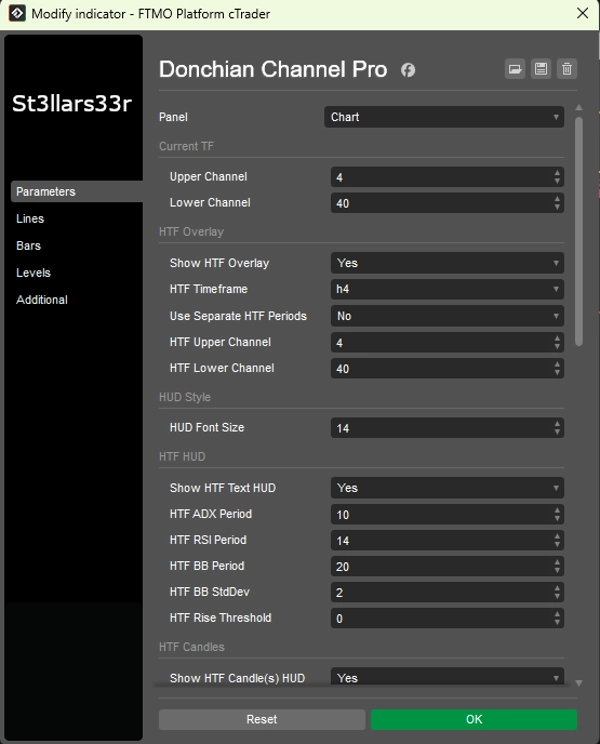
กลุ่ม: TF ปัจจุบัน (Donchian ปัจจุบัน)
- ช่องบนสุด: จำนวนแท่งสำหรับช่องบนสุด ค่ามาก = อัปเดตน้อยลง เส้นเรียบกว่า
- ช่องล่างสุด: จำนวนแท่งสำหรับช่องล่างสุด
กลุ่ม: HTF Overlay (การซ้อน Donchian กรอบเวลาที่สูงกว่า)
- แสดง HTF Overlay: เปิดใช้งานเส้น HTF บนกราฟ
- กรอบเวลา HTF: เลือกกรอบเวลาที่สูงกว่า (เช่น Hour4)
- ใช้ช่วง HTF แยกต่างหาก: ถ้าเป็นจริง ช่องบน/ล่าง HTF ใช้พารามิเตอร์ของตัวเอง; ถ้าเป็นเท็จ ใช้ช่องบน/ล่างปัจจุบัน
- ช่องบนสุด HTF: ความยาวของช่องบนสุดสำหรับ HTF
- ช่องล่างสุด HTF: ความยาวของช่องล่างสุดสำหรับ HTF
กลุ่ม: สไตล์ HUD
- ขนาดฟอนต์ HUD: ขนาดฟอนต์สำหรับ HUD ทั้งหมด (บนขวา, ล่างซ้าย, ล่างขวา, ล่างกลาง)
กลุ่ม: HTF HUD (ล่างซ้าย)
- แสดงข้อความ HTF HUD: แสดงข้อความ HUD สำหรับ HTF
- ช่วง ADX HTF: ช่วง ADX/DI ค่ามาก = เรียบเนียนกว่า มีเสียงรบกวนน้อย แต่ตอบสนองช้ากว่า
- ช่วง RSI HTF: ช่วง RSI
- ช่วง BB HTF: ช่วง Bollinger Bands
- ส่วนเบี่ยงเบนมาตรฐาน BB HTF: ตัวคูณส่วนเบี่ยงเบนมาตรฐานสำหรับ BB (ค่าคลาสสิกคือ 2.0)
- เกณฑ์การเพิ่มขึ้น HTF: ความไวต่อเมตริกที่เพิ่มขึ้น (ส่งผลต่อสี HUD)
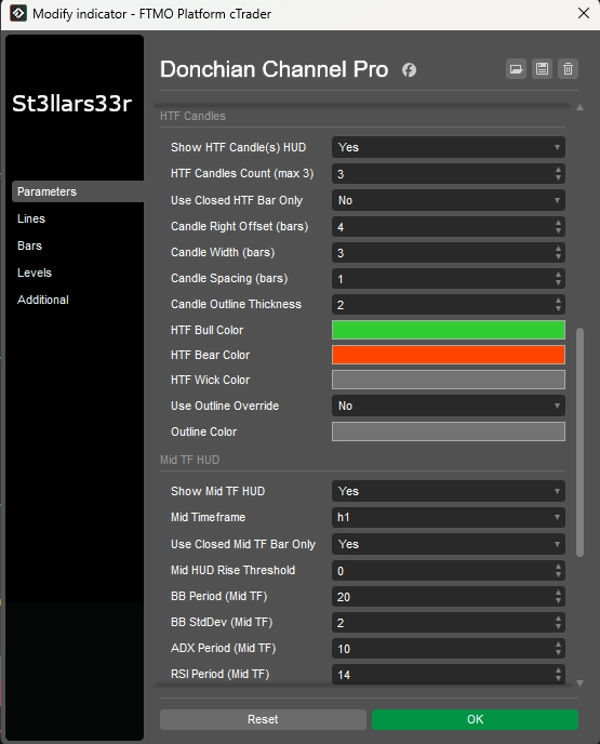
กลุ่ม: HTF Candles (ขวา ใกล้แท่งสุดท้าย)
- แสดง HTF Candle(s) HUD: แสดงแท่งเทียน HTF ที่ด้านขวา
- จำนวนแท่งเทียน HTF (สูงสุด 3): จำนวนแท่งเทียน HTF (1–3)
- ใช้เฉพาะแท่ง HTF ที่ปิดแล้ว: ถ้าเป็นจริง ใช้เฉพาะแท่งเทียน HTF ที่ปิดแล้ว (ค่าคงที่) ถ้าเป็นเท็จ รวมแท่งเทียนเปิดปัจจุบันด้วย
- การเลื่อนแท่งเทียนไปทางขวา (แท่ง): การเลื่อนทางขวาเป็นจำนวนแท่งของ TF ปัจจุบันจากแท่งสุดท้าย (จุดยึด)
- ความกว้างแท่งเทียน (แท่ง): ความกว้างของสี่เหลี่ยมแท่งเทียนในแท่ง TF ปัจจุบัน
- ระยะห่างแท่งเทียน (แท่ง): ช่องว่างระหว่างแท่งเทียน
- ความหนาของเส้นขอบแท่งเทียน: ความหนาของเส้นขอบแท่งเทียน
- สีแท่งเทียนกระทิง HTF / สีแท่งเทียนหมี HTF: สีสำหรับแท่งเทียนกระทิง/หมี
- สีไส้แท่งเทียน HTF: สีสำหรับไส้แท่งเทียน
- ใช้การแทนที่เส้นขอบ: ถ้าเป็นจริง ตัวแท่งเทียนจะถูกวาดด้วยเส้นขอบ (สีเส้นขอบ) โดยไม่มีการเติมสีแท่งกระทิง/หมี
- สีเส้นขอบ: สีสำหรับเส้นขอบเมื่อใช้การแทนที่เส้นขอบ = จริง
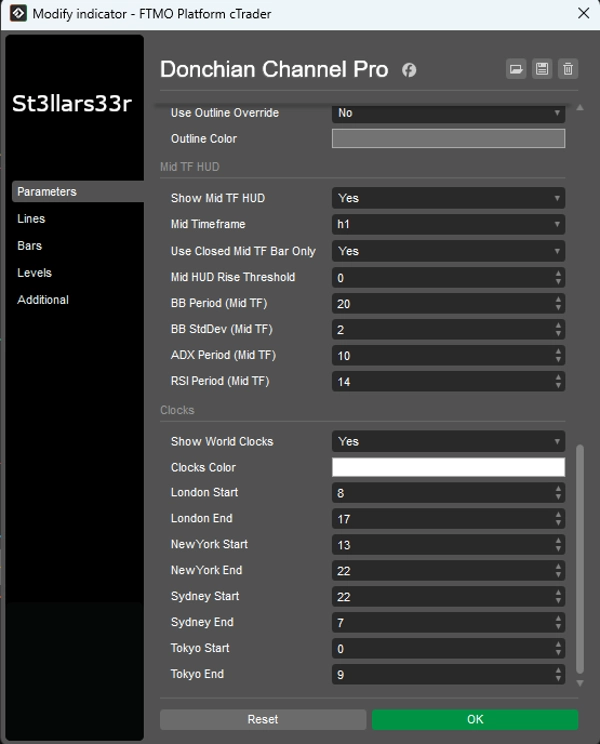
กลุ่ม: Mid TF HUD (ล่างขวา)
- แสดง Mid TF HUD: เปิดใช้งาน HUD สำหรับ TF ระดับกลาง
- กรอบเวลาระดับกลาง: เลือก TF ระดับกลาง (เช่น Minute15)
- ใช้เฉพาะแท่ง Mid TF ที่ปิดแล้ว: เหมือนกับ HTF แต่สำหรับ Mid TF
- เกณฑ์การเพิ่มขึ้น Mid HUD: ความไวสีสำหรับ Mid TF HUD
- ช่วง BB (Mid TF), ส่วนเบี่ยงเบนมาตรฐาน BB (Mid TF): การตั้งค่า Bollinger Bands สำหรับ Mid TF
- ช่วง ADX (Mid TF), ช่วง RSI (Mid TF): ช่วง ADX และ RSI สำหรับ Mid TF
กลุ่ม: นาฬิกา (กึ่งกลางล่าง)
- แสดงนาฬิกาโลก: แสดงบล็อกที่มีนาฬิกาและสูง/ต่ำ เซสชัน
- สีของนาฬิกา: สีข้อความสำหรับนาฬิกา/เซสชัน
- เริ่มต้นลอนดอน / สิ้นสุดลอนดอน: ชั่วโมงเริ่มต้น/สิ้นสุดสำหรับเซสชันลอนดอน
- เริ่มต้นนิวยอร์ก / สิ้นสุดนิวยอร์ก: สำหรับนิวยอร์ก
- เริ่มต้นซิดนีย์ / สิ้นสุดซิดนีย์: สำหรับซิดนีย์
- เริ่มต้นโตเกียว / สิ้นสุดโตเกียว: สำหรับโตเกียว
นาฬิกา: แสดงเวลาท้องถิ่นจริงสำหรับเมืองต่างๆ (ผ่านโซนเวลาของระบบปฏิบัติการพร้อมการชดเชยสำรอง)
- การคำนวณกิจกรรมเซสชัน (และสูง/ต่ำ) ใช้เวลาของเซิร์ฟเวอร์โบรกเกอร์ (Server.Time) หากเซิร์ฟเวอร์ไม่ใช่ UTC ชั่วโมงเซสชันอาจเปลี่ยนแปลง—ปรับ Start/End ตามความเหมาะสมสำหรับเซิร์ฟเวอร์ของคุณ
- ถ้าเซสชันข้ามเที่ยงคืน (End < Start) ตัวบ่งชี้จะคำนวณการเปลี่ยนแปลงวันที่โดยอัตโนมัติ
- เมื่อเซสชันไม่ทำงาน จะแสดงสูง/ต่ำของเซสชันล่าสุดที่เสร็จสิ้น; เมื่อเซสชันใหม่เริ่ม ข้อมูลจะรีเซ็ตและคำนวณใหม่
สรุป
สรุปโดย AI
Donchian Channel Pro is a technical indicator designed for trading breakout strategies by tracking N-period highs and lows. It displays three key lines on the current timeframe chart: the upper channel (highest price over a set number of bars), the lower channel (lowest price), and the midpoint between them. The indicator also supports a higher timeframe (HTF) overlay, showing Donchian lines and HTF candle representations on the current chart for multi-timeframe analysis.
The tool includes multiple customizable Heads-Up Displays (HUDs) positioned around the chart. The TopRight HUD provides symbol details, spread, active session, and daily/weekly/monthly ranges with volume data. The BottomLeft HUD shows HTF metrics such as high/low, ADX, directional indicators, Bollinger Bands position, RSI, and volume, with color-coded trend signals. The BottomRight HUD offers similar data for an intermediate timeframe. The BottomMid HUD displays session clocks and high/low values for major trading sessions (New York, London, Sydney, Tokyo), updating dynamically with session changes.
Parameters allow customization of channel lengths for current and higher timeframes, HUD font sizes, ADX/RSI/Bollinger Bands settings, candle display options, and session times. The indicator supports various markets including Forex, cryptocurrencies, commodities, indices, and stocks, facilitating precise breakout trading decisions.
The tool includes multiple customizable Heads-Up Displays (HUDs) positioned around the chart. The TopRight HUD provides symbol details, spread, active session, and daily/weekly/monthly ranges with volume data. The BottomLeft HUD shows HTF metrics such as high/low, ADX, directional indicators, Bollinger Bands position, RSI, and volume, with color-coded trend signals. The BottomRight HUD offers similar data for an intermediate timeframe. The BottomMid HUD displays session clocks and high/low values for major trading sessions (New York, London, Sydney, Tokyo), updating dynamically with session changes.
Parameters allow customization of channel lengths for current and higher timeframes, HUD font sizes, ADX/RSI/Bollinger Bands settings, candle display options, and session times. The indicator supports various markets including Forex, cryptocurrencies, commodities, indices, and stocks, facilitating precise breakout trading decisions.
โปรไฟล์อินดิเคเตอร์
การสนทนา
รีวิวจากลูกค้า
4.6
รีวิว: 3
5 | 67 % | |
4 | 33 % | |
3 | 0 % | |
2 | 0 % | |
1 | 0 % |
รีวิวจากลูกค้า
September 2, 2025
August 31, 2025
The setup still needs chart context before any serious size. It should stay in the support stack.
August 23, 2025
the review step feels less vague, but the setup still needs a person behind it, and manual context still matters.
คำถามที่พบบ่อย
BTCUSD
Forex
Signal
Breakout
Indices
EURUSD
Commodities
GBPUSD
NZDUSD
Prop
Scalping
Supertrend
Crypto
Stocks
XAUUSD
NAS100
USDJPY
ผลิตภัณฑ์ที่มีให้บริการผ่าน cTrader Store รวมถึงบอทการเทรด อินดิเคเตอร์ และปลั๊กอิน มีให้บริการโดยนักพัฒนาบุคคลที่สามและมีไว้เพื่อวัตถุประสงค์ในการเข้าถึงข้อมูลและทางเทคนิคเท่านั้น cTrader Store ไม่ใช่โบรกเกอร์และไม่ได้ให้คำแนะนำการลงทุน คำแนะนำส่วนบุคคล หรือการรับประกันผลการดำเนินงานในอนาคต










ราคา
ตั้งแต่ 26/05/2025
506.86M
ปริมาณการเทรด
65.71K
Pips ที่ได้กำไร
17
การขาย
1.74K
ติดตั้งฟรี