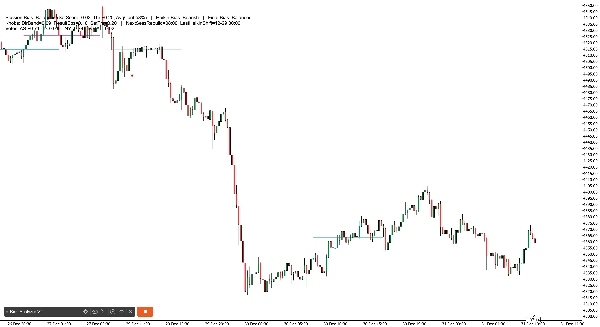
คำอธิบาย
ชีทช่วยจำ . สรุปข้อมูล 3 ปีด้านล่างทิศทางความน่าจะเป็นสูง
การเทรดรายวัน
- เอเชีย: B120 (Session Bias + Heikin 2H เห็นด้วย) | ทางเลือก: Session Bias เท่านั้น
- ลอนดอน: Heikin 1H
- นิวยอร์ก: Heikin 2H
- ตะวันตก(ลอนดอนและนิวยอร์ก): Heikin 2H
- เวลา: ตะวันตก + Heikin 2H พลิก → ติดตามดีที่สุด 30 นาที
สวิง (2–3 วัน)
- ทิศทาง (3 วัน / 72 ชม.): Global Session Bias (รวมเอเชีย+ลอนดอน+นิวยอร์ก)
- ตัวกรองการเข้า: Global Session Bias + Heikin 4H เห็นด้วย (ถ้าไม่เห็นด้วย → ข้าม)
- หลีกเลี่ยงค่าเริ่มต้น: 2 วัน / 48 ชม.
HeikinSessionBiasOnlyBot คือ แดชบอร์ดไบแอสและ “เข็มทิศ” โครงสร้างตลาด สำหรับเทรดเดอร์ที่ตัดสินใจเอง มัน ไม่ทำการเทรด แต่ให้มุมมองที่ชัดเจนและอัปเดตตลอดเวลาของ แนวโน้ม/ไบแอส โดยใช้เครื่องยนต์สองตัวที่เป็นอิสระ:
- Heikin Bias (ไบแอสทิศทางกรอบเวลาสูงกว่า)
- Session Bias (ไบแอสช่วงเวลาเอเชีย/ลอนดอน/นิวยอร์ก + โปรไฟล์ปริมาณ)
สิ่งที่มันทำ (อธิบายง่ายๆ)
1) Heikin Bias (เครื่องยนต์ไบแอสแนวโน้ม)
เครื่องยนต์นี้ทำงานบน Bias TF (นาที) ที่คุณเลือก (ค่าเริ่มต้น 360 นาที / 6 ชั่วโมง):
- มันสร้าง แท่งเทียน Heikin Ashi บนกรอบเวลานั้น
- มันตรวจจับ โซนจุดหมุน เมื่อ “สี” ของ HA เปลี่ยน (เขียว ↔ แดง)
- ไบแอสจะพลิกเมื่อ ราคาปิดทะลุ โซนจุดหมุนล่าสุด:
-
- ราคาปิดทะลุ เหนือโซนแนวต้าน → กระทิง
- ราคาปิดทะลุ ต่ำกว่าโซนแนวรับ → หมี
- ถ้าไม่มีการพลิกผ่านจุดหมุน มันยังสามารถพลิกได้โดยใช้ Inside Engine v2:
-
- มันเฝ้าดู การบีบตัวของแท่งภายใน (การบีบรัด) ที่ยึดติดกับช่วงไส้เทียน
- หลังจาก MinInsideBarsForReversal แท่งภายใน มันจะ “พร้อมใช้งาน”
- ราคาปิด เหนือ ช่วงไส้เทียนยึดติดพลิกเป็นกระทิง; ต่ำกว่า พลิกเป็นหมี
ผลลัพธ์: คุณจะได้ ไบแอสทิศทางกรอบเวลาสูงที่ชัดเจน ที่อัปเดตโดยอัตโนมัติ
2) Session Bias (เครื่องยนต์ไบแอสเอเชีย / ลอนดอน / นิวยอร์ก)
เครื่องยนต์นี้ทำงานบนกรอบเวลาวิเคราะห์ 5 นาทีที่ตั้งไว้ล่วงหน้า และสร้างใหม่ทุกสิ้นช่วงเวลา
สำหรับแต่ละช่วงเวลา (เอเชีย, ลอนดอน, นิวยอร์ก) มัน:
- สร้างช่วง สูง/ต่ำ ของช่วงเวลานั้น
- สร้าง โปรไฟล์ปริมาณง่ายๆ (ถัง) และหาจุด POC (จุดควบคุม)
- ใช้ การแบ่งปริมาณครึ่งช่วง:
-
- เอากึ่งกลางช่วงเวลา: mid = (ต่ำ + สูง) / 2
- เปรียบเทียบปริมาณที่เทรดใน ครึ่งล่างกับครึ่งบน
- สร้างคะแนนทิศทางต่อช่วงเวลาจากสามเสาหลัก:
-
- HYB (ตำแหน่งราคาปิดเทียบกับช่วง + เทียบกับ POC)
- V (ความเบ้ปริมาณมีประสิทธิภาพจากการแบ่งครึ่ง)
- BB (โมเมนตัมการแตกของแท่งเทียน: ตรรกะแตกเท่านั้นเทียบกับแท่งก่อนหน้า)
จากนั้นมันคำนวณ:
- DirScore = ค่าเฉลี่ย(HYB, V, BB)
- ไบแอสช่วงเวลา Bias จาก DirScore โดยใช้ DirBand
- ความมั่นใจช่วงเวลา Confidence จาก:
-
- AGR (ความเห็นพ้องกันระหว่าง HYB/V/BB)
- CLR (ความแข็งแกร่ง/ความชัดเจนของอินพุต)
- PRG (ความ “ก้าวหน้า” ของการเคลื่อนไหวตลอดช่วงเวลา)
สุดท้าย มันรวมสามช่วงเวลาเป็น SetScore และติดป้าย Session Bias โดยรวม
3) “Combined Bias” สุดท้าย (คำตอบหลักของคุณ)
คุณเลือกวิธีรวมเครื่องยนต์สองตัวนี้:
- BothAgree (ค่าเริ่มต้น): แสดงแค่ Bullish/Bearish ถ้า ทั้งสอง เห็นด้วย; ถ้าไม่ใช่ Balanced (หรือ Pending ถ้ายังไม่สมบูรณ์)
- HeikinOnly: แค่ไบแอส Heikin กรอบเวลาสูงกว่า
- SessionOnly: แค่ผลลัพธ์เครื่องยนต์ช่วงเวลา
นี่คือตัวกรองที่ใช้งานได้จริง: ถ้าคุณต้องการเทรดน้อยลงแต่การจัดเรียงที่ชัดเจนขึ้น ให้ใช้ BothAgree.
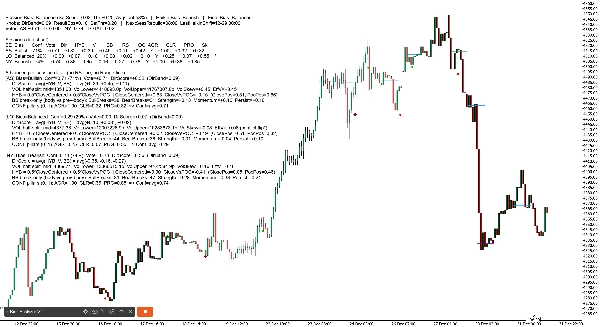
1) ส่วนหัวแดชบอร์ด (บรรทัดบนสุด)
คุณจะเห็นอะไรประมาณนี้:
Session Bias: Bullish (SetScore +0.85, Thr ±0.20, AvgConf 72%) | Heikin Bias: Bullish | Final Bias: Bullish
ความหมายของแต่ละคำ
- Session Bias: ทิศทางรวมจากเอเชีย/ลอนดอน/นิวยอร์ก
- SetScore: “คะแนนโหวตรวม” จากสามช่วงเวลา
-
- แต่ละช่วงเวลาจะให้ โหวต = เครื่องหมายทิศทาง × ความมั่นใจ
- กระทิงบวก, หมีลบ
- Thr (SetThr): ค่าขั้นต่ำของ SetScore ที่ต้องการเพื่อเรียก Session Bias ว่ากระทิง/หมี
-
- ถ้า SetScore อยู่ในช่วง ±Thr → Session Bias จะกลายเป็น Balanced
- AvgConf: ความมั่นใจเฉลี่ยของสามช่วงเวลา (0–100%)
- Heikin Bias: ไบแอสกรอบเวลาสูงกว่า (กระทิง/หมี/รอดู)
- Final Bias: ผลลัพธ์สุดท้ายหลังจากโหมดรวมของคุณ (BothAgree / HeikinOnly / SessionOnly)
2) บรรทัด “ปุ่ม” แดชบอร์ด (ภาพรวมการตั้งค่า)
ตัวอย่าง:
ปุ่ม: DirBand=0.09 ResultEps=0.10 SetThr=0.20 | NextSessRebuild=17:00 LastHeikinShift=12-30 06:00
ความหมาย
- DirBand: ความเข้มข้นของ DirScore ที่ต้องมีเพื่อให้ช่วงเวลาถูกติดป้ายว่ากระทิงหรือหมี
-
- DirBand เล็ก = สัญญาณมากขึ้น, “ไว” มากขึ้น
- DirBand ใหญ่ = สัญญาณน้อยลง, ระมัดระวังมากขึ้น
- ResultEps: “โซนตาย” ที่ใช้เมื่อตัดสินใจว่าผลลัพธ์ชัดเจนหรือไม่
-
- ช่วยหลีกเลี่ยงการตีความความแตกต่างเล็กน้อยว่าเป็นสิ่งสำคัญ
- SetThr: เกณฑ์ที่ใช้ในระดับรวมช่วงเวลา (SetScore)
- NextSessRebuild: เวลาที่จะสร้างช่วงเวลาถัดไปใหม่ (UTC)
- LastHeikinShift: เวลาที่ไบแอส Heikin เปลี่ยนล่าสุด
3) บรรทัด “โหวต” (รวมอย่างรวดเร็ว)
ตัวอย่าง:
โหวต: AS +0.40 LO +0.20 NY -0.10 รวม +0.50
ความหมาย
- โหวต AS / LO / NY = เครื่องหมาย(ทิศทาง) × ความมั่นใจ
- รวม คือผลรวมอย่างง่าย
- นี่คือ “กระดานคะแนนช่วงเวลา” ของคุณ
4) ตารางโหมดละเอียด (แยกตามช่วงเวลา)
ในโหมด Detailed คุณจะได้ตารางกะทัดรัดแบบนี้:
SE | Bias | Conf | Vote | Dir | HYB | V | BB | RS | OC | AGR | CLR | PRG | Sk
คำอธิบายแต่ละคอลัมน์ (ง่ายๆ)
- SE: ป้ายช่วงเวลา (AS, LO, NY)
- Bias: กระทิง / หมี / สมดุล (สำหรับช่วงเวลานั้น)
- Conf: เปอร์เซ็นต์ความมั่นใจสำหรับช่วงเวลานั้น
- Vote: โหวตทิศทาง (เครื่องหมายไบแอส × ความมั่นใจ)
- Dir: DirScore = ค่าเฉลี่ย(HYB, V, BB)
- HYB: คะแนนตำแหน่งราคาปิดแบบผสม
-
- รวม “ราคาปิดในช่วง” + “ราคาปิดเทียบกับ POC”
- V: ความเบ้ปริมาณที่มีประสิทธิภาพ
-
- อิงจาก ปริมาณช่วงบนกับช่วงล่าง ของช่วงเวลา
- สามารถพลิกได้ถ้าขัดแย้งกับ “ผลลัพธ์” (ดู Sk ด้านล่าง)
- BB: คะแนนการแตกของแท่งเทียน
-
- วัดโมเมนตัมแตกเทียบกับขอบเขตแท่งก่อนหน้า
- RS: ResultScore (ผสมระหว่างการเคลื่อนไหวสุทธิ + HYB)
-
- ใช้สำหรับตรวจสอบ “ความชัดเจนของผลลัพธ์”
- OC: ผลลัพธ์ชัดเจนหรือไม่? (ใช่/ไม่ใช่)
-
- ถ้า RS ใหญ่พอ (เกิน ResultEps) ถือว่า “ชัดเจน”
- AGR: เสาหลักความเห็นพ้อง (0..1)
-
- HYB/V/BB ชี้ไปในทิศทางเดียวกันหรือไม่?
- CLR: เสาหลักความชัดเจน (0..1)
-
- HYB/V/BB แข็งแกร่งหรืออ่อนแอ?
- PRG: เสาหลักความก้าวหน้า (0..1)
-
- ช่วงเวลาเคลื่อนไหวอย่างต่อเนื่อง (น้อยการแกว่ง / ติดตามดีขึ้น)?
- Sk: ตัวบ่งชี้ความขัดแย้งของความเบ้า
-
*หมายถึงความเบ้าปริมาณขัดแย้งกับทิศทางผลลัพธ์และถูกพลิกภายในเพื่อหลีกเลี่ยงไบแอสที่ทำให้เข้าใจผิด
2) เส้นประวัติ POC ช่วงเวลา (บนกราฟ)
หุ่นยนต์วาดเส้นแนวนอนแสดง POC (จุดควบคุม) สำหรับช่วงเวลาล่าสุด:
- เส้นแยกสำหรับ AS, LO, NY
- มันวาด “ชุดประวัติ” หลายชุด (ค่าเริ่มต้น 6) โดยจางเส้นเก่า
3) ตัวบ่งชี้การพลิก Heikin (บนกราฟ)
เมื่อไบแอส Heikin พลิก บอทจะพิมพ์ตัวบ่งชี้:
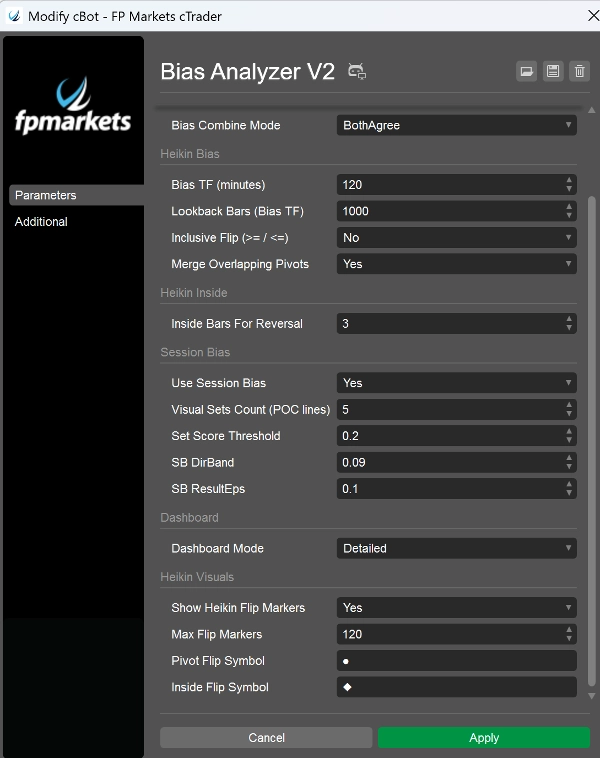
- การพลิกผ่านจุดหมุน ใช้ สัญลักษณ์ Pivot Flip ของคุณ (ค่าเริ่มต้น ●)
- การพลิก Inside Engine ใช้ สัญลักษณ์ Inside Flip ของคุณ (ค่าเริ่มต้น ◆)
- สีแตกต่างตามทิศทางและประเภทการพลิก (เพื่อให้คุณรู้ว่า “ทำไม” มันเปลี่ยน)
พารามิเตอร์ที่สำคัญที่สุด (สิ่งที่ควรเน้นในคำเสนอขายของคุณ)
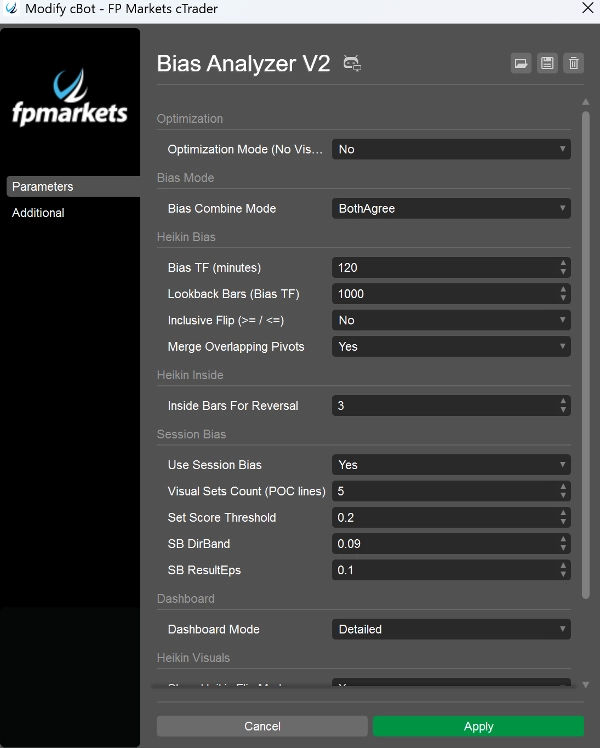
- Bias TF (นาที): กำหนด “กรอบเวลาหลัก” สำหรับไบแอส Heikin (เช่น 240, 360, 720)
- MinInsideBarsForReversal: ควบคุมความแน่นของการบีบรัดก่อนที่เครื่องยนต์ภายในจะพลิก
- ใช้ Session Bias: เปิด/ปิดเครื่องยนต์ช่วงเวลา
- จำนวนชุดภาพ: จำนวนเส้นประวัติ POC ที่เก็บไว้
- DirBand / ResultEps / SetScoreThreshold: ควบคุมความเข้มงวดของเครื่องยนต์ช่วงเวลา
- โหมดรวมไบแอส: กำหนดความระมัดระวังของไบแอสสุดท้าย
- โหมดแดชบอร์ด: BaseOnly กับ Detailed
- โหมดเพิ่มประสิทธิภาพ: ปิดภาพ/เสียงรบกวนสำหรับทดสอบประสิทธิภาพ