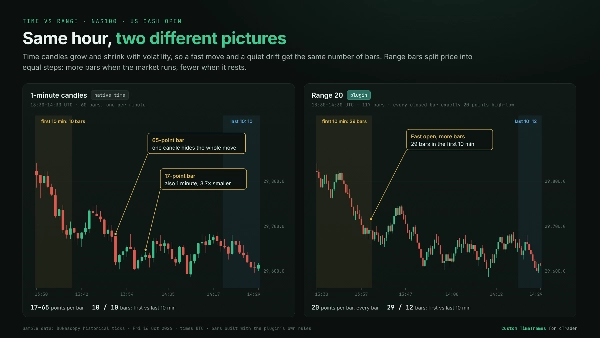
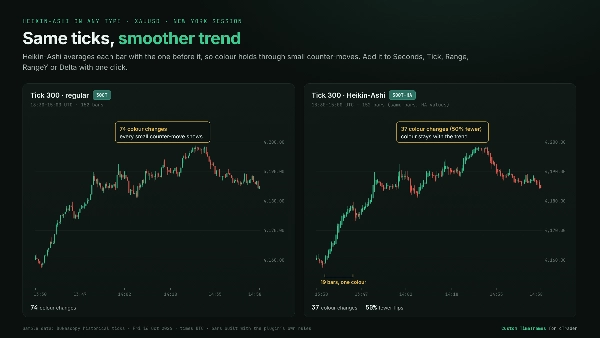
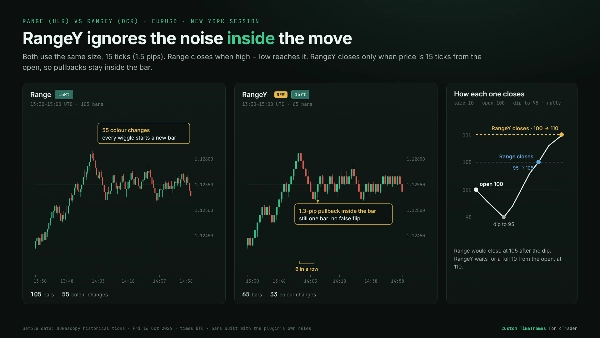
คำอธิบาย
กรอบเวลาที่กำหนดเองสำหรับ cTrader: ปลั๊กอินต้นฉบับ
👨🔧สร้าง ทดสอบ และดูแลโดยตรงโดยผู้พัฒนา
ผมสร้างปลั๊กอินกรอบเวลาที่กำหนดเองต้นฉบับของ cTrader เพื่อให้นักเทรดควบคุมความละเอียดของกราฟได้อย่างแม่นยำโดยไม่ทำลายกระบวนการทำงานปกติของ cTrader ผมเทรดและพัฒนาบน cTrader ทุกวัน และทดสอบและอัปเดตปลั๊กอินนี้กับการเปิดตัว cTrader Desktop ครั้งใหญ่ทุกครั้งเพื่อรักษาความเสถียร
ประเภทกราฟ
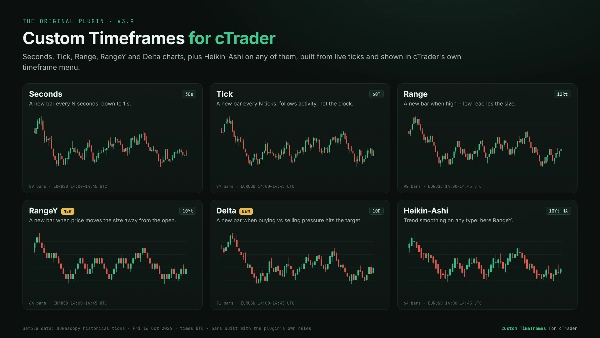
วินาที: ช่วงเวลาที่กำหนดเองต่ำสุดถึง 1 วินาที ดูว่าการเคลื่อนไหวเกิดขึ้นอย่างไรภายในหนึ่งนาที ซึ่งแท่งเทียน 1 นาทีเดียวซ่อนอยู่
ทิก: แท่งใหม่ทุก N ทิก แท่งตามกิจกรรมตลาดแทนที่จะเป็นนาฬิกา ดังนั้นช่วงเวลาที่คึกคักจะมีรายละเอียดมากขึ้นและช่วงเวลาที่เงียบจะถูกบีบอัด
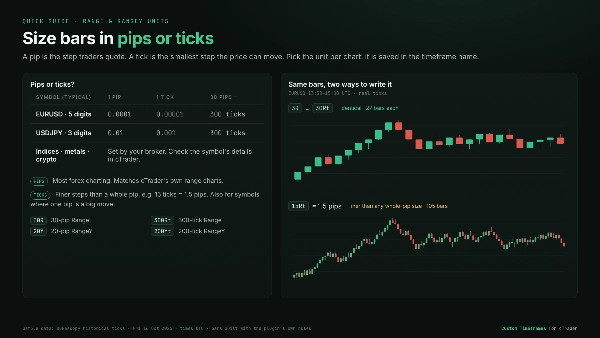
ช่วง: แท่งใหม่ทุกครั้งที่ค่าต่างระหว่างสูงสุดกับต่ำสุดถึงขนาดที่คุณกำหนด แท่งแต่ละแท่งครอบคลุมช่วงราคาที่เท่ากัน แบ่งกลุ่มการแกว่งเป็นแท่งเล็ก ๆ และการเบรกเอาท์จะโดดเด่น กำหนดขนาดเป็นพิปส์หรือทิก
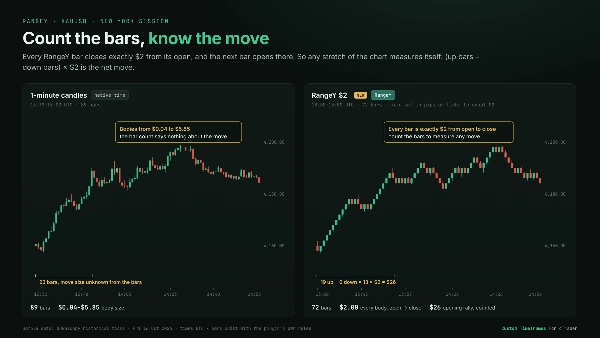
⭐RangeY: แท่งใหม่ทุกครั้งที่ราคาขยับออกจากราคาเปิดของแท่งเป็นขนาดที่คุณกำหนดในทิศทางใดก็ได้ การดึงกลับยังคงอยู่ภายในแท่ง ดังนั้นแต่ละแท่งจึงแสดงการเคลื่อนไหวจริง แท่งแต่ละแท่งปิดที่ขนาดหนึ่งจากราคาเปิดพอดี ดังนั้นการนับแท่งจึงวัดการเคลื่อนไหวได้ กำหนดขนาดเป็นพิปส์หรือทิก
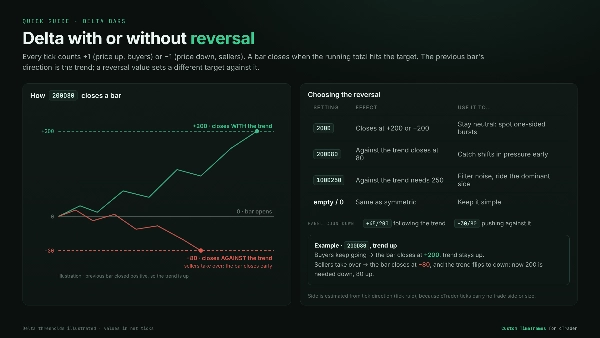
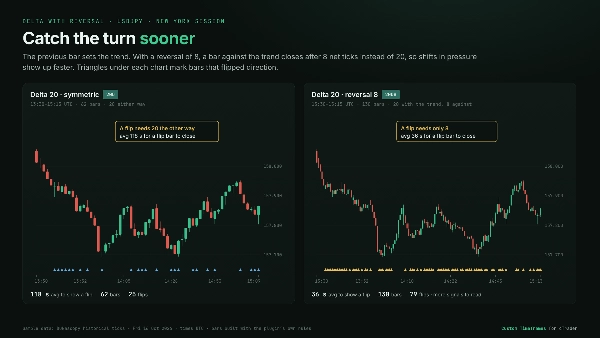
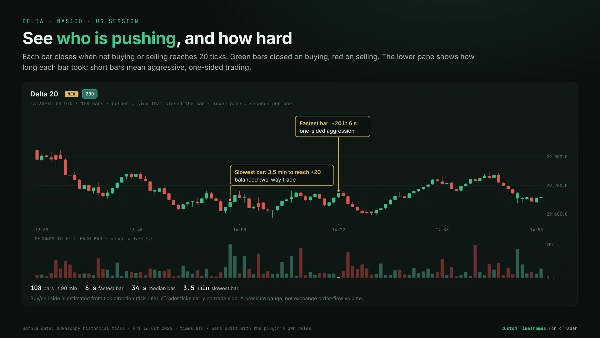
⭐เดลต้า: แท่งใหม่เมื่อแรงกดดันซื้อเทียบกับขายถึงเป้าหมายของคุณ ทิกแต่ละตัวถูกนับเป็นการซื้อหรือขายจากทิศทางที่ราคาขยับ เพราะ cTrader ไม่มีข้อมูลผู้ซื้อ/ผู้ขาย ความก้าวร้าวฝ่ายใดฝ่ายหนึ่งจะปิดแท่งเร็ว และการเทรดที่สมดุลจะทำให้แท่งเปิดอยู่ คุณสามารถตั้งเป้าหมายการกลับตัวแยกต่างหากได้ เพื่อให้การเปลี่ยนแปลงแรงกดดันที่ตรงข้ามกับแท่งก่อนหน้าแสดงผลเร็วขึ้น
Heikin-Ashi: การปรับเทรนด์ให้เรียบมีให้ใช้ในทุกประเภทกราฟข้างต้น
สร้างมาเพื่อการเทรดรายวัน
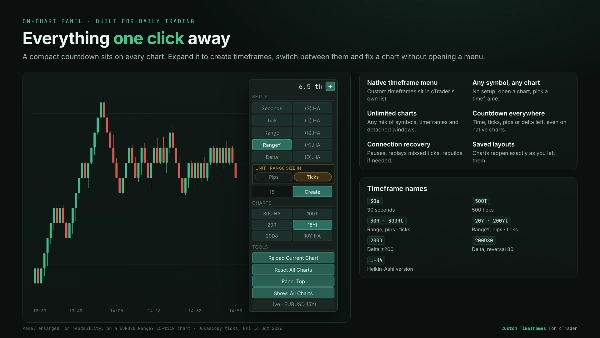
- เมนูกรอบเวลาพื้นฐาน: กรอบเวลาที่กำหนดเองปรากฏในรายการกรอบเวลามาตรฐานของ cTrader เหมือนกราฟพื้นฐาน
- สัญลักษณ์ใดก็ได้ กราฟใดก็ได้: ไม่ต้องตั้งค่าสัญลักษณ์ เปิดกราฟใดก็ได้แล้วเลือกกรอบเวลาที่กำหนดเอง
- กราฟไม่จำกัด: ใช้งานผสมผสานสัญลักษณ์และกรอบเวลาต่าง ๆ ในหน้าต่างหลักและหน้าต่างแยกได้พร้อมกัน
- สลับเหมือนกราฟปกติ: การเปลี่ยนสัญลักษณ์หรือกรอบเวลาทำงานเหมือนกับกรอบเวลาพื้นฐาน
- แผงควบคุมบนกราฟ: ตัวนับถอยหลังขนาดกะทัดรัดถึงแท่งถัดไป ซึ่งขยายเพื่อสร้างกรอบเวลา รายการคลิกเดียวของกรอบเวลาที่กำหนดเองทั้งหมดของคุณ และเครื่องมือรีโหลด / รีเซ็ต การตั้งค่ามีผลทันทีโดยไม่ต้องรีสตาร์ทปลั๊กอิน
- ตัวนับถอยหลังในทุกกราฟ: เวลา ทิก พิปส์ หรือเดลต้าที่เหลือในแท่งปัจจุบัน รวมถึงในกราฟมาตรฐานของ cTrader
- กู้คืนจากเลย์เอาต์: เลย์เอาต์ที่บันทึกไว้จะเปิดใหม่พร้อมกราฟที่กำหนดเองเหมือนเดิม
การจัดการข้อมูลที่เชื่อถือได้
- อัปเดตประวัติและข้อมูลสดอัตโนมัติ: ประวัติโหลดเอง และเลื่อนกลับโหลดแท่งเก่า
- กู้คืนการเชื่อมต่อ: หลังจากการเชื่อมต่อขาดหรือข้อมูลหยุดชะงัก กราฟจะหยุดชั่วคราว เล่นข้อมูลที่ขาดหายไปใหม่ และดำเนินการต่อโดยไม่มีช่องว่าง หากข้อมูลนั้นหายไป กราฟจะสร้างใหม่เอง
- ประหยัดทรัพยากร: สัญลักษณ์ที่คุณไม่ได้ดูจะหยุดโหลดข้อมูล และกราฟที่คึกคักมากจะโหลดเป็นส่วน ๆ เพื่อให้แพลตฟอร์มตอบสนองได้ดี
👉 ดูแกลเลอรีสำหรับ ตัวอย่างตลาดจริง, การเปรียบเทียบ กับกราฟเวลามาตรฐาน และ คู่มือด่วน สำหรับพิปส์กับทิก และ การตั้งค่าเดลต้า.
พัฒนาต่อเนื่อง สนับสนุนโดยตรงจากผู้สร้าง สร้างมาเพื่อระยะยาว
สรุป
The plugin integrates seamlessly into the trading interface with an on-chart panel for quick bar type and size selection, eliminating the need for separate settings menus or restarts. Custom timeframes appear directly in the platform’s standard Period dropdown menu. It loads historical data and updates live in real time, maintaining smooth performance even on high-activity instruments.
This tool is applicable across multiple markets including Forex, indices, cryptocurrencies, and stocks, supporting market, limit, stop, and stop-limit order types. It is designed to facilitate fast execution and detailed price action analysis by providing flexible charting options tailored to user preferences.
รีวิวจากลูกค้า
5 | 100 % | |
4 | 0 % | |
3 | 0 % | |
2 | 0 % | |
1 | 0 % |








!["Custom Timeframes [Iridio Capital]" โลโก้](https://cdn.ctrader.com/image/webp/4d75a920-23c7-4fea-a7b5-594a9d067f2e_63286)