

说明
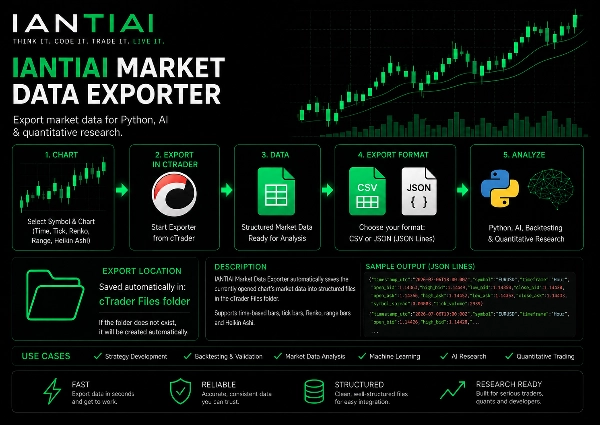
直接从活动的 cTrader 图表 导出市场数据为结构化的 CSV 或 JSON 文件,用于外部研究、回测、Python 分析和量化工作流程。
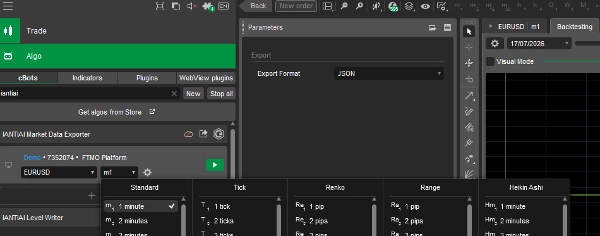
导出器会自动使用 cTrader 中当前选定的 符号、图表类型和时间框架。无需额外配置时间框架。
支持的图表类型
导出器直接与活动的 cTrader 图表协作,支持:
- 标准基于时间的柱状图
- Tick Bars,如 T1、T5、T10、T50 等
- Renko Bars / Renko Bricks
- 范围柱状图
- Heikin Ashi
- 其他支持的 cTrader 图表配置
只需选择您想分析的图表并启动导出器。
买价、卖价及点差信息
导出的数据集包含 买价和卖价的 OHLC 值,以及点差值和成交量信息。
这允许在后续的研究、回测和量化分析中包含 买价和卖价之间的差异。
导出字段包括:
- UTC 时间戳
- 符号
- 时间框架 / 图表类型
- 买价开盘
- 买价最高
- 买价最低
- 买价收盘
- 卖价开盘
- 卖价最高
- 卖价最低
- 卖价收盘
- 点差
- 成交量
为研究而设计
导出的文件可用于:
- Python 和 pandas 分析
- 人工智能和机器学习研究
- 回测和策略验证
- 买卖价及点差感知分析
- Excel 分析
- 量化交易研究
- 市场数据分析
- 定制研究流程
导出格式
CSV
适用于 pandas、Excel、回测和传统量化分析。
JSON
适用于 Python 应用、人工智能工作流程、API 和结构化数据处理。
导出位置
导出的文件会自动保存在本地 cTrader 文件夹中。
如果所需文件夹不存在,导出器启动时会自动创建。
每个选定的符号和图表配置都会创建一个单独的文件。
示例:
IANTIAI_Export_EURUSD_Minute5.csv
IANTIAI_Export_EURUSD_Tick10.csv
IANTIAI_Export_EURUSD_Renko10.csv
JSON 导出使用相同的命名结构。
简单工作流程
选择符号和图表 → 启动导出器 → 分析数据。
使用标准蜡烛图、Tick Bars、Renko Bricks、范围柱状图或 Heikin Ashi — 导出器会跟随 cTrader 中选定的图表。
导出市场数据用于 Python、人工智能及量化研究。
摘要
AI summary
IANTIAI Market Data Exporter is a tool for exporting market data directly from active cTrader charts into structured CSV or JSON files. It automatically captures the currently selected symbol, chart type, and timeframe without additional configuration. Supported chart types include standard time-based bars, tick bars (e.g., T1, T5, T10, T50), Renko bars/bricks, range bars, Heikin Ashi, and other cTrader chart configurations.
The exported dataset contains detailed bid and ask OHLC values, spread, and tick volume, enabling analysis that accounts for bid-ask differences. Exported fields include timestamp (UTC), symbol, timeframe/chart type, bid open/high/low/close, ask open/high/low/close, spread, and tick volume.
Files are saved automatically in the local cTrader Files folder, with separate files created for each symbol and chart configuration. Export formats are CSV, suitable for pandas, Excel, and backtesting, and JSON, ideal for Python applications, AI workflows, APIs, and structured data processing.
This exporter supports workflows such as Python and pandas analysis, AI and machine-learning research, backtesting, bid/ask and spread-aware analysis, Excel analysis, quantitative trading research, market-data analysis, and custom research pipelines. The workflow is straightforward: select the symbol and chart in cTrader, start the exporter, and analyze the resulting data.
The exported dataset contains detailed bid and ask OHLC values, spread, and tick volume, enabling analysis that accounts for bid-ask differences. Exported fields include timestamp (UTC), symbol, timeframe/chart type, bid open/high/low/close, ask open/high/low/close, spread, and tick volume.
Files are saved automatically in the local cTrader Files folder, with separate files created for each symbol and chart configuration. Export formats are CSV, suitable for pandas, Excel, and backtesting, and JSON, ideal for Python applications, AI workflows, APIs, and structured data processing.
This exporter supports workflows such as Python and pandas analysis, AI and machine-learning research, backtesting, bid/ask and spread-aware analysis, Excel analysis, quantitative trading research, market-data analysis, and custom research pipelines. The workflow is straightforward: select the symbol and chart in cTrader, start the exporter, and analyze the resulting data.
交易概览
客户评价
5.0
评价:1
5 | 100 % | |
4 | 0 % | |
3 | 0 % | |
2 | 0 % | |
1 | 0 % |
客户评价
August 22, 2026
A practical and well-structured cTrader market-data exporter for Python, pandas and quantitative research. CSV exports were independently verified on M5, M10 and Tick10, including a clean 58,532-bar Tick10 dataset with excellent data integrity. Active chart detection works well and the workflow is exceptionally simple. Overall, a strong research utility for moving cTrader data into external analytical workflows.
讨论
常见问答
AI Integration
AI Trading
cTrader Store 提供的所有产品,包括交易机器人、指标和插件,均由第三方开发者提供,仅供信息参考和技术访问之用。cTrader Store 并非经纪商,不提供投资建议、个人推荐或任何未来业绩保证。







猜您喜欢














价格
51
销售
1.43K
免费安装