

HMA MTF 2.0
Indicator
5 purchases
Version 1.0, Mar 2025
Windows, Mac
4.2
Reviews: 4

51
Sales
1.44K
Free installs
Description
HMA MTF (Multi-Timeframe ) – Indicator Description
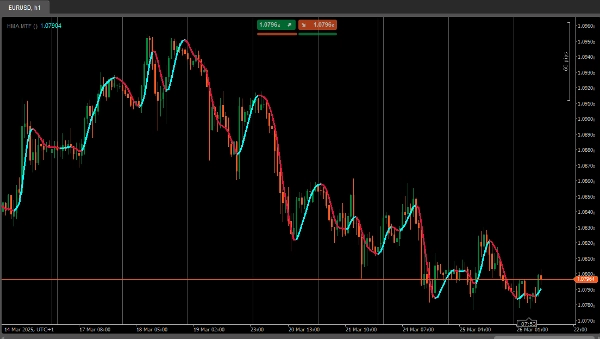
The HMAMTF indicator plots a moving average from a higher or lower timeframe onto your current chart and displays it in two color-coded lines, indicating bullish or bearish momentum. It uses cTrader’s built-in Moving Average functionality and calculates whether the trend is up or down by comparing the current MA value to the previous one.
Parameters
- Time Frame (
TimeFrame, Default ="Hour4")
Defines which timeframe’s data (e.g., 4-hour, daily, weekly) will be used to calculate the moving average. - Price (
PriceType, Default =Close)
Specifies which price (Close, Open, High, or Low) is used for the MA calculation. - Period (
int, Default =14, MinValue =1)
The number of bars considered in the moving average calculation. - MA Type (
MovingAverageType, Default =Weighted)
Chooses the moving average method (e.g., Simple, Exponential, Smoothed, Weighted) applied to the selected price series.
Summary
AI summary
HMA MTF 2.0 is a multi-timeframe indicator designed for use on the cTrader platform. It plots a moving average calculated from a user-selected higher or lower timeframe onto the current chart. The indicator displays two color-coded lines that represent bullish or bearish momentum by comparing the current moving average value to the previous one.
Key configurable parameters include:
1. Time Frame – selects the timeframe (e.g., 4-hour, daily, weekly) used for the moving average calculation.
2. Price – chooses the price type (Close, Open, High, or Low) applied in the moving average computation.
3. Period – defines the number of bars considered in the moving average.
4. MA Type – specifies the moving average method, such as Simple, Exponential, Smoothed, or Weighted.
This indicator supports multiple markets including Forex, Indices, Commodities, Crypto, and Stocks, providing a versatile tool for trend analysis across different asset classes.
Key configurable parameters include:
1. Time Frame – selects the timeframe (e.g., 4-hour, daily, weekly) used for the moving average calculation.
2. Price – chooses the price type (Close, Open, High, or Low) applied in the moving average computation.
3. Period – defines the number of bars considered in the moving average.
4. MA Type – specifies the moving average method, such as Simple, Exponential, Smoothed, or Weighted.
This indicator supports multiple markets including Forex, Indices, Commodities, Crypto, and Stocks, providing a versatile tool for trend analysis across different asset classes.
Indicator profile
Customer reviews
4.2
Reviews: 4
5 | 25 % | |
4 | 75 % | |
3 | 0 % | |
2 | 0 % | |
1 | 0 % |
Customer reviews
April 7, 2025
April 5, 2025
The main upside is the first look still needs context. Manual review still matters.
April 3, 2025
Not perfect, but the workflow felt cleaner. Bad settings can ruin the idea.
April 1, 2025
the part that matters is the workflow stays easier to manage, and M15 is enough for the first pass.
Discussion
FAQ
Prop
Forex
Indices
Commodities
Crypto
Stocks
Products available through cTrader Store, including trading bots, indicators and plugins, are provided by third-party developers and made available for informational and technical access purposes only. cTrader Store is not a broker and does not provide investment advice, personal recommendations or any guarantee of future performance.


















Price
51
Sales
1.44K
Free installs