
Description
Indicateur FVG & IFVG
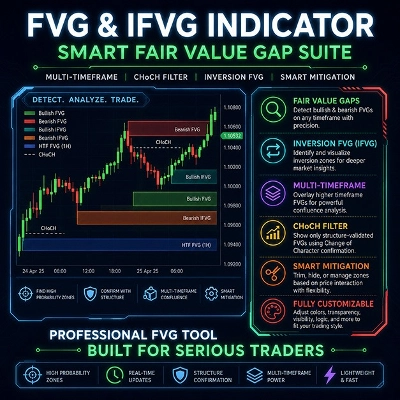
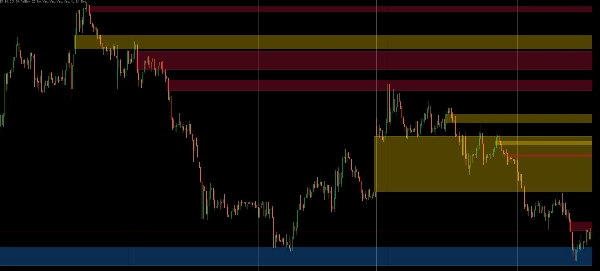
Indicateur FVG & IFVG est un outil avancé Smart Money Concepts qui détecte, filtre et gère automatiquement les écarts de juste valeur (FVG) et les écarts d'inversion de juste valeur (IFVG) en utilisant une analyse intelligente de la structure du marché et de la qualité des écarts.
Contrairement aux indicateurs FVG traditionnels, il évalue chaque déséquilibre en utilisant un filtrage basé sur l'ATR, la force du déplacement, la confirmation CHoCH et une confluence optionnelle de timeframe supérieur, vous permettant de vous concentrer sur les opportunités de trading institutionnel de la plus haute qualité.
Conçu pour le Forex, les indices, l'or, la crypto et les actions — sur n'importe quelle unité de temps.
Tradez les déséquilibres institutionnels avec précision.
⚙ Moteur de détection intelligent
- Détection automatique des écarts de juste valeur haussiers et baissiers
- Détection automatique des écarts d'inversion FVG haussiers et baissiers (IFVG)
- Filtrage intelligent de la qualité des écarts
- Validation minimale des écarts basée sur l'ATR
- Option de filtrage des écarts en pips fixes
- Filtre optionnel de force des chandeliers de déplacement
- Gestion dynamique des zones en temps réel
📊 Filtrage de la structure du marché
- Confirmation CHoCH (Changement de Caractère) optionnelle
- Détection de la structure du marché basée sur les swings
- Filtre les zones de déséquilibre de faible qualité
- Met en évidence uniquement les configurations institutionnelles significatives
🌍 Analyse multi-timeframe
- Affichage des FVG des timeframes supérieurs
- Affichage des IFVG des timeframes supérieurs
- Filtre de confluence HTF optionnel
- Superposition des zones HTF directement sur votre graphique
- Idéal pour l'analyse top-down
🎯 Moteur de mitigation intelligent
Choisissez comment les zones réagissent lorsque le prix revient :
- Boîte complète — Conservez toute la zone jusqu'à sa complète invalidation
- Réduire la portion mitigée — Rétrécissez la zone au fur et à mesure que la liquidité est comblée
- Masquer au contact — Supprimez la zone après la première mitigation
Les FVG haussiers et baissiers se convertissent automatiquement en IFVG lorsqu'ils sont invalidés, vous permettant de suivre en temps réel les retournements de support et résistance.
🎨 Visualisation professionnelle
Choisissez comment les zones sont affichées :
- Boîtes remplies
- Boîtes avec bordure
- Lignes médianes
Les contrôles supplémentaires incluent :
- Transparence ajustable
- Mode de superposition historique
- Couleurs indépendantes pour :
-
- FVG du TF actuel
- IFVG du TF actuel
- FVG du TF supérieur
- IFVG du TF supérieur
⚙ Filtre de qualité des écarts
Améliorez la qualité du signal en utilisant plusieurs méthodes de filtrage :
Multiplicateur ATR
N'affichez que les écarts plus grands qu'un pourcentage configurable de l'ATR actuel.
Taille fixe en pips
Exige une taille minimale d'écart mesurée en pips.
Filtre de déplacement
Exige que la bougie du milieu ait un pourcentage minimum de corps, garantissant que l'écart est créé par un momentum réel plutôt que par une action de prix faible.
⚙ Personnalisation complète
Contrôle total sur :
- Méthode de filtrage des écarts
- Multiplicateur ATR
- Période ATR
- Taille minimale en pips
- Pourcentage du corps de déplacement
- Confirmation CHoCH
- Confluence HTF
- Comportement de mitigation
- Mode de visualisation
- Transparence
- Couleurs individuelles pour chaque type de zone
🎯 Idéal pour
- Smart Money Concepts (SMC)
- Trading ICT
- Stratégies d'écarts de juste valeur
- Traders de liquidité
- Scalpers
- Day Traders
- Swing Traders
- Analyse multi-timeframe
- Forex, indices, or, crypto & actions
⚙ Paramètres
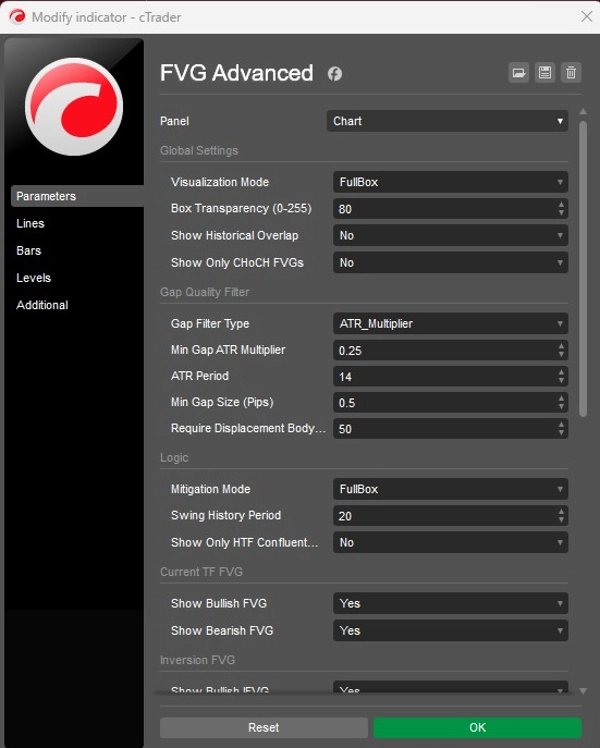
Paramètres globaux
Mode de visualisation
Choisissez entre Boîte remplie, Boîte avec bordure ou Ligne médiane.
Transparence de la boîte
Ajustez l'opacité de toutes les zones affichées.
Afficher la superposition historique
Gardez les zones mitigées visibles pour l'analyse historique au lieu de les supprimer.
Afficher uniquement les FVG CHoCH
Affichez uniquement les FVG confirmés par un Changement de Caractère.
Type de filtre d'écart
- Multiplicateur ATR
- Pips fixes
- Aucun
Multiplicateur ATR minimum pour l'écart
Taille minimale de l'écart relative à l'ATR actuel.
Période ATR
Période ATR utilisée pour le filtrage basé sur l'ATR.
Taille minimale de l'écart (en pips)
Taille minimale autorisée de l'écart en mode Pips fixes.
Exiger un corps de déplacement (%)
Pourcentage minimum du corps de la bougie requis pour la bougie du milieu, filtrant les écarts faibles ou indécis.
Logique
Mode de mitigation
- Boîte complète
- Réduire la portion mitigée
- Masquer au contact
Période d'historique des swings
Contrôle la sensibilité de la détection des swings utilisée pour la validation CHoCH.
Afficher uniquement les FVG confluents HTF
Affiche uniquement les FVG du timeframe actuel qui se superposent à un FVG actif de timeframe supérieur.
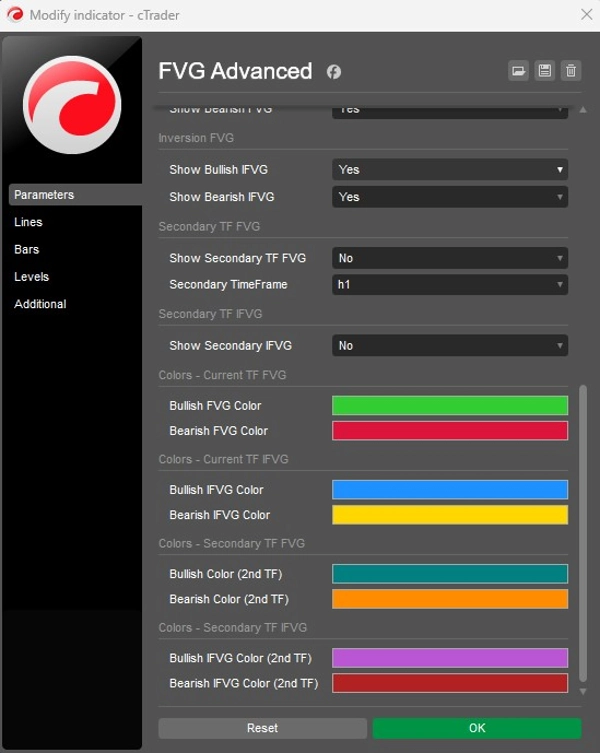
Bascules de fonctionnalités
Activez ou désactivez indépendamment :
- FVG haussier
- FVG baissier
- IFVG haussier
- IFVG baissier
- FVG de timeframe secondaire
- IFVG de timeframe secondaire
Sélectionnez le timeframe supérieur utilisé pour l'analyse de confluence.
Résumé
Key features include automatic detection of bullish and bearish FVGs and IFVGs, intelligent gap quality filtering with options for ATR multiplier or fixed pip size, and dynamic real-time zone management. Market structure filtering highlights meaningful institutional setups by confirming imbalances with swing-based detection and CHoCH validation. Multi-timeframe analysis overlays higher timeframe zones for top-down assessment, with optional confluence filtering.
The smart mitigation engine offers customizable zone behavior upon price return, including full zone retention, trimming mitigated portions, or hiding zones after touch. Visualization options include filled boxes, border boxes, or midpoint lines with adjustable transparency and independent colors for each zone type. Full customization covers gap filtering parameters, market structure settings, mitigation modes, and display preferences.
FVG Advanced is suitable for traders employing Smart Money Concepts, ICT trading, liquidity strategies, and various trading styles such as scalping, day trading, and swing trading.
Discussion
Avis clients
Questions fréquentes
Vous pourriez aussi aimer




![Logo de "[Stellar Strategies] Smart ADX"](https://cdn.ctrader.com/image/webp/af13b084-b6f6-41db-b7bc-c7e688b57b05_36929)

Prix
