Description
Sniper Ashfield Pro waits for one event - the fast EMA crossing the slow one - and then asks six
questions before it draws anything. Is the fast EMA on the right side? Is price on the right side of
the session VWAP? Is RSI past 50? Is MACD above or below its signal line? Is ADX strong enough, with
price on the right side of the fast EMA? Is volume above its average, on a candle closing the right
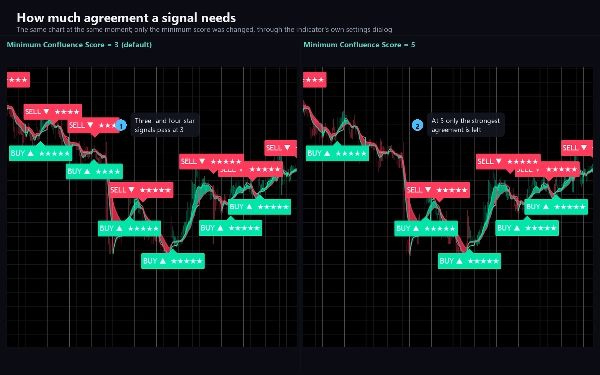
way? Each yes is a point. When the score reaches your minimum, the signal is drawn with its score in
stars, and it comes with a plan.
WHAT IT DRAWS
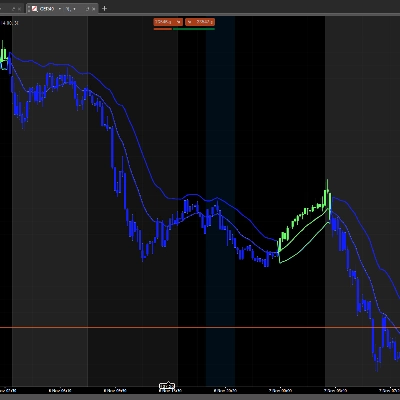
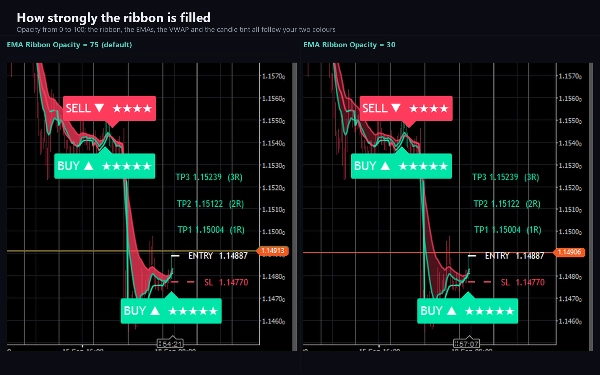
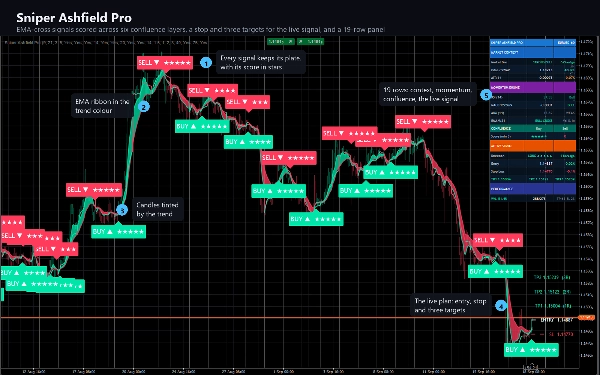
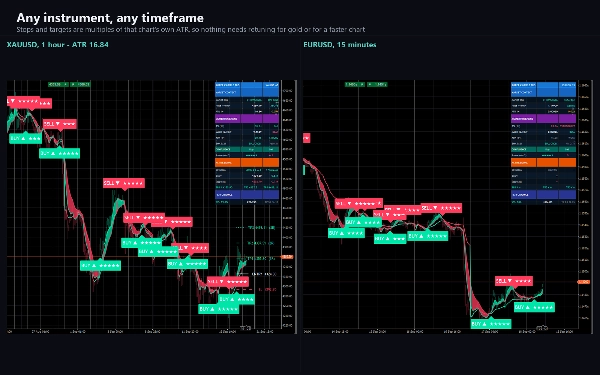
- A fast and a slow EMA with a filled ribbon between them, in the colour of the current trend.
- The session VWAP, coloured by which side of it price is on.
- Candles tinted by the EMA trend, so the direction is readable at a glance.
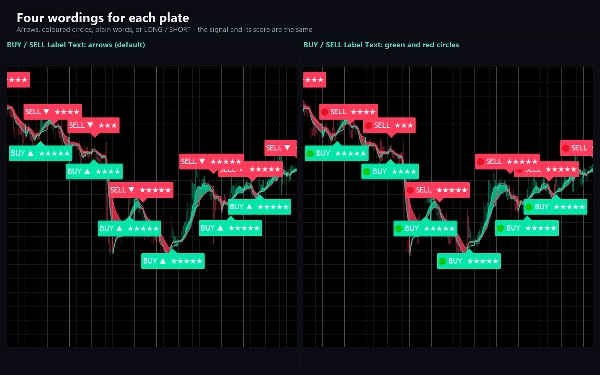
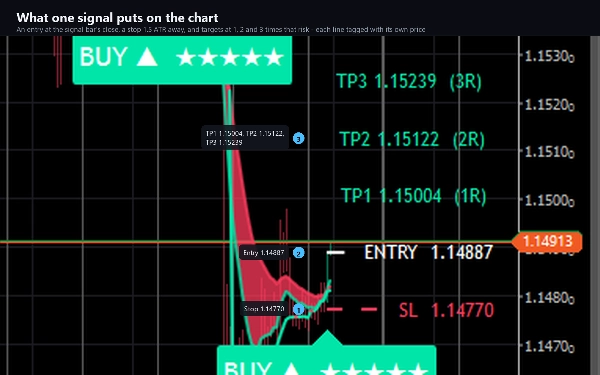
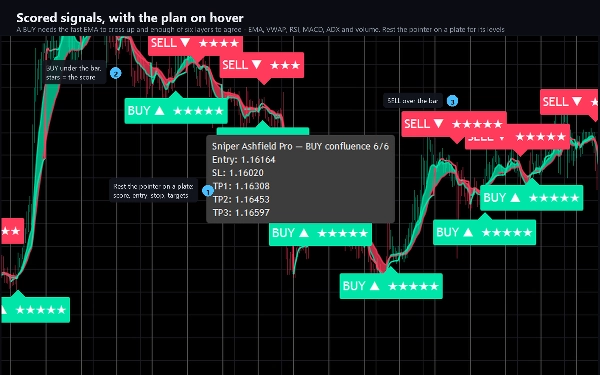
- A plate on every signal bar - BUY under the bar, SELL over it - with the score as stars. Rest the
pointer on a plate to see its score, entry, stop and all three targets.
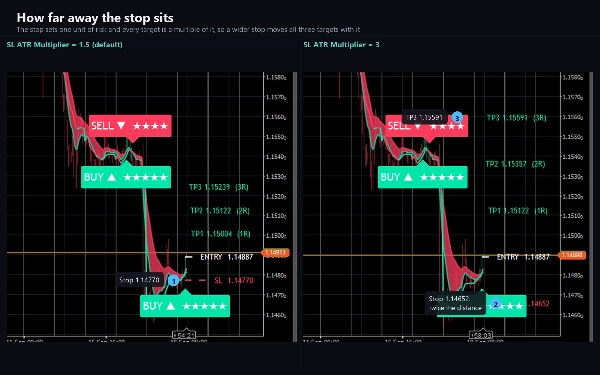
- For the latest signal: an entry line, a stop 1.5 ATR away, and three targets at 1, 2 and 3 times
that risk, each with a price tag. A target that is reached is restyled; when the trade reaches its
third target or its stop, its lines are removed, and the next signal replaces them.
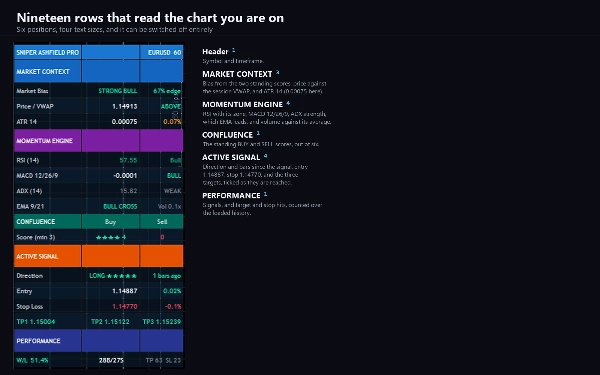
- A nineteen-row panel: market bias, price against VWAP, ATR, RSI, MACD, ADX, which EMA leads, volume
against its average, both standing scores, the live signal with entry, stop and targets, and a
running count of signals, targets reached and stops reached.
HOW IT DECIDES
Signals are only considered on the bar where the EMAs cross, and a signal in the same direction is
held back for a cooldown you set. Each of the five filters after the EMA can be switched off - and
a switched-off filter awards its point automatically, so switching filters off makes signals MORE
frequent, not less. Raise the minimum score if you switch filters off. Non-Repaint Mode is on by
default: a signal is decided when its bar closes and never moves afterwards.
KEY SETTINGS
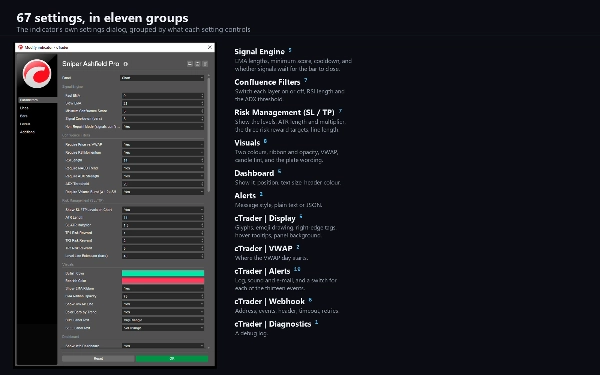
67 in eleven groups. The two EMA lengths, the minimum score and the cooldown; each filter on or off,
the RSI length and the ADX threshold; the ATR length and multiplier for the stop, three risk-to-reward
targets and how far the level lines run; two colours, the ribbon and its opacity, VWAP, candle tint,
and four wordings for the plates; the panel's position, size and header colour; and cTrader groups
for display, the VWAP day, alerts and the webhook.
ALERTS AND WEBHOOK
Thirteen events, each with its own switch: BUY, SELL, either, both EMA crosses, price crossing VWAP
either way, RSI crossing 50 either way, all three targets and the stop. Delivered as a cTrader log
line, a sound of your choice, and e-mail. A signal alert carries the entry, the stop, all three
targets and the score. Nothing fires while the indicator walks the chart's history, and nothing fires
in a backtest.
A webhook posts signals - and, if you choose, targets, stops and crosses - as JSON to any address you
enter: a trading bot, a journal, a relay, an automation flow. It stays off until you enter one, it is
deduplicated per event per bar, capped at twenty messages a minute, and a failure is logged rather
than thrown. It sends through cTrader's own networking service, which is why the indicator needs no
file or network access rights at all.
TYPE AND WINDOW
An overlay indicator: everything is drawn on the price chart, and it adds no separate pane.
TIMEFRAMES AND INSTRUMENTS
Any. The stop and targets are multiples of that chart's own ATR, and prices are formatted to your
broker's own tick, so nothing needs retuning between a fifteen-minute chart and a daily one, or
between a five-decimal pair and gold. Volume is required: the VWAP and one of the six layers read your
broker's tick volume.
USE CASES
- Trading trend continuations only when momentum, trend strength and volume agree with the cross.
- Turning a signal into a plan: one stop and three targets, drawn before you act.
- Scanning a chart's history quickly: every signal keeps its plate and its score.
- Being told by log line, sound, e-mail or webhook when a signal fires or a target is reached.
WHO IT IS FOR
Traders who like moving-average crosses but want them filtered, and anyone who wants a signal to
arrive with a stop and a set of targets rather than an arrow.
TRIAL
The free trial is the full indicator on EURUSD only - every broker suffix works. On any other symbol
it shows a notice and draws nothing. No time limit, no reduced history, no missing features. The full
version removes the symbol restriction and changes nothing else.
TECHNICAL NOTES AND LIMITATIONS
Access rights: none. The indicator cannot read files, start processes or open connections of its own.
It is a charting and analysis tool. It does not place orders and it has no access to your account.
The panel's PERFORMANCE row counts what the drawn levels met on the bars your chart has loaded. A stop
reached after the first target counts as a win, and a trade replaced by a newer signal is not
counted. It is a description of that history, not a backtest and not a forecast.
SUPPORT
Questions go through the Discussion tab. Include your broker, symbol, timeframe, cTrader version and
a screenshot, and you will get a useful answer first time.
Trading involves risk. Past performance does not guarantee future results.
Summary
The indicator visually overlays the price chart with the fast and slow EMAs connected by a colored ribbon indicating trend direction, session VWAP colored by price position, and candles tinted by EMA trend. Signals are marked with BUY or SELL plates showing their score in stars, accompanied by an entry price, an ATR-based stop loss, and three risk-to-reward targets. Targets update visually when reached, and signals respect a cooldown period to avoid repetition.
A detailed nineteen-row panel provides real-time market bias, indicator values, signal details, and performance counts. Alerts for multiple events—including EMA crosses, VWAP crossings, RSI levels, targets, and stops—can be delivered via cTrader log, sound, email, or webhook in JSON format for integration with external systems. The indicator operates in non-repaint mode and includes extensive customization options across eleven setting groups.