
![Trading product for [Stellar Strategies] Market Structure Breakout 지표 Signal Breakout, image 1](https://cdn.ctrader.com/image/webp/bceec265-3247-4b11-915f-6295a29c106d_28465)
[Stellar Strategies] Market Structure Breakout
지표
702 다운로드
버전 1.0, Apr 2025
Windows, Mac
5.0
리뷰: 1
![Trading product for [Stellar Strategies] Market Structure Breakout 지표 Signal Breakout, image 2](https://cdn.ctrader.com/image/webp/01ab79aa-faea-416f-a7e8-dac2f6195047_28466)
![Trading product for [Stellar Strategies] Market Structure Breakout 지표 Signal Breakout, image 3](https://cdn.ctrader.com/image/webp/3588f2c0-dd5a-4df4-967c-fe2b4de791f8_28467)
![Trading product for [Stellar Strategies] Market Structure Breakout 지표 Signal Breakout, image 4](https://cdn.ctrader.com/image/webp/c098fda7-69e9-4b38-92b0-1561a798b674_28468)
![Trading product for [Stellar Strategies] Market Structure Breakout 지표 Signal Breakout, image 5](https://cdn.ctrader.com/image/webp/4a442b80-f948-483a-bd0a-8ce3767e6b2e_28469)

20.46M
거래량
8.02K
핍 수익
27
판매
4.91K
무료 설치
설명
시장 구조 돌파 지표
개요
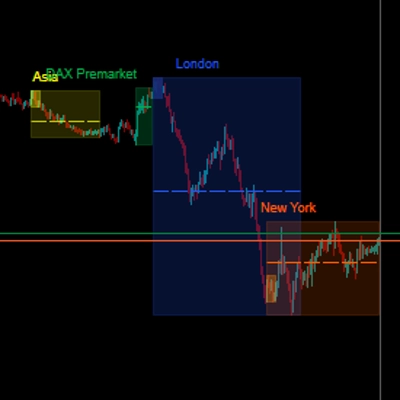
이 지표는 cTrader 차트에서 최근 가격 범위의 돌파를 감지하여 잠재적인 거래 기회를 식별하도록 설계되었습니다. 가격이 최근 최고점 위에서 크게 마감할 때(잠재적 강세 지속/반전) 또는 최근 최저점 아래에서 마감할 때(잠재적 약세 지속/반전)를 시각적으로 강조하며, 시장 구조 돌파 개념에서 영감을 받았습니다.
작동 원리
- 범위 식별: 각 바마다 지표는 지정된 이전 바 수(
Lookback Period)를 되돌아봅니다. 해당 기간 내에 도달한 절대 최고가와 최저가를 식별합니다. - 돌파 감지: 현재 바의 종가가 되돌아본 기간 내 최고가보다 높은지(강세 돌파) 또는 최저가보다 낮은지(약세 돌파)를 확인합니다.
- 추세 필터링 (선택 사항):
Enable Trend Filter가true로 설정된 경우, 지표는 이동평균(Trend MA Period및Trend MA Type)에 대한 가격도 확인합니다. -
- 강세 돌파 신호는 종가가 이동평균보다 위에 있을 때만 유효한 것으로 간주됩니다.
- 약세 돌파 신호는 종가가 이동평균보다 아래에 있을 때만 유효한 것으로 간주됩니다. 이는 이동평균이 정의하는 우세한 추세에 반하는 돌파를 걸러내는 데 도움이 됩니다.
시각적 요소
- 화살표:
-
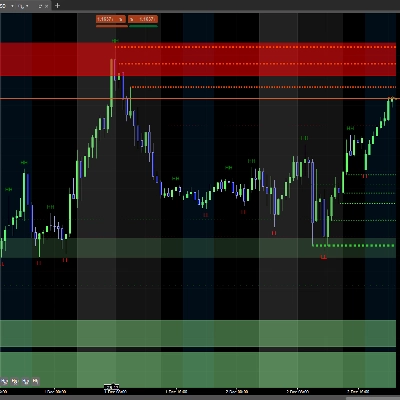
- 기본 색상 라임그린인 강세 화살표가 최근 최고가 위에서 마감한 바의 저점 아래에 나타납니다(추세 필터가 활성화된 경우 이를 만족해야 함).
- 기본 색상 빨간색인 약세 화살표가 최근 최저가 아래에서 마감한 바의 고점 위에 나타납니다(추세 필터가 활성화된 경우 이를 만족해야 함).
- 화살표와 바 사이의 거리는 ATR(
Arrow ATR Offset Multiplier)를 사용한 시장 변동성에 따라 자동으로 조정됩니다.
- 수평선:
-
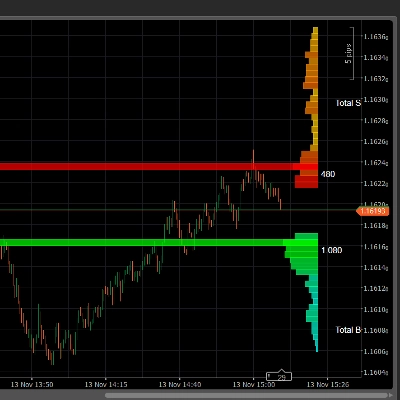
- 강세 돌파가 발생하면, 깨진 최고가 수준에 깨진 저항선(기본 빨간색)이 그려집니다.
- 약세 돌파가 발생하면, 깨진 최저가 수준에 깨진 지지선(기본 라임그린)이 그려집니다.
- 이 선들은 고점/저점 피벗이 발생한 바에서 시작하여
Line Extension Bars로 정의된 바 수만큼 돌파 바를 지나 앞으로 연장됩니다. 이는 깨진 수준을 시각화하는 데 도움이 됩니다. - 선 스타일과 두께는 사용자 지정할 수 있습니다.
- 레이블 (선택 사항):
-
Label Type이None이 아니면, 확장된 수평선 끝 근처에 텍스트 레이블이 나타납니다.- 이는 실제
Price수준, 사용자 지정Text(예: "MSB") 또는Both를 표시할 수 있습니다. - 레이블 색상은 사용자 지정 가능합니다.
- 히스토리 제한: 차트를 깔끔하게 유지하기 위해 가장 최근의
Max Historical Breakouts개수만큼 강세 및 약세 신호(화살표 + 선 + 레이블)를 표시합니다. 0으로 설정하면 모두 표시됩니다.
사용 방법 및 주의할 점
- 진입 신호: 돌파 화살표는 돌파 방향으로의 잠재적 진입 지점을 신호할 수 있습니다. 강세 화살표는 롱 진입 가능성을, 약세 화살표는 숏 진입 가능성을 나타냅니다.
- 확인: 신호를 확인하기 위해 다른 분석 방법(예: 거래량 분석, 차트 패턴, 기본적 분석)과 함께 돌파를 사용하세요. 이 지표만 단독으로 의존하지 마십시오.
- 지지/저항: 지표가 그리는 수평선은 가격이 이전에 멈췄던 수준을 나타냅니다. 돌파 후 이 수준들은 역할이 바뀔 수 있습니다:
-
- 깨진 저항선(빨간 선)은 잠재적 미래 지지선 역할을 할 수 있습니다.
- 깨진 지지선(초록 선)은 잠재적 미래 저항선 역할을 할 수 있습니다. 이후 바에서 가격이 이 연장선과 어떻게 상호작용하는지 관찰하세요.
- 추세 맥락:
Trend Filter를 활성화하면 광범위한 시장 방향과 일치하는 돌파에 집중할 수 있어 강한 추세에 반하는 거래를 줄일 수 있습니다. - 매개변수 조정:
Lookback Period를 실험해 보세요. 짧은 기간은 더 민감하고 신호가 많아질 수 있지만(노이즈 가능성 있음), 긴 기간은 더 중요한 범위에서의 돌파를 식별하지만 신호가 적어집니다. 시간대와 시장 특성에 따라 조정하세요. 추세를 정의하기 위해Trend MA Period를 조정하세요. - 시간 프레임: 이 지표는 모든 시간 프레임에서 작동합니다.
Lookback Period20은 해당 특정 시간 프레임의 20개 바를 의미합니다.
알림
Enable Sound Alerts가true로 설정되면, 최신 실시간 바에서 새로운 돌파 신호가 나타날 때 지정된Alert Sound File을 재생합니다(백테스트나 히스토리 로딩 중에는 알림이 울리지 않습니다).
주요 매개변수
Lookback Period: 최고가/최저가를 찾기 위한 과거 바 수.Enable Trend Filter: 이동평균 필터 켜기/끄기.Trend MA Period/Type: 추세 필터링 이동평균 설정.Max Historical Breakouts: 표시할 과거 신호 수 제한.Arrow ATR Offset Multiplier: 변동성에 따른 화살표와 바 사이 거리 조절.Line Extension Bars: 돌파 이후 수평선 연장 바 수.Label Type/Custom Label Text: 선 위 레이블 표시 설정.Enable Sound Alerts/Alert Sound File: 오디오 알림 구성.- 색상/스타일 매개변수: 시각적 외관 사용자 지정.
면책 조항: 거래에는 위험이 따릅니다. 이 지표는 계산에 기반한 기술적 신호를 제공하지만, 수익을 보장하거나 미래를 예측하지 않습니다. 항상 위험 관리를 사용하고 거래 결정을 내리기 전에 자체 분석을 수행하세요.
요약
AI 요약
The Market Structure Breakout Indicator for cTrader identifies potential trading opportunities by detecting price breakouts from recent ranges. It analyzes a user-defined lookback period to find the highest highs and lowest lows, then signals a bullish breakout when the current bar closes above the recent high, or a bearish breakout when it closes below the recent low. An optional trend filter uses a customizable Moving Average to validate breakouts aligned with the prevailing trend, filtering out counter-trend signals.
Visual cues include lime green bullish arrows below bars breaking above highs and red bearish arrows above bars breaking below lows. These arrows are positioned dynamically based on market volatility using the ATR (Average True Range). The indicator also draws horizontal lines at broken support or resistance levels, extending forward to help visualize these key price levels. Labels can be optionally displayed on these lines, showing price, custom text, or both, with customizable colors.
Users can limit the number of historical breakout signals shown to maintain chart clarity. Sound alerts can be enabled to notify when new breakout signals occur in real time. The indicator works on any timeframe, with sensitivity adjustable via the lookback period and trend filter settings. It is intended to assist in identifying entry points and support/resistance levels but should be used alongside other analysis methods.
Visual cues include lime green bullish arrows below bars breaking above highs and red bearish arrows above bars breaking below lows. These arrows are positioned dynamically based on market volatility using the ATR (Average True Range). The indicator also draws horizontal lines at broken support or resistance levels, extending forward to help visualize these key price levels. Labels can be optionally displayed on these lines, showing price, custom text, or both, with customizable colors.
Users can limit the number of historical breakout signals shown to maintain chart clarity. Sound alerts can be enabled to notify when new breakout signals occur in real time. The indicator works on any timeframe, with sensitivity adjustable via the lookback period and trend filter settings. It is intended to assist in identifying entry points and support/resistance levels but should be used alongside other analysis methods.
지표 프로필
상담
고객 리뷰
5.0
리뷰: 1
5 | 100 % | |
4 | 0 % | |
3 | 0 % | |
2 | 0 % | |
1 | 0 % |
고객 리뷰
August 12, 2025
Pros: Clear market structure levels and breakout detection, customizable visuals, lightweight and stable. Cons: No alerts, no MTF mode, no preset saving.
자주 묻는 질문(FAQ)
Signal
Breakout
ATR
트레이딩 봇, 지표, 플러그인 등 cTrader Store에서 제공되는 상품은 제3자 개발자에 의해 제공되며, 이는 단순히 정보 및 기술적 접근을 목적으로 제공된 것입니다. cTrader Store는 중개인이 아니며, 투자 조언, 개인별 추천 또는 향후 성과에 대한 어떠한 보장도 제공하지 않습니다.
이 작성자의 상품 더 보기
!["[Stellar Strategies] Wave Trend Pro" 로고](https://cdn.ctrader.com/image/webp/5f226fbb-245a-41cd-9cdd-b018257d5e6d_28617)
!["[Stellar Strategies] Market Session Ultimate" 로고](https://cdn.ctrader.com/image/webp/61ffd537-0125-4246-9e72-42eca1791d64_28232)
!["[Stellar Strategies] BOS Trend 1.0" 로고](https://cdn.ctrader.com/image/webp/6cdec0f1-0e97-4a82-a8a4-2b67aed54d38_25695)
!["[Stellar Strategies] Inside Bar with Signals" 로고](https://cdn.ctrader.com/image/webp/1d9e8bfa-3b2c-4440-bb37-5856902008a7_30683)
!["[StellarStrategies] Scheduled Trade Executor" 로고](https://cdn.ctrader.com/image/webp/daefc6af-7eca-453e-878d-1b981be2c401_25646)
!["[Stellar Strategies] Smart ADX" 로고](https://cdn.ctrader.com/image/webp/af13b084-b6f6-41db-b7bc-c7e688b57b05_36929)
!["[Stellar Strategies] Linear Regression Candles 1.1" 로고](https://cdn.ctrader.com/image/webp/8b9cff9f-2431-46d2-b0ec-c7f55f4a4a6d_27918)
!["[Stellar Strategies] VBO" 로고](https://cdn.ctrader.com/image/webp/f034c012-94d4-445a-a01b-febd1cdedaef_36944)
!["[Stellar Strategies] SP500 Gap Closure cBot 1.0" 로고](https://cdn.ctrader.com/image/webp/92c23fdc-4ad1-4e61-bdb5-c77f6ec8c539_27686)
!["[Stellar Strategies] Candlestick Patterns Dashboard" 로고](https://cdn.ctrader.com/image/webp/ae8691a5-4884-4553-9bcc-64e16ac82a30_38344)
!["[Stellar Strategies] QQE" 로고](https://cdn.ctrader.com/image/webp/e702104a-874c-4b39-97dd-fb34518d1015_27712)
!["[Stellar Strategies] Visual Trend Momentum" 로고](https://cdn.ctrader.com/image/webp/48aee0a5-f10e-4bc8-9671-78e156fcc5df_27548)









가격
20.46M
거래량
8.02K
핍 수익
27
판매
4.91K
무료 설치