
![Trading product for [Stellar Strategies] BOS Trend 1.0 Gösterge, image 1](https://cdn.ctrader.com/image/webp/6cdec0f1-0e97-4a82-a8a4-2b67aed54d38_25695)
[Stellar Strategies] BOS Trend 1.0
Gösterge
493 i̇ndirmeler
Sürüm 1.0, Nov 2024
Windows, Mac
5.0
Değerlendirmeler: 1
![Trading product for [Stellar Strategies] BOS Trend 1.0 Gösterge, image 2](https://cdn.ctrader.com/image/webp/2738d263-76dc-4e6f-a818-7e66349e6883_25696)
![Trading product for [Stellar Strategies] BOS Trend 1.0 Gösterge, image 3](https://cdn.ctrader.com/image/webp/5338cc95-bf3e-4db4-b575-3e935cff8e90_25697)
![Trading product for [Stellar Strategies] BOS Trend 1.0 Gösterge, image 4](https://cdn.ctrader.com/image/webp/59502053-3cfb-4232-b1da-c27ad8852e60_25698)
![Trading product for [Stellar Strategies] BOS Trend 1.0 Gösterge, image 5](https://cdn.ctrader.com/image/webp/e32ea74f-662d-4c30-8571-3b8062b6be90_25699)
![Trading product for [Stellar Strategies] BOS Trend 1.0 Gösterge, image 6](https://cdn.ctrader.com/image/webp/fe0c3dd9-19fe-4833-bd0e-640ccec47e31_25700)
![Trading product for [Stellar Strategies] BOS Trend 1.0 Gösterge, image 7](https://cdn.ctrader.com/image/webp/0fa38032-d41c-4684-a0ec-c9512db0d567_25701)
![Trading product for [Stellar Strategies] BOS Trend 1.0 Gösterge, image 8](https://cdn.ctrader.com/image/webp/10e865d7-9813-4932-ac9b-3b76516518c9_25702)

20.46M
İşlem hacmi
8.02K
Kazanılan pip
27
Satışlar
4.91K
Ücretsiz yüklemeler
Açıklama
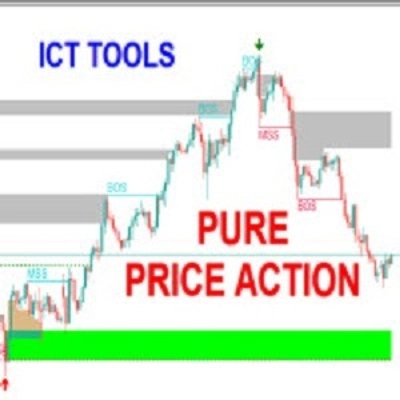
[Stellar Strategies] BOS Trend, cAlgo için tasarlanmış premium çok zaman dilimli Bir Yapı Kırılması (BOS) göstergesidir. Çoklu zaman dilimlerinde yükseliş ve düşüş BOS'larını tespit ederek tüccarlara piyasa trendleri hakkında kritik bilgiler sağlar.
Özellikler:
- Çoklu Zaman Dilimi Analizi: Fiyat hareketlerini çeşitli zaman dilimlerinde (1 dakikadan günlük) analiz eder.
- Özelleştirilebilir Zaman Dilimleri: Analizinizi kişiselleştirmek için belirli zaman dilimlerini etkinleştirin veya devre dışı bırakın.
- Gerçek Zamanlı Uyarılar: Bir BOS tespit edildiğinde grafikte mesajlar gösterir.
- Kullanıcı Dostu Arayüz: Farklı grafik arka planlarında daha iyi görünürlük için özelleştirilebilir metin rengi.
Parametreler:
- Geriye Bakış Dönemi (Varsayılan: 20): BOS tespiti için geriye bakılacak bar sayısı.
- Zaman Dilimi Parametreleri:
-
1 Dakikalık Zaman Dilimini Kullan5 Dakikalık Zaman Dilimini Kullan15 Dakikalık Zaman Dilimini Kullan30 Dakikalık Zaman Dilimini Kullan1 Saatlik Zaman Dilimini Kullan4 Saatlik Zaman Dilimini KullanGünlük Zaman Dilimini Kullan
- Metin Rengi (Varsayılan: "Sarı"): BOS mesajlarının rengini ayarlar.
Göstergenin Kullanımı:
- Göstergenin Eklenmesi:
-
- cAlgo platformunuzu açın.
- Göstergeler bölümüne gidin ve [Stellar Strategies] BOS Trend göstergesini grafiğinize ekleyin.
- Parametrelerin Ayarlanması:
-
- Geriye Bakış Dönemi: Ticaret stratejinize göre geriye bakış dönemini ayarlayın (varsayılan 20 bar).
- Zaman Dilimlerini Etkinleştir/Devre Dışı Bırak: İlgili seçenekleri işaretleyerek veya işaretini kaldırarak analiz etmek istediğiniz zaman dilimlerini seçin.
- Metin Rengi: Grafik arka planınızla iyi kontrast oluşturan bir metin rengi seçin.
- BOS Sinyallerinin Okunması:
-
- Yükseliş BOS: Yeşil çizgiler yükseliş yapı kırılmasını gösterir.
- Düşüş BOS: Kırmızı çizgiler düşüş yapı kırılmasını gösterir.
- BOS Mesajları: "Mevcut Zaman Dilimi: Yükseliş BOS tespit edildi" gibi mesajlar grafikte görünür ve etkinleştirdiğiniz diğer zaman dilimlerinden gelen mesajlar da gösterilir.
- Verilerin Yorumlanması:
-
- BOS sinyallerini potansiyel trend dönüşlerini veya devamlarını belirlemek için kullanın.
- Trendlerin daha güçlü teyidi için çoklu zaman dilimi analizine dikkat edin.
- Görünümü Özelleştirme:
-
- BOS mesajlarının metin rengini ve konumunu daha iyi okunabilirlik için ayarlayabilirsiniz.
Örnek:
İşte [Stellar Strategies] BOS Trend göstergesinin nasıl kullanılacağına dair adım adım bir örnek:
- Göstergiyi Ekleyin:
-
- cAlgo platformunuzda bir grafik açın.
-
Indicatorsbölümüne gidin ve [Stellar Strategies] BOS Trend seçin.
- Parametreleri Ayarlayın:
-
-
Lookback Perioddeğerini 20 olarak ayarlayın. -
Use 1 Minute Time Frame,Use 5 Minute Time Frameve ihtiyaç duyulan diğer zaman dilimlerini etkinleştirin. - Metin rengini daha iyi görünürlük için
Yellowolarak ayarlayın.
-
- Grafiği İzleyin:
-
- Grafiğinizdeki yeşil (yükseliş) ve kırmızı (düşüş) BOS çizgilerini gözlemleyin.
- Farklı zaman dilimlerinde BOS tespiti gösteren mesajları arayın.
- Harekete Geçin:
-
- Trend dönüşleri veya devamları temelinde bilinçli ticaret kararları vermek için BOS sinyallerini kullanın.
Bu adımları izleyerek, çok zaman dilimli BOS analizi ile ticaret stratejinizi geliştirmek için [Stellar Strategies] BOS Trend göstergesini etkili bir şekilde kullanabilirsiniz.
Daha fazla yardıma veya bilgiye ihtiyacınız olursa lütfen bana bildirin! 📈📉
Özet
YZ özeti
The [Stellar Strategies] BOS Trend is a multi-timeframe Break of Structure (BOS) indicator designed for the cAlgo platform. It identifies key market trend shifts by detecting uptrend and downtrend BOS signals across multiple timeframes ranging from 1 minute to daily charts. Users can customize which timeframes to analyze and adjust the lookback period for BOS detection, with a default of 20 bars. The indicator provides real-time alerts directly on the chart, displaying messages such as "Current TF: Uptrend BOS detected" to inform traders of structural breaks. Visual cues include green lines for uptrend BOS and red lines for downtrend BOS. The interface allows customization of text color to enhance visibility against different chart backgrounds. Traders can use the BOS signals to identify potential trend reversals or continuations, leveraging multi-timeframe analysis for stronger confirmation. The indicator supports flexible configuration to fit various trading strategies and preferences.
Gösterge profili
Tartışma
Müşteri değerlendirmeleri
5.0
Değerlendirmeler: 1
5 | 100 % | |
4 | 0 % | |
3 | 0 % | |
2 | 0 % | |
1 | 0 % |
Müşteri değerlendirmeleri
August 18, 2025
Pros: Automatically detects and marks Break Of Structure points indicating trend shifts. Clean visual arrows and straightforward setup. Cons: No alerts, tooltips, or template saving. May produce noise without volume or market context filters.
SSS
cTrader Store üzerinden erişilebilen işlem botları, göstergeler ve eklentiler gibi ürünler, üçüncü taraf sağlayıcılar tarafından sağlanır ve yalnızca bilgilendirme ve teknik erişim amaçlarıyla sunulur. cTrader Store bir broker değildir ve yatırım tavsiyesi, kişisel öneriler vermez veya gelecekteki performansı garanti etmez.
Bu oluşturanın diğer ürünleri
!["[Stellar Strategies] Market Structure Breakout" logosu](https://cdn.ctrader.com/image/webp/bceec265-3247-4b11-915f-6295a29c106d_28465)
!["[Stellar Strategies] Market Session Ultimate" logosu](https://cdn.ctrader.com/image/webp/61ffd537-0125-4246-9e72-42eca1791d64_28232)
!["[Stellar Strategies] Wave Trend Pro" logosu](https://cdn.ctrader.com/image/webp/5f226fbb-245a-41cd-9cdd-b018257d5e6d_28617)
!["[Stellar Strategies] Inside Bar with Signals" logosu](https://cdn.ctrader.com/image/webp/1d9e8bfa-3b2c-4440-bb37-5856902008a7_30683)
!["[StellarStrategies] Scheduled Trade Executor" logosu](https://cdn.ctrader.com/image/webp/daefc6af-7eca-453e-878d-1b981be2c401_25646)
!["[Stellar Strategies] Smart ADX" logosu](https://cdn.ctrader.com/image/webp/af13b084-b6f6-41db-b7bc-c7e688b57b05_36929)
!["[Stellar Strategies] Linear Regression Candles 1.1" logosu](https://cdn.ctrader.com/image/webp/8b9cff9f-2431-46d2-b0ec-c7f55f4a4a6d_27918)
!["[Stellar Strategies] VBO" logosu](https://cdn.ctrader.com/image/webp/f034c012-94d4-445a-a01b-febd1cdedaef_36944)
!["[Stellar Strategies] SP500 Gap Closure cBot 1.0" logosu](https://cdn.ctrader.com/image/webp/92c23fdc-4ad1-4e61-bdb5-c77f6ec8c539_27686)
!["[Stellar Strategies] Candlestick Patterns Dashboard" logosu](https://cdn.ctrader.com/image/webp/ae8691a5-4884-4553-9bcc-64e16ac82a30_38344)
!["[Stellar Strategies] QQE" logosu](https://cdn.ctrader.com/image/webp/e702104a-874c-4b39-97dd-fb34518d1015_27712)
!["[Stellar Strategies] Visual Trend Momentum" logosu](https://cdn.ctrader.com/image/webp/48aee0a5-f10e-4bc8-9671-78e156fcc5df_27548)










Fiyat
20.46M
İşlem hacmi
8.02K
Kazanılan pip
27
Satışlar
4.91K
Ücretsiz yüklemeler