

wt.Tick Imbalance Bars
Desktop plugin
Version 1.0, Feb 2026
Windows, Mac
5.0
Reviews: 3
99.81M
Traded volume
150.07K
Pips won
102
Sales
545
Free installs
Description
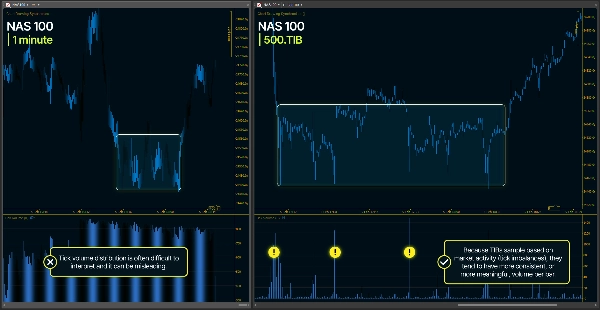
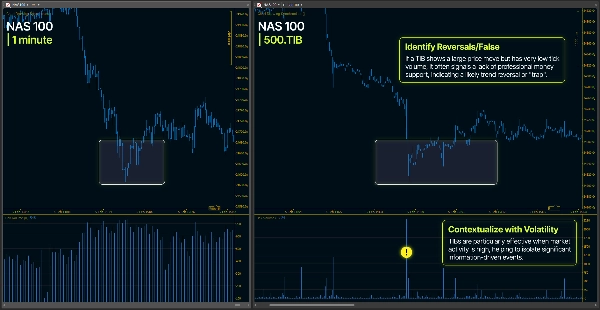
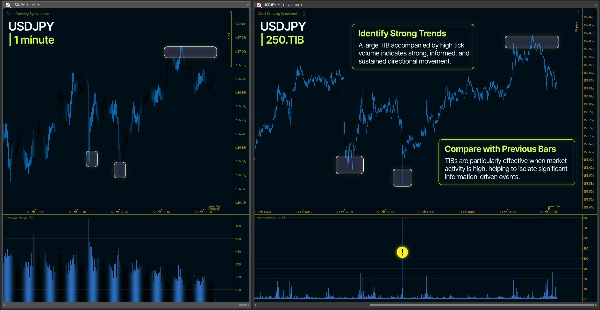
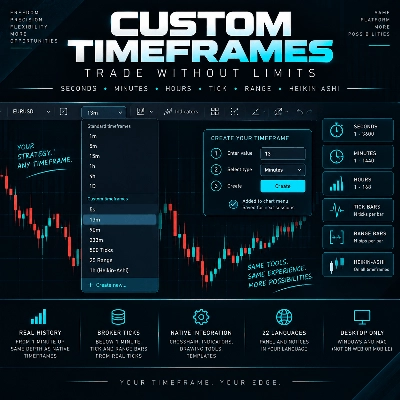
The Tick Imbalance Bars ( TIB ) Custom Timeframe Plugin creates custom timeframes based on tick flow dynamics rather than fixed time intervals. Unlike traditional timeframes (1min, 5min, 1h), TIB bars are formed when cumulative tick imbalance reaches a dynamic threshold.
Key Concept
- Each tick is classified as +1 (uptick), -1 (downtick), or previous sign (no price change)
- These signed ticks accumulate into a running imbalance: θ (theta)
- When |θ| reaches a threshold, a new bar forms
- The threshold adapts based on recent tick flow patterns
- This creates bars that reflect actual market activity rather than arbitrary time divisions
Adaptive Threshold. The plugin uses an Exponential Weighted Moving Average (EWMA) to estimate the probability of upward vs downward ticks. This estimate continuously updates and adjusts the bar formation threshold, making the timeframe adaptive to changing market conditions.
Adaptive Aggregation. When a bar would normally close with very few ticks (micro-bar), the plugin automatically enters aggregation mode and continues accumulating ticks until reaching a minimum threshold. This prevents fragmented bars while preserving the core TIB algorithm.
Plugin Parameters Guide
Expected Bar Size
- Range: 50 - 10000
- What it does: Sets the target number of ticks per bar
- Effect: Higher values create fewer, larger bars; lower values create more, smaller bars
- Direct impact: This is the primary control for bar frequency
EWMA Alpha
- Range: 0,001 - 0.9 ( Recommended default value 0,001 )
- What it does: Controls how responsive the threshold is to recent tick patterns
- Effect:
- Higher values = more reactive, follows recent changes quickly
- Lower values = more stable, smooths over longer periods
- Impact on bars: Affects how quickly bar size adjusts to changing market conditions
Initial Imbalance
- Range: 0.0 - 1.0 ( Recommended default value 0.5 )
- What it does: Sets the starting probability estimate for upward ticks
- Effect:
- 0.5 = neutral starting point (50% up, 50% down)
- Above 0.5 = bullish bias at initialization
- Below 0.5 = bearish bias at initialization
- Impact on bars: Affects the first few bars only, then EWMA takes over
Name Extension
- What it does: Adds a custom suffix to the timeframe name
- Effect: "Live" creates "1000.TIB-Live", allowing multiple instances with different settings
- Purpose: Distinguishes between different TIB configurations in Custom Timeframe List
Max History Days
- Range: 1 - 30 ( Recommended default value >5 )
- What it does: Defines how many days of historical tick data to load
- Effect: More days = more historical bars but longer initial load time
- Trade-off: Loading 30 days of tick data can take significant time depending on tick volume
- Note: Range value is counting also weekend days.
Min Ticks Per Bar
- Range: 10 - 500
- What it does: Sets the minimum number of ticks allowed in any bar
- Effect: When a bar would close with fewer ticks, aggregation mode activates
- Purpose: Prevents micro-bars during low activity periods
- Common setting: 5-10% of Expected Bar Size
Feel free to contact me for Complete Usage Guide. I'm happy to guide you through getting everything configured just right.
This Plugin ( product ) is directly linked to the following products:
1. WT - Tick Imbalance Bars - Indicator Version
- Usage: Same core TIB algorithm used to be applied ( overlayed on native cTrader timeframes )
- Complete description available on indicator product page
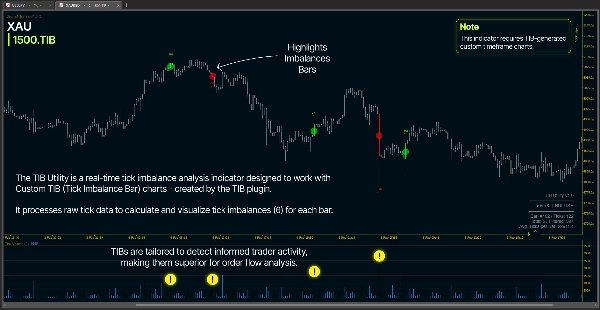
2. wt.TiB Utility - Indicator Version
- Usage: Highlights and provides notifications / alerts for TIB related events
- Complete description available on indicator product page
IMPORTANT NOTE
The TIB Indicator and TIB Plugin are included at no additional cost with the purchase of either product. Although they are listed as separate products, only one purchase is required. For example, purchasing the TIB Indicator also grants access to the TIB Plugin, and vice versa. Please contact me after purchase to receive the related file.
Summary
AI summary
The wt.Tick Imbalance Bars plugin generates custom trading bars based on tick flow dynamics instead of fixed time intervals. Each tick is assigned a sign (+1 for uptick, -1 for downtick, or previous sign if unchanged), and these accumulate into a running imbalance (θ). A new bar forms when the absolute imbalance reaches an adaptive threshold, which adjusts continuously using an Exponential Weighted Moving Average (EWMA) of recent tick patterns. This approach creates bars that better reflect actual market activity.
Key features include:
- Adaptive threshold for bar formation responsive to market conditions.
- Aggregation mode to prevent micro-bars by ensuring a minimum number of ticks per bar.
- Configurable parameters such as Expected Bar Size (target ticks per bar), EWMA Alpha (responsiveness of threshold adjustment), Initial Imbalance (starting bias for tick direction), Min Ticks Per Bar (minimum ticks to avoid fragmented bars), Max History Days (historical tick data loaded), and Name Extension (custom suffix for timeframe names).
The plugin supports market data, positions, orders, and chart access, and works with market, limit, stop, and stop-limit order types. It is designed for use across various markets including Forex, indices, and commodities, and supports risk management tools like stop loss and take profit. The plugin complements related indicator versions that overlay Tick Imbalance Bars or provide alerts on TIB events.
Key features include:
- Adaptive threshold for bar formation responsive to market conditions.
- Aggregation mode to prevent micro-bars by ensuring a minimum number of ticks per bar.
- Configurable parameters such as Expected Bar Size (target ticks per bar), EWMA Alpha (responsiveness of threshold adjustment), Initial Imbalance (starting bias for tick direction), Min Ticks Per Bar (minimum ticks to avoid fragmented bars), Max History Days (historical tick data loaded), and Name Extension (custom suffix for timeframe names).
The plugin supports market data, positions, orders, and chart access, and works with market, limit, stop, and stop-limit order types. It is designed for use across various markets including Forex, indices, and commodities, and supports risk management tools like stop loss and take profit. The plugin complements related indicator versions that overlay Tick Imbalance Bars or provide alerts on TIB events.
Plugin profile
Plugin category
Utilities
Data access
Market data
Positions
Orders
Chart
Supported order types
Market
Limit
Stop
Stop-limit
Supported risk controls
Stop loss
Take profit
Trailing stop loss
Session filter
Spread filter
News filter
Break-even
Equity stop loss
Daily limits
Max drawdown limit
Discussion
Customer reviews
5.0
Reviews: 3
5 | 100 % | |
4 | 0 % | |
3 | 0 % | |
2 | 0 % | |
1 | 0 % |
Customer reviews
February 11, 2026
Useful tool, but not for lazy entries. It supports reviewing information faster and feels more useful if the trader stays selective.
February 11, 2026
No reason to judge this from 1 good trade. A better check is 10 minute checks, 20 percent less clicking and 2 weeks before using a larger account.
February 8, 2026
The product feels practical for platform workflow if the trader keeps control. A 90 setup sample on M5 should show whether it really helps.
FAQ
Prop
Forex
Signal
Breakout
Scalping
Indices
Commodities
Products available through cTrader Store, including trading bots, indicators and plugins, are provided by third-party developers and made available for informational and technical access purposes only. cTrader Store is not a broker and does not provide investment advice, personal recommendations or any guarantee of future performance.
















Price
99.81M
Traded volume
150.07K
Pips won
102
Sales
545
Free installs