
![Trading product for [Stellar Strategies] BOS Trend 1.0 Indicatore, image 1](https://cdn.ctrader.com/image/webp/6cdec0f1-0e97-4a82-a8a4-2b67aed54d38_25695)
[Stellar Strategies] BOS Trend 1.0
Indicatore
493 download
Versione 1.0, Nov 2024
Windows, Mac
5.0
Recensioni: 1
![Trading product for [Stellar Strategies] BOS Trend 1.0 Indicatore, image 2](https://cdn.ctrader.com/image/webp/2738d263-76dc-4e6f-a818-7e66349e6883_25696)
![Trading product for [Stellar Strategies] BOS Trend 1.0 Indicatore, image 3](https://cdn.ctrader.com/image/webp/5338cc95-bf3e-4db4-b575-3e935cff8e90_25697)
![Trading product for [Stellar Strategies] BOS Trend 1.0 Indicatore, image 4](https://cdn.ctrader.com/image/webp/59502053-3cfb-4232-b1da-c27ad8852e60_25698)
![Trading product for [Stellar Strategies] BOS Trend 1.0 Indicatore, image 5](https://cdn.ctrader.com/image/webp/e32ea74f-662d-4c30-8571-3b8062b6be90_25699)
![Trading product for [Stellar Strategies] BOS Trend 1.0 Indicatore, image 6](https://cdn.ctrader.com/image/webp/fe0c3dd9-19fe-4833-bd0e-640ccec47e31_25700)
![Trading product for [Stellar Strategies] BOS Trend 1.0 Indicatore, image 7](https://cdn.ctrader.com/image/webp/0fa38032-d41c-4684-a0ec-c9512db0d567_25701)
![Trading product for [Stellar Strategies] BOS Trend 1.0 Indicatore, image 8](https://cdn.ctrader.com/image/webp/10e865d7-9813-4932-ac9b-3b76516518c9_25702)

20.46M
Volume negoziato
8.02K
Profitto in pip
27
Vendite
4.91K
Installazioni gratuite
Descrizione
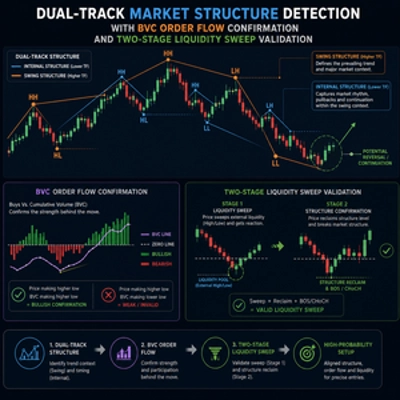
Il [Stellar Strategies] BOS Trend è un indicatore premium multi-timeframe di Break of Structure (BOS) progettato per cAlgo. Fornisce ai trader informazioni critiche sulle tendenze di mercato rilevando BOS di trend rialzista e ribassista su più timeframe.
Caratteristiche:
- Analisi Multi-Timeframe: Analizza i movimenti di prezzo su vari timeframe (da 1 min a giornaliero).
- Timeframe Personalizzabili: Abilita o disabilita specifici timeframe per adattare la tua analisi.
- Avvisi in Tempo Reale: Mostra messaggi sul grafico quando viene rilevato un BOS.
- Interfaccia Intuitiva: Colore del testo personalizzabile per una migliore visibilità su diversi sfondi del grafico.
Parametri:
- Periodo di Lookback (Predefinito: 20): Il numero di barre da considerare per rilevare il BOS.
- Parametri del Time Frame:
-
Usa il Time Frame da 1 MinutoUsa il Time Frame da 5 MinutiUsa il Time Frame da 15 MinutiUsa il Time Frame da 30 MinutiUsa il Time Frame da 1 OraUsa il Time Frame da 4 OreUsa il Time Frame Giornaliero
- Colore del Testo (Predefinito: "Giallo"): Imposta il colore per i messaggi BOS.
Come Usare l'Indicatore:
- Aggiungere l'Indicatore:
-
- Apri la tua piattaforma cAlgo.
- Vai alla sezione indicatori e aggiungi [Stellar Strategies] BOS Trend al tuo grafico.
- Impostare i Parametri:
-
- Periodo di Lookback: Regola il periodo di lookback in base alla tua strategia di trading (il valore predefinito è 20 barre).
- Abilita/Disabilita Time Frame: Seleziona i timeframe che vuoi analizzare spuntando o deselezionando le opzioni corrispondenti.
- Colore del Testo: Scegli un colore del testo che contrasti bene con lo sfondo del grafico per una chiara visibilità.
- Lettura dei Segnali BOS:
-
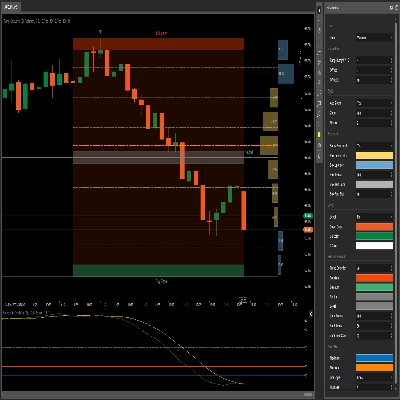
- BOS di Trend Rialzista: Le linee verdi indicano una rottura di struttura al rialzo.
- BOS di Trend Ribassista: Le linee rosse indicano una rottura di struttura al ribasso.
- Messaggi BOS: Messaggi come "TF Corrente: BOS rialzista rilevato" appariranno sul grafico, insieme ad altri messaggi provenienti dai diversi timeframe che hai abilitato.
- Interpretazione dei Dati:
-
- Usa i segnali BOS per identificare potenziali inversioni o continuazioni di trend.
- Presta attenzione all'analisi multi-timeframe per una conferma più solida delle tendenze.
- Personalizzazione della Visualizzazione:
-
- Puoi regolare il colore del testo e la posizione dei messaggi BOS per una migliore leggibilità.
Esempio:
Ecco un esempio passo-passo di come usare l'indicatore [Stellar Strategies] BOS Trend:
- Aggiungi l'Indicatore:
-
- Apri un grafico nella tua piattaforma cAlgo.
- Vai a
Indicatorie seleziona [Stellar Strategies] BOS Trend.
- Imposta i Parametri:
-
- Imposta il
Periodo di Lookbacka 20. - Abilita
Usa il Time Frame da 1 Minuto,Usa il Time Frame da 5 Minutie altri timeframe secondo necessità. - Imposta
Colore del Testosu "Giallo" per una migliore visibilità.
- Imposta il
- Monitora il Grafico:
-
- Osserva le linee BOS verdi (trend rialzista) e rosse (trend ribassista) sul tuo grafico.
- Cerca messaggi che indicano il rilevamento di BOS su diversi timeframe.
- Agisci:
-
- Usa i segnali BOS per prendere decisioni di trading informate basate su inversioni o continuazioni di trend.
Seguendo questi passaggi, puoi utilizzare efficacemente l'indicatore [Stellar Strategies] BOS Trend per migliorare la tua strategia di trading con l'analisi BOS multi-timeframe.
Sentiti libero di farmi sapere se hai bisogno di ulteriore assistenza o di più informazioni! 📈📉
Riepilogo
Riepilogo AI
The [Stellar Strategies] BOS Trend is a multi-timeframe Break of Structure (BOS) indicator designed for the cAlgo platform. It identifies key market trend shifts by detecting uptrend and downtrend BOS signals across multiple timeframes ranging from 1 minute to daily charts. Users can customize which timeframes to analyze and adjust the lookback period for BOS detection, with a default of 20 bars. The indicator provides real-time alerts directly on the chart, displaying messages such as "Current TF: Uptrend BOS detected" to inform traders of structural breaks. Visual cues include green lines for uptrend BOS and red lines for downtrend BOS. The interface allows customization of text color to enhance visibility against different chart backgrounds. Traders can use the BOS signals to identify potential trend reversals or continuations, leveraging multi-timeframe analysis for stronger confirmation. The indicator supports flexible configuration to fit various trading strategies and preferences.
Profilo indicatore
Discussioni
Recensioni dei clienti
5.0
Recensioni: 1
5 | 100 % | |
4 | 0 % | |
3 | 0 % | |
2 | 0 % | |
1 | 0 % |
Recensioni dei clienti
August 18, 2025
Pros: Automatically detects and marks Break Of Structure points indicating trend shifts. Clean visual arrows and straightforward setup. Cons: No alerts, tooltips, or template saving. May produce noise without volume or market context filters.
Domande frequenti
I prodotti disponibili tramite cTrader Store, inclusi bot di trading, indicatori e plugin, sono forniti da sviluppatori terzi e resi disponibili esclusivamente a scopo informativo e di accesso tecnico. cTrader Store non è un broker e non fornisce consulenze in materia di investimento, raccomandazioni individualizzate o garanzie di risultati futuri.
![Logo di "[Stellar Strategies] Market Structure Breakout"](https://cdn.ctrader.com/image/webp/bceec265-3247-4b11-915f-6295a29c106d_28465)
![Logo di "[Stellar Strategies] Market Session Ultimate"](https://cdn.ctrader.com/image/webp/61ffd537-0125-4246-9e72-42eca1791d64_28232)
![Logo di "[Stellar Strategies] Wave Trend Pro"](https://cdn.ctrader.com/image/webp/5f226fbb-245a-41cd-9cdd-b018257d5e6d_28617)
![Logo di "[Stellar Strategies] Inside Bar with Signals"](https://cdn.ctrader.com/image/webp/1d9e8bfa-3b2c-4440-bb37-5856902008a7_30683)
![Logo di "[StellarStrategies] Scheduled Trade Executor"](https://cdn.ctrader.com/image/webp/daefc6af-7eca-453e-878d-1b981be2c401_25646)
![Logo di "[Stellar Strategies] Smart ADX"](https://cdn.ctrader.com/image/webp/af13b084-b6f6-41db-b7bc-c7e688b57b05_36929)
![Logo di "[Stellar Strategies] Linear Regression Candles 1.1"](https://cdn.ctrader.com/image/webp/8b9cff9f-2431-46d2-b0ec-c7f55f4a4a6d_27918)
![Logo di "[Stellar Strategies] VBO"](https://cdn.ctrader.com/image/webp/f034c012-94d4-445a-a01b-febd1cdedaef_36944)
![Logo di "[Stellar Strategies] SP500 Gap Closure cBot 1.0"](https://cdn.ctrader.com/image/webp/92c23fdc-4ad1-4e61-bdb5-c77f6ec8c539_27686)
![Logo di "[Stellar Strategies] Candlestick Patterns Dashboard"](https://cdn.ctrader.com/image/webp/ae8691a5-4884-4553-9bcc-64e16ac82a30_38344)
![Logo di "[Stellar Strategies] QQE"](https://cdn.ctrader.com/image/webp/e702104a-874c-4b39-97dd-fb34518d1015_27712)
![Logo di "[Stellar Strategies] Visual Trend Momentum"](https://cdn.ctrader.com/image/webp/48aee0a5-f10e-4bc8-9671-78e156fcc5df_27548)







Prezzo
20.46M
Volume negoziato
8.02K
Profitto in pip
27
Vendite
4.91K
Installazioni gratuite