"Trend Lines Premium Engine" 로고
Trend Lines Premium Engine
"Trend Lines Premium Engine" 업로드된 이미지
가입일 03/10/2024
143
판매
32.42K
무료 설치

🔷 Trend Lines Premium Engine

Multi-Layer Market Structure & Dynamic Regression Indicator

https://chartshots.spotware.com/c/69d3c949a2e08


📌 What is it?

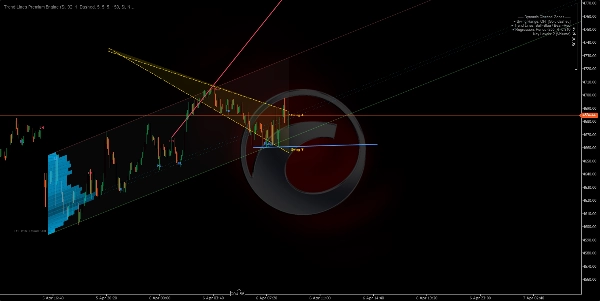
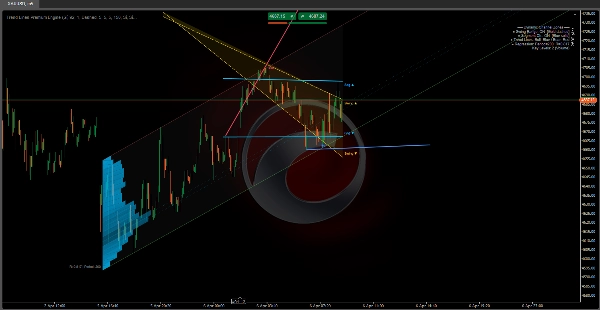
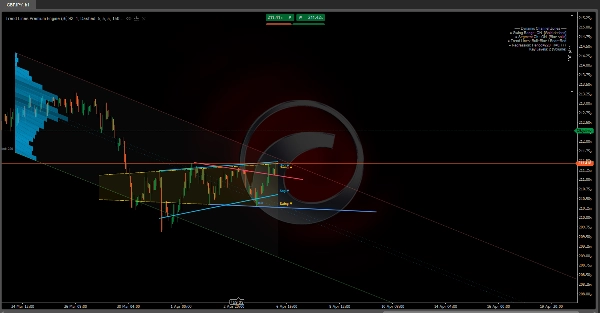
Trend Lines Premium Engine is an overlay indicator that combines 5 independent modules into a single tool. Each module can be toggled on or off. It maps market structure, dynamic channels, and volume-based regression zones directly on the price chart.

It answers three core questions:

  • Where is price within the current structure?
  • What is the dominant trend and where are the breaking points?
  • At which price levels is activity concentrated?


🧩 The 5 Modules


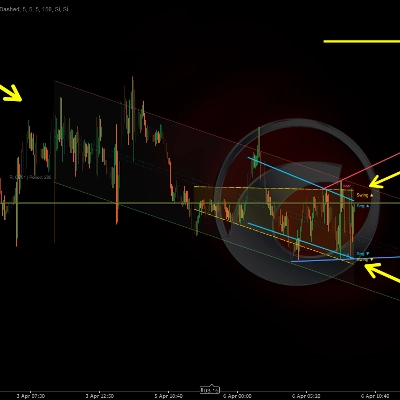
1️⃣ Swing Range Connector

https://chartshots.spotware.com/c/69d3cab9b805b

Detects the most recent swing highs and swing lows, then draws a sloped channel connecting the oldest to the newest on both sides. The area between is filled as a dynamic range zone.

How it works:

  • A bar qualifies as a swing point when its high (or low) is the most extreme compared to N bars before and N bars after it.
  • A straight line is drawn from the oldest stored swing to the most recent, creating upper and lower boundaries.
  • The channel shifts automatically each time a new swing point is confirmed.

How to read it:

  • Price inside the channel → defined structural range.
  • Break above/below → volatility expansion or structure shift.
  • Channel slope → predominant range direction.

Parameter

Purpose

Bars Before / After Swing

Bars required on each side to confirm a swing. Higher = more significant swings

Max Swing Points

How many swings to store. Controls channel depth

History Window

How far back the channel is drawn


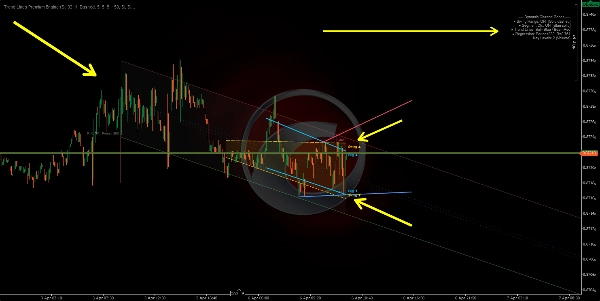
2️⃣ Segment Linear Channel

https://chartshots.spotware.com/c/69d3cb221bba1

Splits the analysis window into 5 equal segments, finds the highest high and lowest low in each, then fits a least-squares regression line through those 5 upper points and another through the 5 lower points.

How it works:

  • The window is divided into 5 parts. One representative extreme is extracted per part.
  • Linear regression is applied over those 5 points for each boundary.
  • The result is a channel that adapts to segmented price structure rather than just two endpoints.

How to read it:

  • Ascending channel → structural uptrend.
  • Descending channel → structural downtrend.
  • Repeated touches on a boundary → dynamic support/resistance.

Difference from Module 1: Swing Range connects only the first and last swing. Segment Channel uses 5-point regression, making it smoother and less reactive to a single swing.


3️⃣ Swing Point Labels

Detects swing highs and lows and classifies them into 4 market structure categories:

Label

Meaning

Indicates

HL

Higher Low

Bullish structure

HH

Higher High

Bullish structure

LH

Lower High

Bearish structure

LL

Lower Low

Bearish structure

How it works:

  • Each new swing low is compared to the previous swing low. Higher → HL. Lower → LL.
  • Each new swing high is compared to the previous swing high. Higher → HH. Lower → LH.

How to read it:

  • HL + HH sequence → uptrend intact.
  • LH + LL sequence → downtrend intact.
  • An HL breaking into LL, or an LH breaking into HH → structure shift (BOS/CHoCH).

By default only HL and LH are displayed to keep the chart clean. HH and LL can be enabled for full structure visibility.


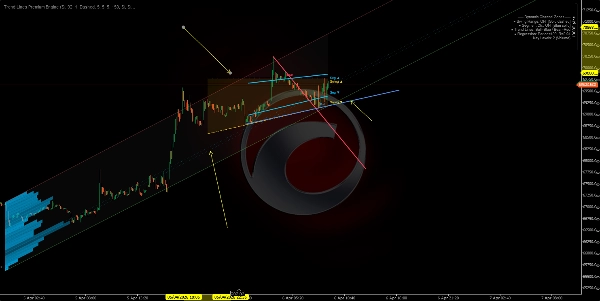
4️⃣ Automatic Trend Lines

https://chartshots.spotware.com/c/69d3cc071272e

Draws trend lines connecting the two most recent swing lows (bullish line) and the two most recent swing highs (bearish line). The active line is prominent; previous lines fade out.

How it works:

  • New swing low detected → line drawn from prior swing low to the new one (bullish trend line).
  • New swing high detected → line drawn from prior swing high to the new one (bearish trend line).
  • The line projects forward by a configurable number of bars.
  • When a new line is created, the previous one fades to a semi-transparent color.

Breakout signals (optional): When enabled, the indicator detects if the closing price crosses an active trend line:

  • 🔼 Up arrow → bullish breakout.
  • 🔽 Down arrow → bearish breakout.

Parameter

Purpose

Max Line Pairs

How many line pairs to keep visible. Set to 1 for cleanest view

Max Extension Bars

How far the line projects forward. Prevents lines from crossing the entire chart


5️⃣ Dynamic Regression Zone

The most advanced module. Calculates a linear regression channel on closing prices and overlays an activity profile (histogram) showing where volume or touches concentrated within the channel. It also marks key levels at the highest-activity zones.

A) Regression Channel:

  • Least-squares linear regression is applied to closing prices over a given period.
  • Standard deviation of prices from the regression line is calculated.
  • Upper and lower bands are placed at N standard deviations from the center (default: 2.0).
  • Optionally computed in logarithmic scale for better accuracy on high-price or high-volatility instruments.

B) Auto Period Detection:

  • The algorithm tests multiple periods (50 to 400 bars) and calculates the Pearson correlation coefficient for each.
  • It selects the period with the highest correlation — where the linear regression best fits the price movement.
  • The correlation value is displayed on the chart (e.g., R = 0.85).

C) Activity Histogram:

  • The channel is divided into horizontal sections (up to 25).
  • For each section, the algorithm counts how many bars touched that price level, weighted by volume or number of touches (configurable).
  • Higher-activity sections appear as longer, more opaque bars.
  • This reveals the Point of Control (POC) and high/low activity zones within the channel.

D) Key Levels:

  • The sections with the highest activity are projected forward as horizontal lines.
  • They function as volume-based support and resistance within the regression context.

How to read it:

  • Price near upper band → statistically overbought zone.
  • Price near lower band → statistically oversold zone.
  • R close to 1 or -1 → strong, reliable linear trend. R close to 0 → ranging or regression is not significant.
  • Key levels act as price magnets — zones with historical activity concentration tend to attract price back.


🎯 Use Cases

Use Case

Modules

Identify market structure (bullish/bearish/range)

Swing Labels + Trend Lines

Detect dynamic support & resistance

Swing Range + Segment Channel

Find value zones by volume

Regression Zone + Key Levels

Confirm structure breaks

Trend Lines + Breakout Signals

Measure trend strength

Pearson Correlation (Regression Zone)


⚙️ Recommended Setup by Style

Style

Suggested Modules

Scalping (M1–M15)

Swing Labels + Trend Lines

Intraday (M15–H1)

All modules

Swing Trading (H4–D1)

Swing Range + Regression Zone + Key Levels

Pure structure analysis

Swing Labels + Trend Lines only


⚠️ Important Notes


지표 프로필
지표 카테고리
추세
출력 유형
데이터 요구 사항
지원되는 신호
0.0
리뷰: 0
고객 리뷰
이 상품에 대한 리뷰가 아직 없습니다. 이미 사용해 보셨나요? 다른 사람들에게 가장 먼저 소개해 주세요!
BTCUSD
Breakout
Scalping
EURUSD
GBPUSD
NZDUSD
SMC
XAUUSD
NAS100
USDJPY
트레이딩 봇, 지표, 플러그인 등 cTrader Store에서 제공되는 상품은 제3자 개발자에 의해 제공되며, 이는 단순히 정보 및 기술적 접근을 목적으로 제공된 것입니다. cTrader Store는 중개인이 아니며, 투자 조언, 개인별 추천 또는 향후 성과에 대한 어떠한 보장도 제공하지 않습니다.

이 작성자의 상품 더 보기

"ZigZag" 로고
4.3
(6)
무료
ZigZag filters noise, spots trends, patterns, pivots, aiding analysis, trade management, and confirmations. 📉📈
Identify bullish and bearish Order Blocks to spot key support/resistance levels and potential trend reversals! 📈🔄
📊 Shows volume by price levels, highlights POC, and key zones. Identifies dynamic support/resistance and imbalances.
Market structural patterns , specifically the concepts of Change of Character (ChoCH) 🔄 and Break of Structure (BoS) 💥
Adaptive trend channel using linear regression and Pearson correlation for dynamic support, resistance, and trends.
"Identify key market zones and visualize support/resistance from multiple timeframes on a single chart.
📊Zones Supply & Demand: Identifies key price levels with high volume concentration, marking Supply/Demand Zones & Marke
💹 Define a price channel 📈 and determine trend direction (bullish 🟢 or bearish 🔴).
identify and highlight temporary market inefficiencies known as "fair value gaps" 🚨 within specific trading Sessions.
Identify market structure effortlessly with swing highs, lows, CHoCH, and BOS levels for smart trading decisions! 📊🔍"
Detects bullish and bearish divergences
Advanced price action tool that combines multiple technical analysis concepts

좋아하실 만한 다른 항목

PDHL - Previous Day High&Low
Track VWAP for Asia, London, NY, Sydney, Daily, Weekly, Monthly & Custom Sessions. Perfect for FX & intraday trading!
Get the exact SuperTrend experience from TV, now perfectly rebuilt for cTrader
FBX VWAP Anchored — Professional VWAP
Super Trend MA
Enhance the trading experience with real-time Spread, Time To Close, rPNL, uPNL, PNL and minimalistic Bid / Ask lines
Draws support and resistance on all pairs.
Price direction by calculating the probability of reaching new highs/lows. Shows levels & stats📈
Automatically plots Fibonacci retracement levels using the highest and lowest points of a customizable time range.
Combines multiple Currency Pairs / Symbols into a single Weighted Average Strength of that currency.
Where price swings, volume speaks
Killzone Session With VWAP – Precision Meets Price Action
Visualize global trading sessions with colored range boxes. Track New York, London, Tokyo, and Sydney sessions
Entry Momentum MACD Power Guide
Previous day key levels indicator
The Floating Risk Indicator is an essential tool for traders who prioritize risk management.
Displays the POC line for previous sessions in an easy to see manner.
Universal Renko Overlay. Tick-Accurate Renko Bars Aligned with Futures Contract Specifications.
가입일 03/10/2024
143
판매
32.42K
무료 설치