present
Sign up and get $50 off your first purchase
Trading product for Sentinel Tick volume Profile (Free) Indicator Key Levels Volume, image 1
Sentinel Tick volume Profile (Free)
Indicator
92 downloads
Version 1.0, Aug 2026
Windows, Mac
Trading product for Sentinel Tick volume Profile (Free) Indicator Key Levels Volume, image 2
Trading product for Sentinel Tick volume Profile (Free) Indicator Key Levels Volume, image 3
Trading product for Sentinel Tick volume Profile (Free) Indicator Key Levels Volume, image 4
Since 19/06/2026
1
Sales
387
Free installs

Description

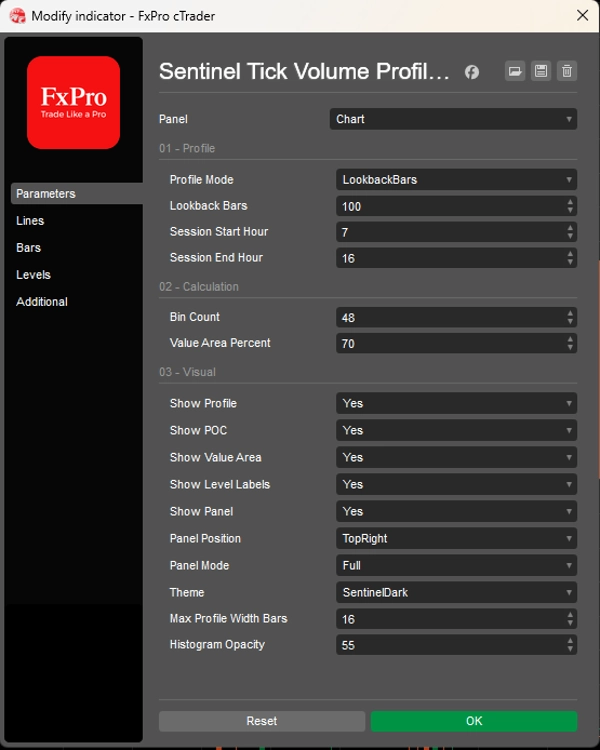
Sentinel Tick Volume Profile Free is a non-trading cTrader indicator that converts available chart tick-volume data into a visual price-distribution profile. It is designed to help manual traders understand where tick activity was concentrated within a selected chart range.

The indicator works in three main steps:

1. Select the Profile Range

The indicator first decides which bars should be included in the profile calculation.

There are two range modes:

Lookback Bars
Uses a fixed number of recent chart bars. For example, if Lookback Bars is set to 240, the indicator builds the profile from the most recent 240 bars available on the chart.

Current Session
Uses the configured Session Start Hour and Session End Hour. The session hours are interpreted using indicator chart times. The indicator can handle active sessions, completed sessions, previous sessions, and overnight sessions.

This range selection determines the price area and tick-volume sample used for the profile.

2. Build the Tick-Volume Profile

After the range is selected, the indicator divides the selected high-to-low price range into a configurable number of price bins.

Each bar’s broker tick volume is then allocated into the bins touched by that bar’s high-low range.

This creates an estimated tick-volume distribution by price level.

From this distribution, the indicator calculates:

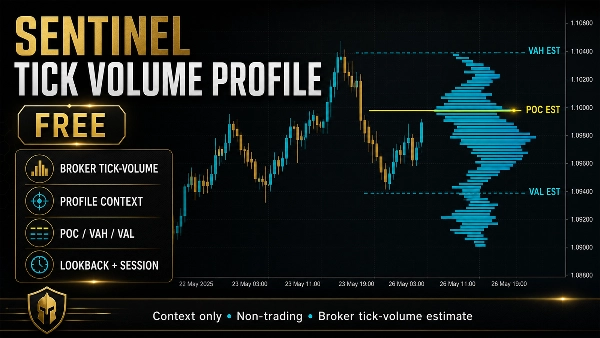
Estimated POC
The price bin with the highest broker tick-volume concentration.

Estimated VAH
The upper boundary of the estimated value area.

Estimated VAL
The lower boundary of the estimated value area.

Estimated Value Area
The area around the estimated POC that contains the selected percentage of total tick volume. The default value-area setting is 70%.

These values are estimates based on broker tick-volume data. They are not exchange-reported volume levels.

3. Display the Profile on the Chart

The indicator then displays the calculated profile as visual chart context.

It can show:

  • A tick-volume profile histogram
  • Estimated POC line
  • Estimated VAH line
  • Estimated VAL line
  • Value-area shading
  • Compact chart labels: POC est, VAH est, and VAL est
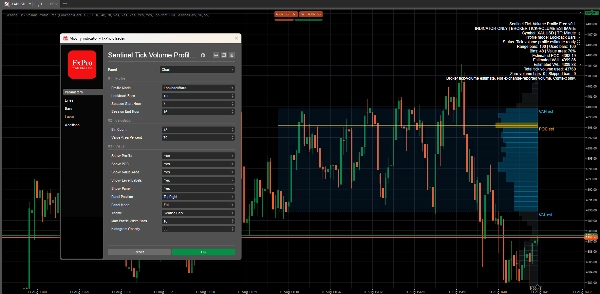
  • A panel summary with the selected profile mode, range details, bin count, estimated levels, total tick volume used, and limitation wording

The chart labels can be turned on or off. The profile, POC, value area, and panel can also be controlled separately.


PANEL MODES

The indicator includes three panel modes:

Full
Shows the most complete information, including range bars, used bars, bin count, value-area percentage, estimated POC, estimated VAH, estimated VAL, total tick volume used, zero-volume bars, skipped bars, and the broker tick-volume limitation.

Compact
Shows a shorter summary with the mode, bin count, status, estimated POC, and value-area range.

Minimal
Shows a very compact one-line status focused on the estimated POC and context-only limitation.


Important Data Limitation

Sentinel Tick Volume Profile Free uses broker tick-volume data from the chart. It does not use exchange-reported volume, futures volume, footprint data, delta, tape data, or institutional order-flow data.

The profile is therefore best understood as a broker tick-volume profile estimate.

Values may vary depending on the broker, symbol, timeframe, session, and available chart history.

What the Indicator Does Not Do

Sentinel Tick Volume Profile Free does not place orders, modify positions, close trades, manage trades, or control cBots.

It does not provide buy signals, sell signals, entry confirmation, trade instructions, market predictions, win-rate estimates, performance forecasts, or profitability claims.

It is a manual visual context tool only.

Summary

AI summary
Sentinel Tick Volume Profile (Free) is a non-trading indicator for the cTrader platform that visualizes broker tick-volume data as a price-distribution profile on the chart. It helps manual traders identify price levels with concentrated tick activity within a selected range. Users can choose between two profile range modes: a fixed number of recent bars (Lookback Bars) or a defined session period (Current Session) based on chart time.

The indicator divides the high-to-low price range of the selected bars into configurable price bins, allocating tick volume across these bins to estimate volume distribution by price level. It calculates key estimated levels including the Point of Control (POC)—the price bin with the highest tick volume concentration—along with the Value Area High (VAH), Value Area Low (VAL), and the Value Area itself, which by default covers 70% of total tick volume.

The profile is displayed visually on the chart with options to show a histogram, estimated POC, VAH, VAL lines, value-area shading, and compact labels. A panel provides summary information in three modes (Full, Compact, Minimal) detailing profile parameters and volume data. The indicator uses broker tick-volume data only and does not execute trades or provide trading signals. It serves as a manual visual tool to enhance market context understanding.
Indicator profile
Indicator category
Statistics
Output type
Visualisation
Data requirements
Bars only
Volume
Supported signals
Level touch

Customer reviews

0.0
Reviews: 0
Customer reviews
No reviews for this product yet. Already tried it? Be the first to tell others!

Discussion

FAQ

Key Levels
Volume
Products available through cTrader Store, including trading bots, indicators and plugins, are provided by third-party developers and made available for informational and technical access purposes only. cTrader Store is not a broker and does not provide investment advice, personal recommendations or any guarantee of future performance.

More from this author

Indicator
VWAP
Volume
+1
Free session VWAP with value bands, session highs/lows, and tick-volume context for intraday traders.
cBot
ADX
ATR
+5
SP500 M5 cBot focused on structured index setups, controlled fixed-lot risk and clean profile-based execution and profit
24.6%
ROI
10.65
Profit factor
cBot
ADX
EMA
+5
Gold-focused cTrader cBot with M10, M15 and H1 presets, configurable filters, risk controls and trade management.
41.3%
ROI
2.18
Profit factor
cBot
ATR
EMA
+5
Sentinel Sterling trades GBPUSD with presets, Custom mode, fixed lots, safety controls, and flexible settings.
9.6%
ROI
1.56
Profit factor
cBot
ATR
Fixed Lot
+5
Sentinel Pulse is a DAX cBot using momentum continuation filters, fixed-lot, rule-based exits, and fixed risk controls.
4.26
Profit factor
Indicator
ATR
Volume
+4
Advanced broker tick-volume profile with estimated POC, VAH/VAL, estimated HVN/LVN and session/lookback context.

You may also like

Indicator
MSS
Volume
+3
Rejection-based volume profile with tiered heat zones, POC levels and a fully draggable anchor on cTrader.
Indicator
ATR
RSI
+5
Supply and demand zones with break of structure, higher timeframe MA signals, a percent stop and three targets.
Indicator
RSI
Indices
Stochastic RSI (StochRSI) is a technical indicator used to measure the strength and weakness of the RSI.
Indicator
Forex
BTCUSD
+11
Catch High-Probability Reversals with Precision Swing
Indicator
Forex
BTCUSD
+4
The Linear Regression Oscillator (LRO) is a technical indicator based on linear regression analysis.
Indicator
Volume
Channel
+2
Identify key support and resistance levels through detailed volume distribution analysis.
Indicator
EMA
Forex
+5
ALMA Smoothed Gaussian Moving Average (ASGMA) – by LudwigICT
Indicator
ATR
RSI
+4
Adaptive Ichimoku with nine-factor confluence scoring, five signal types, smart TP/SL and an MTF panel.
Indicator
AI
Grid
+17
Clean 3D, Sleek Candles for Trend Patterns.
Indicator
ATR
RSI
+6
Adaptive trend channel using linear regression and Pearson correlation for dynamic support, resistance, and trends.
Indicator
ATR
Prop
+5
Anchor volume profiles to pivots with POC, VAH, VAL and real-time insights for clearer trade decisions.
Indicator
Designed to plot a future prediction channel based on Fibonacci retracement levels 📊
Indicator
Prop
Forex
+5
Tracks NY, London, Tokyo, Sydney sessions with custom visuals, and a real-time expanding range box and breakout High/Low
Indicator
BOS
CHOCH
+5
A professional-grade cTrader indicator for traders following the Inner Circle Trader (ICT) methodology.
Indicator
ATR
EMA
+3
EMA cross filtered by a trend average and its ATR channel, with long, short and close marks and colored candles.
Indicator
Prop
Forex
+4
Draws pivots (P, S/R, CPR) from selected anchors like H1–Month1, with optional mid-levels (PS1, S1S2, etc.)
Indicator
Signal
USDJPY
See USD demand in one line—Composite OBV fuses six major FX pairs into a clear momentum gauge.
Indicator
ATR
Flag
+5
Decision panel with Buy/Sell scores, market bias, setup quality, trading cost and clear trade reasons.

Price

Since 19/06/2026
1
Sales
387
Free installs