

HMA MTF 2.0
Индикатор
5 покупки
Версия 1.0, Mar 2025
Windows, Mac
4.2
Отзывы: 4

51
Продажи
1.46K
Бесплатные установки
Описание
HMA MTF (Мультивременной интервал) – Описание индикатора
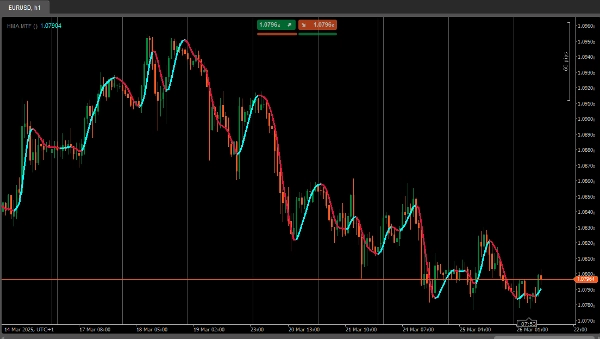
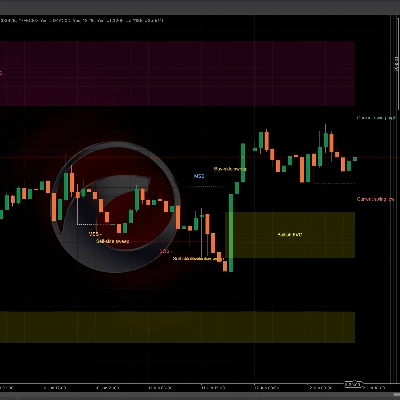
Индикатор HMAMTF отображает скользящую среднюю с более высокого или более низкого таймфрейма на вашем текущем графике и показывает её в двух цветных линиях, указывающих на бычий или медвежий импульс. Он использует встроенную функцию скользящей средней cTrader и определяет направление тренда, сравнивая текущее значение MA с предыдущим.
Параметры
- Таймфрейм (
TimeFrame, По умолчанию ="Hour4")
Определяет, данные какого таймфрейма (например, 4 часа, дневной, недельный) будут использоваться для расчёта скользящей средней. - Цена (
PriceType, По умолчанию =Close)
Указывает, какая цена (Закрытия, Открытия, Максимум или Минимум) используется для расчёта MA. - Период (
int, По умолчанию =14, Мин. значение =1)
Количество баров, учитываемых при расчёте скользящей средней. - Тип MA (
MovingAverageType, По умолчанию =Weighted)
Выбирает метод скользящей средней (например, Простая, Экспоненциальная, Сглаженная, Взвешенная), применяемый к выбранной серии цен.
Сводка
ИИ-сводка
HMA MTF 2.0 is a multi-timeframe indicator designed for use on the cTrader platform. It plots a moving average calculated from a user-selected higher or lower timeframe onto the current chart. The indicator displays two color-coded lines that represent bullish or bearish momentum by comparing the current moving average value to the previous one.
Key configurable parameters include:
1. Time Frame – selects the timeframe (e.g., 4-hour, daily, weekly) used for the moving average calculation.
2. Price – chooses the price type (Close, Open, High, or Low) applied in the moving average computation.
3. Period – defines the number of bars considered in the moving average.
4. MA Type – specifies the moving average method, such as Simple, Exponential, Smoothed, or Weighted.
This indicator supports multiple markets including Forex, Indices, Commodities, Crypto, and Stocks, providing a versatile tool for trend analysis across different asset classes.
Key configurable parameters include:
1. Time Frame – selects the timeframe (e.g., 4-hour, daily, weekly) used for the moving average calculation.
2. Price – chooses the price type (Close, Open, High, or Low) applied in the moving average computation.
3. Period – defines the number of bars considered in the moving average.
4. MA Type – specifies the moving average method, such as Simple, Exponential, Smoothed, or Weighted.
This indicator supports multiple markets including Forex, Indices, Commodities, Crypto, and Stocks, providing a versatile tool for trend analysis across different asset classes.
Профиль индикатора
Обсуждение
Отзывы покупателей
4.2
Отзывы: 4
5 | 25 % | |
4 | 75 % | |
3 | 0 % | |
2 | 0 % | |
1 | 0 % |
Отзывы покупателей
April 7, 2025
April 5, 2025
The main upside is the first look still needs context. Manual review still matters.
April 3, 2025
Not perfect, but the workflow felt cleaner. Bad settings can ruin the idea.
April 1, 2025
the part that matters is the workflow stays easier to manage, and M15 is enough for the first pass.
Частые вопросы
Prop
Forex
Indices
Commodities
Crypto
Stocks
Продукты, доступные в cTrader Store, включая торговых ботов, индикаторы и плагины, предоставляются сторонними разработчиками и доступны исключительно в информационных и технических целях. cTrader Store не является брокером и не предоставляет инвестиционные консультации, персональные рекомендации или какие-либо гарантии будущей доходности.






![Логотип продукта "[Stellar Strategies] Market Session Ultimate"](https://cdn.ctrader.com/image/webp/61ffd537-0125-4246-9e72-42eca1791d64_28232)


Цена
51
Продажи
1.46K
Бесплатные установки