
Mô tả
📌 Chỉ Báo Làm Gì
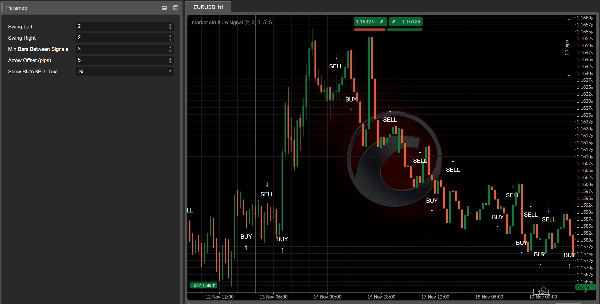
MarketStructureOscSignals là một công cụ tín hiệu thuần túy dựa trên hành động giá.
Nó:
- Phát hiện đỉnh và đáy dao động sử dụng lookback trái/phải.
- Theo dõi xem các dao động đó đang hình thành:
-
- Đỉnh cao hơn + Đáy cao hơn → Cấu trúc tăng
- Đỉnh thấp hơn + Đáy thấp hơn → Cấu trúc giảm
- Khi cấu trúc chuyển đổi:
-
- Từ giảm → tăng → nó vẽ một tín hiệu MUA
- Từ tăng → giảm → nó vẽ một tín hiệu BÁN
Vì vậy mỗi tín hiệu đại diện cho một thay đổi thực sự trong cấu trúc thị trường, không chỉ là một sự giao cắt trung bình động.
⚙️ Các Tham Số & Cách Cài Đặt
1. Swing Left / Swing Right
Chúng kiểm soát mức độ “nghiêm ngặt” của đỉnh/đáy dao động.
- Swing Left (mặc định 2)
Số thanh bên trái của dao động phải có đỉnh thấp hơn (cho đỉnh dao động) hoặc đáy cao hơn (cho đáy dao động). - Swing Right (mặc định 2)
Số thanh bên phải cũng phải xác nhận dao động.
Cách sử dụng:
- Giá trị nhỏ (1–2):
-
- Nhiều dao động hơn, nhiều tín hiệu hơn
- Hoạt động tốt trên khung thời gian cao hơn (H1, H4, D1)
- Giá trị lớn hơn (3–4+):
-
- Chỉ các điểm quay cấu trúc chính
- Ít tín hiệu nhưng mạnh hơn
- Tốt trên khung thời gian thấp hơn để tránh nhiễu
2. Min Bars Between Signals
Số thanh tối thiểu phải trôi qua giữa hai tín hiệu.
- Tránh tập trung các mũi tên trên mỗi đợt hồi nhỏ.
- Ví dụ:
-
- Đặt thành
3→ ít nhất 3 thanh giữa một tín hiệu và tín hiệu tiếp theo. - Trên biểu đồ rất nhanh (M1–M5) bạn có thể muốn
5–10. - Trên H1 hoặc cao hơn,
2–3thường là đủ.
- Đặt thành
3. Arrow Offset (pips)
Khoảng cách mũi tên và nhãn được đặt cách nến bao xa (tính bằng pip).
- Đối với Forex:
-
5–10pip thường trông đẹp.
- Đối với chỉ số (US500, US100, v.v.):
-
- Dùng offset lớn hơn (ví dụ 20–50 “pip” tùy kích thước pip của nhà môi giới).
Nếu mũi tên chồng lên nến, tăng giá trị này lên.
Nếu chúng quá xa, giảm nó xuống.
4. Show BUY/SELL Text
true→ hiển thị cả mũi tên (↑/↓) và chữ “BUY” hoặc “SELL”.false→ chỉ mũi tên.
Nếu biểu đồ cảm thấy lộn xộn, bạn có thể ẩn chữ và chỉ giữ lại mũi tên.
🔍 Cách Tín Hiệu Được Tạo Ra (Logic)
Bên trong chỉ báo:
- Theo dõi hai đỉnh dao động gần nhất và hai đáy dao động gần nhất:
-
_prevHigh,_lastHigh_prevLow,_lastLow
- Từ đó kiểm tra:
-
- Đỉnh và đáy có đều tăng lên không?
-
- → Xu hướng tăng (
StructureTrendSignal.Bullish)
- → Xu hướng tăng (
- Đỉnh và đáy có đều giảm xuống không?
-
- → Xu hướng giảm (
StructureTrendSignal.Bearish)
- → Xu hướng giảm (
- Nếu không đồng nhất, xu hướng trước đó được giữ lại.
- Mỗi khi xu hướng cấu trúc thay đổi:
-
Giảm → Tăng→ tín hiệu MUATăng → Giảm→ tín hiệu BÁN
- Nó cũng đảm bảo:
-
- Xu hướng không phải là
Unknown(không phải lúc bắt đầu). - Đủ số thanh đã trôi qua kể từ tín hiệu cuối cùng (
MinBarsBetweenSignals).
- Xu hướng không phải là
Điều này có nghĩa mỗi mũi tên đánh dấu một sự chuyển đổi cấu trúc thực sự, không phải nhiễu ngẫu nhiên.
📈 Cách Đọc Tín Hiệu MUA/BÁN Trên Biểu Đồ
✅ Tín Hiệu MUA
Bạn thấy gì:
- Một mũi tên lên
↑dưới nến - Tùy chọn chữ “BUY” gần mũi tên
Ý nghĩa:
- Cấu trúc thay đổi từ giảm → tăng.
- Đỉnh và đáy dao động gần đây giờ đều đang tăng.
- Thị trường có khả năng chuyển sang xu hướng tăng mới hoặc tiếp tục cấu trúc tăng.
Cách sử dụng:
- Tìm điểm vào lệnh mua dài:
-
- Trên nến tín hiệu hoặc vài nến tiếp theo.
- Tốt nhất là sau một đợt hồi nhỏ về mức hỗ trợ (đáy dao động trước, vùng cầu, VWAP, VA low, v.v.).
- Dùng các công cụ như Kalman Trend / EMA / Volume Profile để lọc:
-
- Chỉ mua khi khung thời gian cao hơn hoặc Kalman cũng đang tăng.
✅ Tín Hiệu BÁN
Bạn thấy gì:
- Một mũi tên xuống
↓trên nến - Tùy chọn chữ “SELL”
Ý nghĩa:
- Cấu trúc thay đổi từ tăng → giảm.
- Đỉnh và đáy dao động giờ đều đang giảm.
- Thị trường có khả năng bước vào xu hướng giảm hoặc tiếp tục cấu trúc giảm.
Cách sử dụng:
- Tìm điểm vào lệnh bán ngắn:
-
- Trên nến tín hiệu hoặc các nến tiếp theo gần kháng cự.
- Lý tưởng sau khi retest hỗ trợ bị phá (nay là kháng cự), VAH, vùng cung, v.v.
🎯 Các Ứng Dụng Thực Tiễn Trong Giao Dịch
1. Là Công Cụ Vào Lệnh Độc Lập
Bộ quy tắc đơn giản:
- Thiết lập Mua
-
- Chờ một mũi tên MUA.
- Đặt lệnh mua dài tại/gần nến tín hiệu.
- Dừng lỗ dưới đáy dao động gần nhất.
- Mục tiêu là đỉnh dao động trước hoặc kháng cự chính.
- Thiết lập Bán
-
- Chờ một mũi tên BÁN.
- Đặt lệnh bán ngắn tại/gần nến tín hiệu.
- Dừng lỗ trên đỉnh dao động gần nhất.
- Mục tiêu là đáy dao động trước hoặc hỗ trợ chính.
Đây là cách sử dụng cơ bản nhất và hoạt động tốt nhất trên H1, H4 và D1, nơi cấu trúc rõ ràng hơn.
2. Là Công Cụ Xác Nhận Với Các Chỉ Báo Khác Của Bạn
Đây là lúc nó trở nên mạnh mẽ.
🔹 Với Kalman Filter Trend
- Chỉ nhận tín hiệu MUA khi:
-
- Xu hướng Kalman dốc lên và giá ở trên hoặc bằng đường Kalman.
- Chỉ nhận tín hiệu BÁN khi:
-
- Xu hướng Kalman dốc xuống và giá ở dưới hoặc bằng đường Kalman.
Hiệu quả:
Kalman cung cấp cho bạn một xu hướng mượt mà, MarketStructureOscSignals cung cấp cho bạn các chuyển đổi cấu trúc chính xác. Cùng nhau chúng lọc ra nhiều giao dịch xấu.
🔹 Với Volume Profile / Hỗ Trợ & Kháng Cự
- MUA mạnh:
-
- Mũi tên MUA xuất hiện gần VA Low, đáy dao động trước hoặc quét thanh khoản, kèm từ chối.
- BÁN mạnh:
-
- Mũi tên BÁN xuất hiện gần VA High, đỉnh dao động trước hoặc quét thanh khoản ở trên cùng.
Ở đây tín hiệu không chỉ là một mô hình kỹ thuật mà còn được neo vào các vùng thanh khoản và dòng lệnh.
3. Dùng Để Tăng/ Giảm Vị Thế
Bạn cũng có thể dùng tín hiệu mới như:
- Điểm Tăng Vị Thế
Thêm vào vị thế khi tín hiệu mới xuất hiện cùng chiều với giao dịch hiện tại của bạn và khung thời gian cao hơn đồng thuận. - Thoát Sớm / Thoát Một Phần
Nếu bạn đang mua và có một tín hiệu BÁN ngược chiều (đặc biệt gần cấu trúc quan trọng), bạn có thể: -
- Đóng một phần vị thế
- Hoặc siết chặt điểm dừng
🧪 Cài Đặt Khởi Đầu Đề Xuất
Cho Forex H1 / H4:
Swing Left = 2Swing Right = 2Min Bars Between Signals = 3Arrow Offset = 5–10 pips
Cho Chỉ số M15 / H1:
Swing Left = 2–3Swing Right = 2–3Min Bars Between Signals = 5Arrow Offsetđiều chỉnh theo ký hiệu (ví dụ 20–50 “pip” tùy nhà môi giới)
Cho Crypto H1 / H4:
- Dao động cao hơn một chút để lọc nhiễu:
-
Swing Left = 3Swing Right = 3Min Bars Between Signals = 4–6
Luôn kiểm tra lại với công cụ và khung thời gian bạn ưa thích để tinh chỉnh Swing và MinBarsBetweenSignals.
Tóm tắt
The indicator provides visual signals as arrows and optional text on the chart, marking significant structural shifts rather than simple moving average crossovers. Users can adjust parameters such as swing strictness, minimum bars between signals to avoid clustering, arrow offset for display clarity, and whether to show BUY/SELL text.
Market Strutture Signal Pro supports multiple markets including Forex, indices, commodities, stocks, and cryptocurrencies, with recommended settings tailored for different timeframes and asset classes. It can be used as a standalone entry tool or combined with other indicators like Kalman Filter Trend and Volume Profile to enhance trade confirmation and filtering. The indicator also supports scaling in/out strategies based on structural shifts.
This tool is suitable for traders focusing on higher timeframes (H1, H4, D1) for cleaner structure signals and can be fine-tuned through backtesting for specific instruments and timeframes.
Đánh giá của khách hàng
5 | 50 % | |
4 | 50 % | |
3 | 0 % | |
2 | 0 % | |
1 | 0 % |