

HMA MTF 2.0
Chỉ báo
5 lượt mua
Phiên bản 1.0, Mar 2025
Windows, Mac
4.2
Đánh giá: 4

51
Lượt bán
1.41K
Cài đặt miễn phí
Mô tả
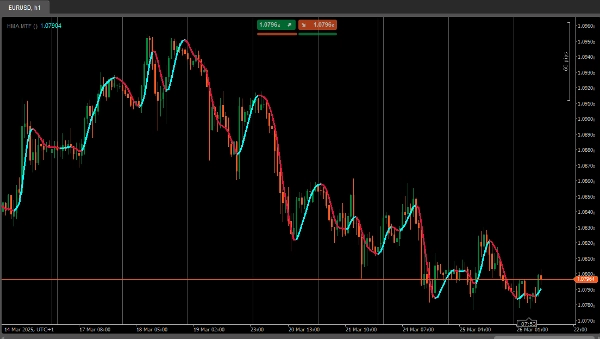
HMA MTF (Multi-Timeframe ) – Mô tả chỉ báo
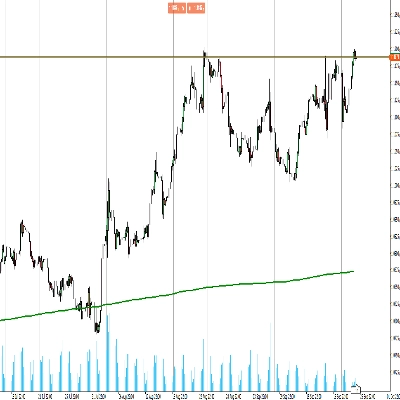
Chỉ báo HMAMTF vẽ một đường trung bình động từ khung thời gian cao hơn hoặc thấp hơn lên biểu đồ hiện tại của bạn và hiển thị nó dưới dạng hai đường màu, biểu thị xu hướng tăng hoặc giảm. Nó sử dụng chức năng Trung bình Động tích hợp của cTrader và tính toán xem xu hướng đang tăng hay giảm bằng cách so sánh giá trị MA hiện tại với giá trị trước đó.
Tham số
- Khung thời gian (
TimeFrame, Mặc định ="Hour4")
Xác định dữ liệu của khung thời gian nào (ví dụ: 4 giờ, hàng ngày, hàng tuần) sẽ được sử dụng để tính trung bình động. - Giá (
PriceType, Mặc định =Close)
Chỉ định giá nào (Đóng, Mở, Cao, hoặc Thấp) được sử dụng để tính toán MA. - Chu kỳ (
int, Mặc định =14, Giá trị tối thiểu =1)
Số thanh được xem xét trong phép tính trung bình động. - Loại MA (
MovingAverageType, Mặc định =Weighted)
Chọn phương pháp trung bình động (ví dụ: Đơn giản, Lũy thừa, Mượt, Có trọng số) áp dụng cho chuỗi giá đã chọn.
Tóm tắt
AI summary
HMA MTF 2.0 is a multi-timeframe indicator designed for use on the cTrader platform. It plots a moving average calculated from a user-selected higher or lower timeframe onto the current chart. The indicator displays two color-coded lines that represent bullish or bearish momentum by comparing the current moving average value to the previous one.
Key configurable parameters include:
1. Time Frame – selects the timeframe (e.g., 4-hour, daily, weekly) used for the moving average calculation.
2. Price – chooses the price type (Close, Open, High, or Low) applied in the moving average computation.
3. Period – defines the number of bars considered in the moving average.
4. MA Type – specifies the moving average method, such as Simple, Exponential, Smoothed, or Weighted.
This indicator supports multiple markets including Forex, Indices, Commodities, Crypto, and Stocks, providing a versatile tool for trend analysis across different asset classes.
Key configurable parameters include:
1. Time Frame – selects the timeframe (e.g., 4-hour, daily, weekly) used for the moving average calculation.
2. Price – chooses the price type (Close, Open, High, or Low) applied in the moving average computation.
3. Period – defines the number of bars considered in the moving average.
4. MA Type – specifies the moving average method, such as Simple, Exponential, Smoothed, or Weighted.
This indicator supports multiple markets including Forex, Indices, Commodities, Crypto, and Stocks, providing a versatile tool for trend analysis across different asset classes.
Hồ sơ chỉ báo
Đánh giá của khách hàng
4.2
Đánh giá: 4
5 | 25 % | |
4 | 75 % | |
3 | 0 % | |
2 | 0 % | |
1 | 0 % |
Đánh giá của khách hàng
April 7, 2025
April 5, 2025
The main upside is the first look still needs context. Manual review still matters.
April 3, 2025
Not perfect, but the workflow felt cleaner. Bad settings can ruin the idea.
April 1, 2025
the part that matters is the workflow stays easier to manage, and M15 is enough for the first pass.
Thảo luận
Câu hỏi thường gặp
Prop
Forex
Indices
Commodities
Crypto
Stocks
Các sản phẩm có sẵn trên cTrader Store, bao gồm bot giao dịch, chỉ báo và plugin, được cung cấp bởi các nhà phát triển bên thứ ba và chỉ nhằm mục đích cung cấp thông tin và tiếp cận kỹ thuật. cTrader Store không phải là nhà môi giới và không cung cấp lời khuyên đầu tư, khuyến nghị cá nhân hay bất kỳ đảm bảo nào về hiệu suất trong tương lai.
















Giá
51
Lượt bán
1.41K
Cài đặt miễn phí