
Açıklama
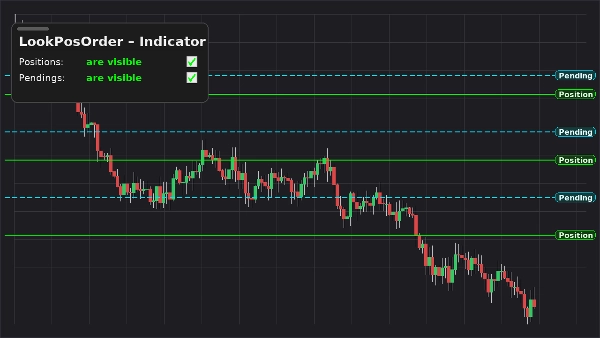
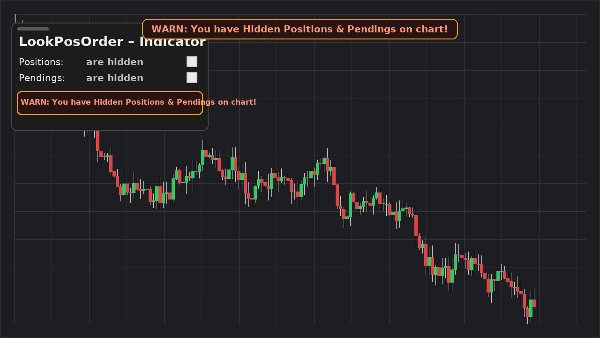
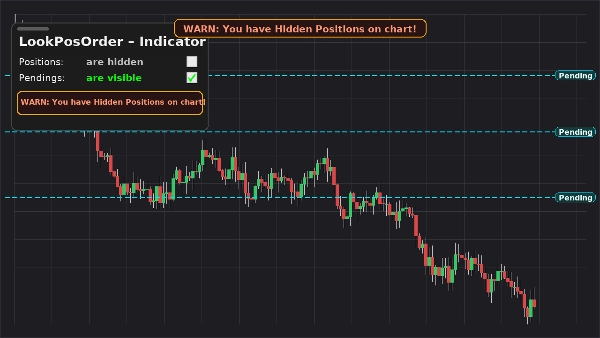
LookPosOrder (Gösterge) sizi güvende ve hızlı tutar: grafiğinizde yüzen, sürüklenebilir bir panel ekler ve Pozisyonları ve Bekleyen Emirleri gösterip gizlemenizi sağlar—ve sabit, üst-orta uyarı bandı yükseltir, mevcut sembol için gizli öğeler varsa.
Ne yapar
- Grafikte panel iki açma/kapama düğmesi ile:
-
- Pozisyonlar: görünür / gizli
- Bekleyenler: görünür / gizli
- Sabit grafikte uyarı (kaydırma/zoom yaparken hareket etmez) gizli öğeler varsa.
- Aynı satır içi uyarı panel içinde.
- Sembol başına farkındalık: yalnızca aktif sembolde gizli öğeler varsa uyarır.
- Tercihlerinizi sembol bazında hatırlar.
Tüccarların neden sevdiği
- Hatalardan kaçının: gizlediğiniz emirleri/pozisyonları unutmayın.
- Anında açma/kapama: grafik menülerinde gezinmeye son.
- Temiz kaplama: sürüklenebilir, kompakt ve duyarlı.
Ana Özellikler
- Grafikte, sürüklenebilir kontrol paneli
- Tek tıklamayla açma/kapama için Pozisyonlar ve Bekleyen Emirler
- Sabit gizli öğeler varsa uyarı bandı
- Panel içinde satır içi uyarı
- Sembol başına farkındalık
- Yerel Görüntü Ayarları ile birlikte çalışır (başka yerde değiştirirseniz otomatik senkronize olur)
Gereksinimler
- cTrader 5.4.9 veya daha yeni önerilir
- Masaüstü platform
Kurulum
- Gösterge dosyasını indirin.
- cTrader’ı açın → Otomatize Et → Göstergeler → İçe Aktar.
- LookPosOrder – Gösterge’yi grafiğinize (kaplama) ekleyin.
- Paneli istediğiniz yere sürükleyin; görünürlüğü yönetmek için iki onay kutusunu kullanın.
Nasıl Kullanılır
- Yüzen panelden Pozisyonlar ve Bekleyenler açma/kapama yapın.
- Mevcut sembol için gizli ve öğeler varsa, uyarılar görünür:
-
- “UYARI: Grafikte Gizli Pozisyonlarınız Var!”
- “UYARI: Grafikte Gizli Bekleyen Emirleriniz Var!”
- “UYARI: Grafikte Gizli Pozisyonlar ve Bekleyen Emirleriniz Var!”
- Uyarı bandı sabit olarak üst ortada yer alır. Gerekirse aşağı taşımak için gösterge parametresi “Y offset Uyarı Metni” kullanın.
SSS
S: Emirlerimi/pozisyonlarımı değiştirir mi?
C: Hayır. Sadece grafik görünürlüğünü (yerel Görüntü Ayarları) açıp kapatır.
S: Diğer semboller için uyarı verir mi?
C: Hayır. Uyarılar sadece mevcut sembolde gizli öğeler varsa görünür.
S: Grafik menüsünden görünürlüğü değiştirirsem ne olur?
C: Gösterge paneli ve uyarıları otomatik senkronize eder.
S: Performans etkisi nedir?
C: Minimum—hafif kaplama ve sembol başına kontroller.
Destek & İade
- Açıklanan şekilde çalışmazsa 14 gün para iade garantisi.
Özet
Müşteri değerlendirmeleri
5 | 33 % | |
4 | 67 % | |
3 | 0 % | |
2 | 0 % | |
1 | 0 % |