Deskripsi
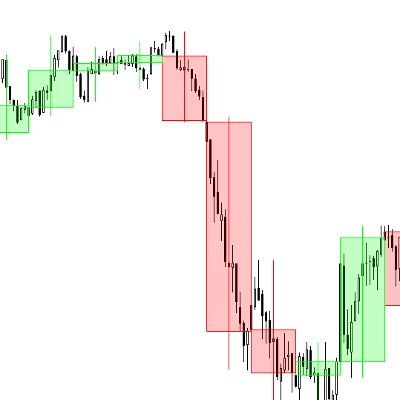
Tujuan dari algoritma cTrader indikator Boxify ini adalah untuk mencoba memasukkan aksi harga ke dalam zona, atau lebih tepatnya, kotak. Dengan cara ini, trader dapat memperoleh keunggulan pada posisi tradingnya. Ini bukan indikator yang dapat berdiri sendiri, melainkan alat yang bagus yang dapat melengkapi strategi atau setup trading apa pun.
Mendeteksi pergerakan menyamping dapat membantu trader mengamankan keuntungan, memotong kerugian, atau menempatkan order limit yang menguntungkan. Berikut beberapa cara kita dapat menggunakan kotak:
Mendeteksi area konsolidasi
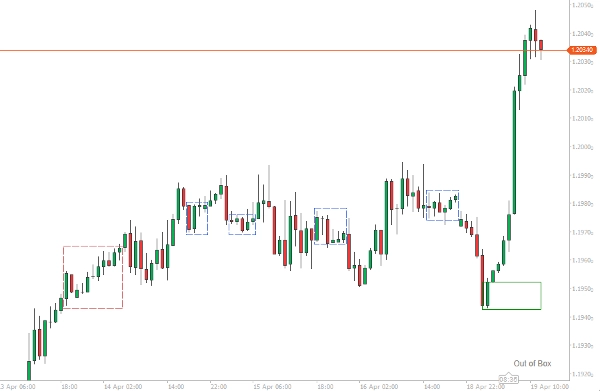
Untuk kotak-kotak masa lalu yang berisi beberapa bar di dalamnya, kita dapat dengan aman mengasumsikan bahwa ini adalah area konsolidasi dan bahwa kita memiliki pergerakan menyamping. Area ini dapat berfungsi sebagai level support atau resistance dalam analisis aksi harga Anda.
Menempatkan perdagangan Anda dengan lebih baik
Jika Anda memiliki setup untuk perdagangan dan Anda melihat harga membentuk kotak, Anda selalu dapat menggunakan kotak tersebut sebagai panduan untuk aksi harga, agar mendapatkan posisi yang lebih menguntungkan untuk perdagangan Anda. Kotak yang sedang terbentuk saat ini dapat digunakan untuk mengamankan beberapa keuntungan pada posisi yang menang, masuk kembali ke pasar yang sedang tren, atau menempatkan stop loss.
Menempatkan order limit
Pergerakan menyamping yang panjang pada akhirnya akan mengarah ke breakout. Boxify dapat membantu Anda menempatkan order limit, di atas atau di bawah, untuk mendapatkan hasil maksimal dari awal breakout.
Opsi indikator
Indikator akan mencoba membentuk kotak harga dari minimal 2 bar ke atas. Pesan dari indikator akan muncul di sudut kanan bawah area grafik.
- Jika harga sedang tren, pesan “Out of Box” akan muncul.
- Jika harga sedang membentuk kotak, pesan “Boxing” akan muncul.
- Jika harga sedang membentuk kotak dan harga menembus batas atas, “Breaking High” akan muncul.
- Jika harga sedang membentuk kotak dan harga menembus batas bawah, “Breaking Low” akan muncul.
Kotak dianggap selesai saat bar baru dibuka, karena harga selalu dapat menarik kembali ke dalam kotak.
Minimum Bar untuk Kotak
Angka ini mewakili jumlah minimum bar yang harus dimiliki sebuah kotak agar dianggap selesai. Gunakan angka yang lebih rendah untuk titik masuk, dan angka yang lebih tinggi untuk area konsolidasi.
Filter ATR
Boxify memiliki indikator ATR internal, yang dapat Anda gunakan sebagai opsi penyaringan, jika Anda ingin menghentikan pembentukan kotak pada bar mana pun yang panjangnya (High-Low) melebihi nilai ATR. Gunakan opsi ini jika Anda ingin masuk perdagangan.
Gabungkan Tumpang Tindih
Awal sebuah kotak dapat dimulai sebelum kotak sebelumnya berakhir (terutama jika kita memilih angka yang sangat rendah untuk panjang kotak). Kita dapat menggabungkan kotak-kotak ini dengan opsi ini, sehingga kita dapat melihat kotak yang lebih besar terbentuk – Kotak-kotak ini akan memiliki batas berwarna biru.
Toleransi
Sebuah angka yang mencerminkan toleransi yang dapat dimiliki batas atas/bawah kotak. Angka kecil harus digunakan ketika kita ingin masuk perdagangan, angka yang lebih besar harus digunakan ketika kita ingin menemukan area konsolidasi.
Ringkasan
Key features include:
- Detection of price boxing with messages displayed on the chart indicating states such as “Boxing,” “Out of Box,” “Breaking High,” and “Breaking Low.”
- Configurable minimum bars per box to differentiate between entry points and consolidation zones.
- An internal Average True Range (ATR) filter to exclude bars exceeding volatility thresholds from box formation.
- Option to merge overlapping boxes to form larger zones, visually distinguished by blue borders.
- Adjustable tolerance for box boundary limits to fine-tune sensitivity for trade entries or consolidation identification.
Boxify complements existing trading strategies by providing visual zones that enhance decision-making across Forex, indices, commodities, and cryptocurrencies.
Ulasan pelanggan
5 | 50 % | |
4 | 50 % | |
3 | 0 % | |
2 | 0 % | |
1 | 0 % |







![Logo "[Stellar Strategies] MARSI Signal Plotter"](https://cdn.ctrader.com/image/webp/7b2b8da6-8f8e-4646-8d4a-4710c516c01e_25567)