
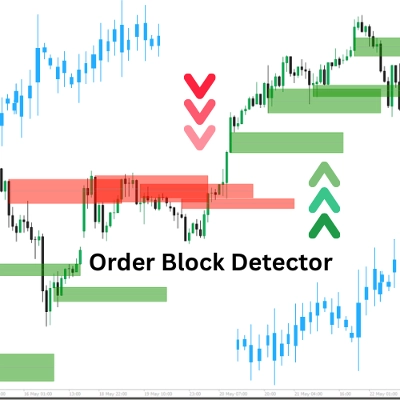
Order Block Finder
Indicator
2.22K downloads
Version 1.0, May 2025
Windows, Mac
5.0
Reviews: 2
90.06M
Traded volume
2.83M
Pips won
4.12K
Free installs
Description
The "Order Block Detector" indicator is built to spot and display Order Blocks (OBs) on the price chart—key zones where big players (institutions) place significant buy or sell orders, often triggering strong price reactions. It helps traders pinpoint potential support/resistance zones for smarter trade entries, stop-losses, or take-profits.
Concept
- Order Blocks: These are price zones where the market reverses or pauses due to heavy institutional order flow. The indicator detects OBs by analyzing volume pivot highs and market state (bullish/bearish).
- How it works:
- Determines market state (bullish/bearish) by comparing highs/lows to a lookback period (Length).
- Identifies OBs at volume peaks tied to key price levels.
- Draws rectangles and average lines to mark OBs, while checking and removing mitigated OBs when price breaks through.
- Use case: Traders can use OBs as high-probability zones for trade setups, risk management, or profit targets.
Parameter Breakdown
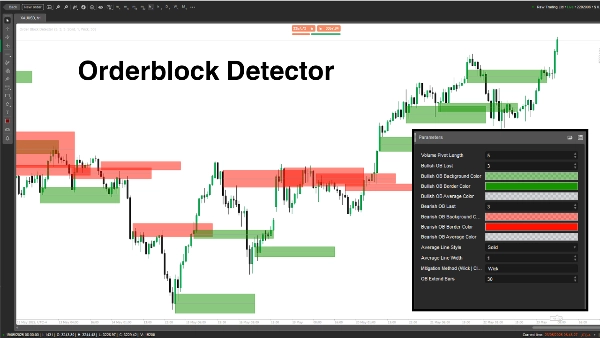
- Volume Pivot Length (Length, Default: 5, Min: 1)
- What it does: Sets the lookback period (number of bars) for calculating highs/lows and volume pivot highs.
- Why it matters: A longer length increases accuracy but reduces OB frequency; shorter length catches more OBs but may include noise.
- Bullish OB Last (BullExtLast, Default: 3, Min: 1)
- What it does: Limits the number of bullish OBs stored and tracked.
- Why it matters: Caps the number of displayed bullish OBs to keep the chart clean and optimize performance.
- Bullish OB Background Color (BgBullCss, Default: #80169400)
- What it does: Sets the background color and transparency of bullish OB rectangles.
- Why it matters: Helps visually distinguish bullish OBs on the chart.
- Bullish OB Border Color (BullCss, Default: #169400)
- What it does: Defines the border color of bullish OB rectangles.
- Why it matters: Enhances visibility of bullish OB zones.
- Bullish OB Average Color (BullAvgCss, Default: #609598A1)
- What it does: Colors the average line within bullish OBs.
- Why it matters: Marks the midpoint of the OB, serving as a key reference level for traders.
- Bearish OB Last (BearExtLast, Default: 3, Min: 1)
- What it does: Limits the number of bearish OBs stored and tracked.
- Why it matters: Like BullExtLast, keeps the chart uncluttered by capping bearish OBs.
- Bearish OB Background Color (BgBearCss, Default: #80FF1100)
- What it does: Sets the background color and transparency of bearish OB rectangles.
- Why it matters: Differentiates bearish OBs from bullish ones.
- Bearish OB Border Color (BearCss, Default: #FF1100)
- What it does: Defines the border color of bearish OB rectangles.
- Why it matters: Makes bearish OBs stand out for quick identification.
- Bearish OB Average Color (BearAvgCss, Default: #609598A1)
- What it does: Colors the average line within bearish OBs.
- Why it matters: Highlights the central price level of bearish OBs for trade planning.
- Average Line Style (LineStyle, Default: Solid)
- What it does: Sets the style of the OB average line (Solid, Dashed, Dotted).
- Why it matters: Customizes the look of the average line to suit trader preferences.
- Average Line Width (LineWidth, Default: 1, Min: 1)
- What it does: Adjusts the thickness of the OB average line.
- Why it matters: Controls how prominent the average line appears on the chart.
- Mitigation Method (Mitigation, Default: "Wick")
- What it does: Defines how OBs are invalidated:
- Wick: Uses the lowest price (bullish OB) or highest price (bearish OB) to check for mitigation.
- Close: Uses the closing price to check for mitigation.
- Why it matters: Affects how sensitive the indicator is to price breaking OB zones, impacting when OBs are removed.
The Order Block Detector is a powerful tool for spotting institutional order zones based on volume spikes and price action. It draws clear OB rectangles with average lines and removes invalidated ones dynamically. Traders can tweak parameters to fine-tune detection, display, and management of OBs to match their trading style.
Summary
AI summary
Order Block Finder is an indicator designed to identify and display Order Blocks (OBs) on price charts. Order Blocks represent key price zones where institutional traders place significant buy or sell orders, often causing notable price reactions. This tool helps traders locate potential support and resistance areas for improved trade entries, stop-loss placements, and take-profit targets.
The indicator works by analyzing volume pivot highs and determining market state (bullish or bearish) based on highs and lows over a configurable lookback period. It marks OBs with rectangles and average lines, dynamically removing those invalidated when price breaks through the zones. Users can customize parameters such as the lookback length, the number of bullish and bearish OBs tracked, colors and styles of OB rectangles and average lines, and the method used to detect OB mitigation (using wick or close prices).
This flexibility allows traders to tailor the detection and visualization of Order Blocks to their trading style, aiding in identifying high-probability zones for trade setups, risk management, and profit targeting.
The indicator works by analyzing volume pivot highs and determining market state (bullish or bearish) based on highs and lows over a configurable lookback period. It marks OBs with rectangles and average lines, dynamically removing those invalidated when price breaks through the zones. Users can customize parameters such as the lookback length, the number of bullish and bearish OBs tracked, colors and styles of OB rectangles and average lines, and the method used to detect OB mitigation (using wick or close prices).
This flexibility allows traders to tailor the detection and visualization of Order Blocks to their trading style, aiding in identifying high-probability zones for trade setups, risk management, and profit targeting.
Indicator profile
Customer reviews
5.0
Reviews: 2
5 | 100 % | |
4 | 0 % | |
3 | 0 % | |
2 | 0 % | |
1 | 0 % |
Customer reviews
December 18, 2025
THIS IS BY FAR THE BEST TOOL for OB's - as a beginner I can visually see where I am and Where I need to go - THANK YOU SO MUCH
August 12, 2025
Pros: Automatically identifies bullish and bearish order blocks based on swing breakouts with clear zones. Useful for visual SMC analysis. Cons: No alerts or tooltips. Lacks template saving and volume confirmation features. Slight delay under heavy chart load.
Discussion
FAQ
Products available through cTrader Store, including trading bots, indicators and plugins, are provided by third-party developers and made available for informational and technical access purposes only. cTrader Store is not a broker and does not provide investment advice, personal recommendations or any guarantee of future performance.
More from this author









Price
90.06M
Traded volume
2.83M
Pips won
4.12K
Free installs