Описание
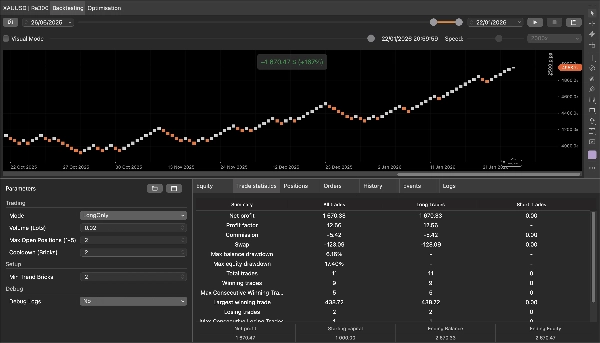
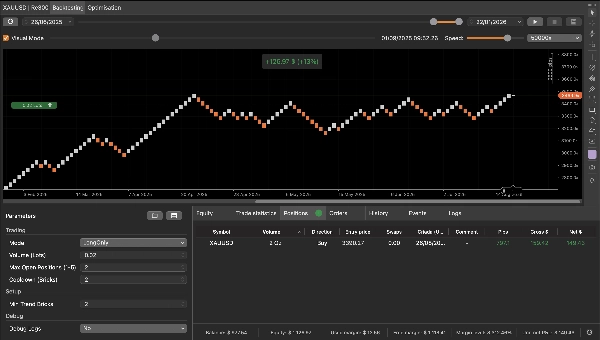
QX Renko 3Plus (Бесплатный | Образовательный Renko-бот)
Этот робот начался с простой просьбы: друг хотел на практике понять, как cBot может обнаруживать сигналы и выполнять входы/выходы на Renko графике. Я создал короткую, чистую, легко проверяемую логику специально для образовательных целей. Теперь я публикую эту бесплатную версию в cTrader Store по той же причине: чтобы помочь вам изучить Renko и показать свою работу как разработчика.
Что он делает (в одной строке)
Он ищет короткий тренд (3+ кирпича одного цвета), ждет ровно 1 откатный кирпич и входит на продолжении кирпича; выходит на первом противоположном кирпиче.
Как это работает на Renko (шаг за шагом)
1) Обнаружение серии тренда
- На каждом закрытом кирпиче бот проверяет, является ли кирпич ВВЕРХ или ВНИЗ.
- Он считает последовательные кирпичи в одном направлении.
- Когда достигается Минимальное количество кирпичей тренда (по умолчанию: 3), он активирует сигнал в этом направлении.
Пример (бычий): ВВЕРХ, ВВЕРХ, ВВЕРХ → сигнал активирован для покупки.
2) Откат обязателен (ИМЕННО 1 кирпич)
После активации:
- Бот требует **один — и только один —** кирпич в противоположном направлении (откат).
- Если появляется 2 или более откатных кирпичей, сигнал отменяется и бот снова ждет новую последовательность из 3+ кирпичей.
Пример (бычий): ВВЕРХ, ВВЕРХ, ВВЕРХ (активирован) → ВНИЗ (откат = 1) ✅
Если становится ВНИЗ, ВНИЗ (откат > 1) ❌ отменено.
3) Вход на продолжении
- После одного откатного кирпича следующий должен вернуться в активированное направление (продолжение).
- Когда этот кирпич продолжения закрывается, бот выполняет вход на рынок.
Пример (бычий): ВВЕРХ, ВВЕРХ, ВВЕРХ (активирован) → ВНИЗ (откат) → ВВЕРХ (продолжение) → ВХОД В ПОКУПКУ
5) Простое образовательное правило выхода
- Если кирпич закрывается против открытого направления, бот закрывает позиции по этой стороне:
-
- Кирпич ВНИЗ закрывает позиции ПОКУПКИ.
- Кирпич ВВЕРХ закрывает позиции ПРОДАЖИ.
Это сделано намеренно просто, чтобы вы могли ясно видеть, как работают выходы «первого противоположного» на Renko.
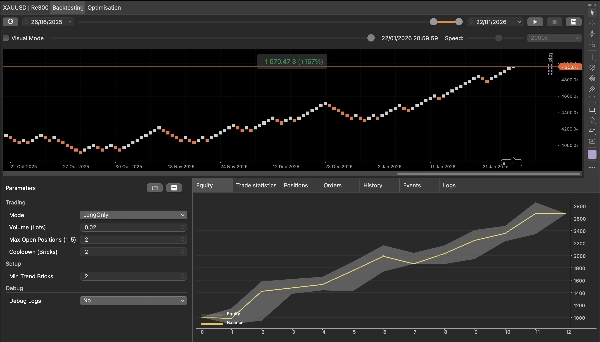
Основные параметры
Торговля
- Режим: Оба / Только длинные / Только короткие
- Объем (лоты): размер ордера в лотах
- Максимум открытых позиций: максимальное количество одновременных позиций (с одинаковой меткой)
- Пауза (кирпичи): минимальное количество кирпичей между входами в одном направлении
Сигнал
- Минимальное количество кирпичей тренда: минимальное количество последовательных кирпичей для активации сигнала
Отладка
- Отладочные логи: включает подробные логи, показывающие активацию, подсчет откатов, отмены, блокировки и входы.
Важные заметки (используйте правильно)
- Используйте на Renko-графике. Размер кирпича определяется настройками вашего графика.
- Бот действует только на закрытых кирпичах (избегает сигналов, пока кирпич формируется).
- Это образовательный инструмент: логика намеренно минимальна для обучения и проверки.
- Не является финансовой рекомендацией. Всегда тестируйте на демо/бэктестах перед реальной торговлей.
Для кого это
- Для всех, кто изучает Renko и паттерны продолжения тренда.
- Трейдеров, которые хотят чистый пример установки с конечным автоматом (активирован → откат → продолжение).
- Разработчиков, которым нужна простая, безопасная для компиляции эталонная реализация.
Сводка
The bot operates exclusively on closed bricks to avoid premature signals and includes configurable parameters such as trading mode (both long and short, long only, or short only), order volume, maximum open positions, cooldown period between entries, and minimum trend bricks to arm setups. Debug logs can be enabled to track the bot’s decision-making process, including arming, pullback counting, cancellations, and entries.
QX Renko 3 Plus serves as a practical tool for traders learning Renko chart automation, developers seeking a clean, compile-safe example of a state-machine setup, and anyone interested in understanding trend continuation strategies on Renko charts. It supports various markets including forex, indices, commodities, and cryptocurrencies, as indicated by its relevant tags.
Отзывы покупателей
5 | 0 % | |
4 | 100 % | |
3 | 0 % | |
2 | 0 % | |
1 | 0 % |