
คำอธิบาย
✅ UATKit มีให้ใช้ฟรีในฐานะการสนับสนุนด้วยความปรารถนาดีต่อชุมชน cTrader สร้างขึ้นโดยเทรดเดอร์มืออาชีพที่เข้าใจความท้าทายในแต่ละวันของการวิเคราะห์กราฟและการดำเนินการ
⚠️โปรดตรวจสอบหน้าผลิตภัณฑ์เป็นระยะสำหรับการอัปเดต เนื่องจาก cTrader จะไม่แจ้งเตือนผู้ใช้เมื่อมีการปล่อยเวอร์ชันใหม่ของตัวชี้วัด
⭐️ ฉันยินดีรับความคิดเห็นและข้อเสนอแนะของคุณในCustomer Reviews และ Discussion sections.
1. ผลิตภัณฑ์นี้คืออะไร
ชุดเครื่องมือเพิ่มประสิทธิภาพการทำงานที่ครอบคลุม ออกแบบมาเพื่อให้การวาดกราฟบน cTrader ราบรื่น ชัดเจน และมีประสิทธิภาพมากขึ้น
Universal Assistant Toolkit (UATKit) คือเครื่องมือเสริมข้างกราฟที่มีฟีเจอร์หลากหลายสำหรับ cTrader
รวบรวมเครื่องมือที่ใช้งานได้จริงหลายอย่าง - แต่ละอย่างออกแบบมาเพื่อแก้ปัญหาการทำงานเฉพาะ - ไว้ในตัวชี้วัดเดียวที่มีน้ำหนักเบาและเป็นหนึ่งเดียว
ทุกฟีเจอร์ใน UATKit ปรับแต่งได้เต็มที่และทำงานแยกกัน ให้เทรดเดอร์ควบคุมการปรับพฤติกรรม รูปลักษณ์ และปุ่มลัดได้อย่างสมบูรณ์ พร้อมเปิดใช้งานเฉพาะเครื่องมือที่ต้องการเพื่อประสบการณ์การวาดกราฟที่สะอาดและตอบสนอง
UATKit มีให้ใช้ฟรีในฐานะการสนับสนุนด้วยความปรารถนาดีต่อชุมชน cTrader สร้างขึ้นโดยเทรดเดอร์มืออาชีพที่เข้าใจความท้าทายในแต่ละวันของการวิเคราะห์กราฟและการดำเนินการ
2. ชุดเครื่องมือนี้สำหรับใคร
UATKit สร้างขึ้นสำหรับเทรดเดอร์ที่:
- ใช้เวลามากในการวิเคราะห์กราฟ
- ชอบเลย์เอาต์กราฟที่สะอาด ให้ข้อมูลครบถ้วน และปรับแต่งได้
- ต้องการเข้าถึงการกระทำทั่วไปได้เร็วขึ้นผ่านปุ่มลัด
- ต้องการความชัดเจนทางสายตาในตลาดที่เคลื่อนไหวรวดเร็ว
- ชื่นชมเครื่องมือที่ช่วยเพิ่มประสิทธิภาพการทำงานโดยไม่เพิ่มความวุ่นวาย
ไม่ว่าคุณจะเทรดสแคปป์ เทรดสวิง หรือแค่ต้องการสภาพแวดล้อมการวาดกราฟที่เป็นระเบียบมากขึ้น UATKit ก็ปรับให้เข้ากับสไตล์ของคุณได้
3. ภาพรวมกลุ่มฟีเจอร์
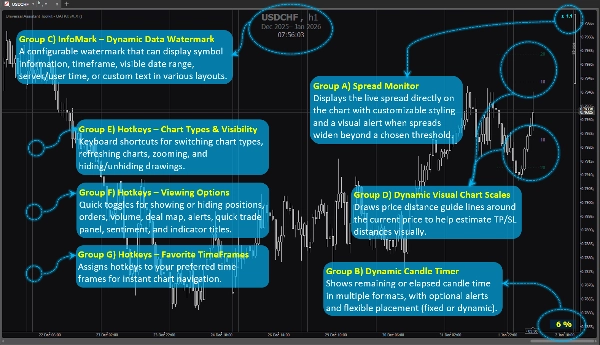
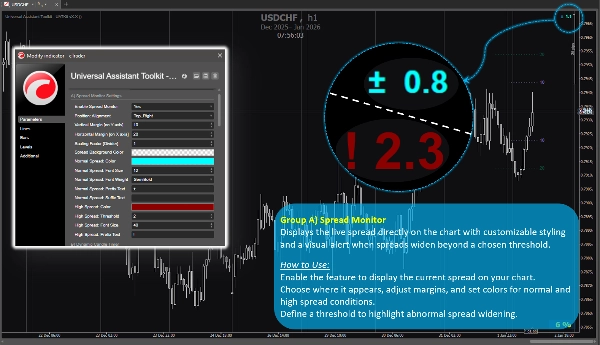
กลุ่มฟีเจอร์ A) 🔸 ตัวตรวจสอบสเปรด
แสดงสเปรดสดบนกราฟโดยตรง พร้อมสไตล์ที่ปรับแต่งได้และแจ้งเตือนทางสายตาเมื่อสเปรดขยายเกินเกณฑ์ที่ตั้งไว้
วิธีใช้:
เปิดใช้งานฟีเจอร์เพื่อแสดงสเปรดปัจจุบันบนกราฟของคุณ
เลือกตำแหน่งที่แสดง ปรับระยะขอบ และตั้งค่าสีสำหรับสภาพปกติและสเปรดสูง
กำหนดเกณฑ์เพื่อเน้นการขยายสเปรดที่ผิดปกติ
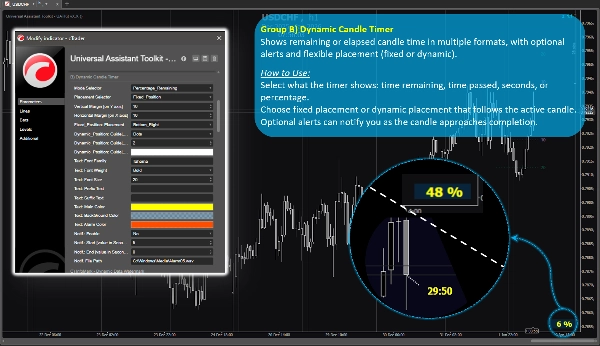
กลุ่มฟีเจอร์ B) 🔸 ตัวจับเวลากระทิงแบบไดนามิก
แสดงเวลาที่เหลือหรือเวลาที่ผ่านไปของแท่งเทียนในหลายรูปแบบ พร้อมแจ้งเตือนตัวเลือกและการวางตำแหน่งที่ยืดหยุ่น (คงที่หรือไดนามิก)
วิธีใช้:
เลือกสิ่งที่ตัวจับเวลาจะแสดง: เวลาที่เหลือ, เวลาที่ผ่านไป, วินาที หรือเปอร์เซ็นต์
เลือกตำแหน่งคงที่หรือไดนามิกที่ติดตามแท่งเทียนที่ใช้งานอยู่
แจ้งเตือนตัวเลือกสามารถแจ้งเตือนเมื่อแท่งเทียนใกล้จะเสร็จ
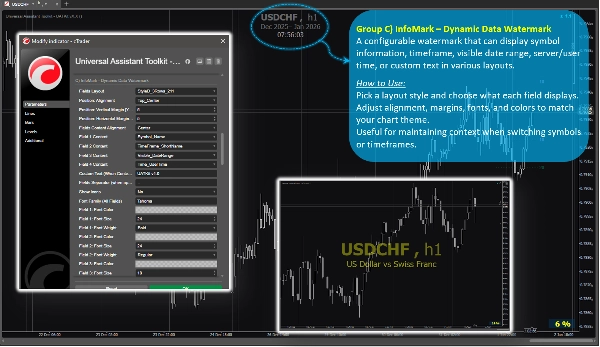
กลุ่มฟีเจอร์ C) 🔸 InfoMark – ลายน้ำข้อมูลแบบไดนามิก
ลายน้ำที่ปรับแต่งได้ซึ่งสามารถแสดงข้อมูลสัญลักษณ์, กรอบเวลา, ช่วงวันที่ที่มองเห็น, เวลาเซิร์ฟเวอร์/ผู้ใช้ หรือข้อความที่กำหนดเองในรูปแบบต่างๆ
วิธีใช้:
เลือกสไตล์เลย์เอาต์และเลือกสิ่งที่แต่ละช่องจะแสดง
ปรับการจัดแนว ระยะขอบ แบบอักษร และสีให้ตรงกับธีมกราฟของคุณ
มีประโยชน์สำหรับการรักษาบริบทเมื่อเปลี่ยนสัญลักษณ์หรือกรอบเวลา
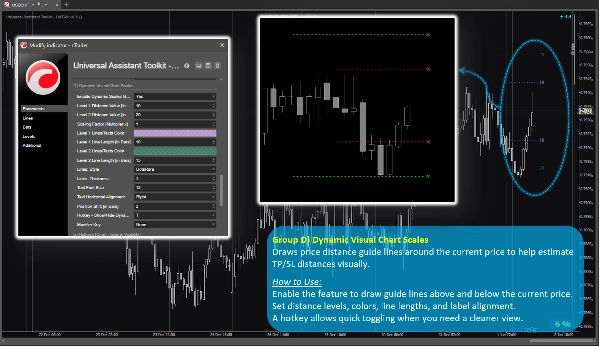
กลุ่มฟีเจอร์ D) 🔸 มาตราส่วนกราฟแบบไดนามิก
วาดเส้นแนวทางระยะห่างราคารอบราคาปัจจุบันเพื่อช่วยประมาณระยะทาง TP/SL ทางสายตา
วิธีใช้:
เปิดใช้งานฟีเจอร์เพื่อวาดเส้นแนวทางเหนือและใต้ราคาปัจจุบัน
ตั้งค่าระดับระยะทาง สี ความยาวเส้น และการจัดแนวป้ายชื่อ
ปุ่มลัดช่วยให้สลับเปิดปิดได้อย่างรวดเร็วเมื่อคุณต้องการมุมมองที่สะอาดขึ้น
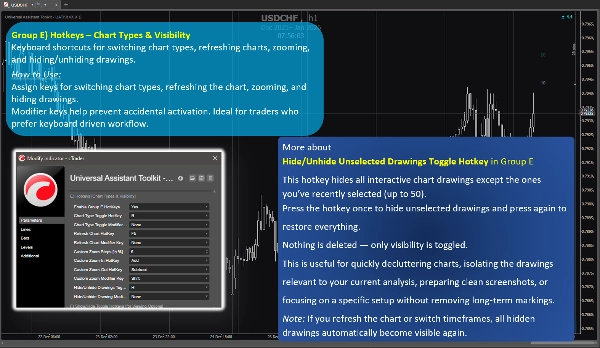
กลุ่มฟีเจอร์ E) 🔸 ปุ่มลัด – ประเภทกราฟ & การมองเห็น
ทางลัดแป้นพิมพ์สำหรับสลับประเภทกราฟ รีเฟรชกราฟ ซูม และซ่อน/แสดงการวาด
วิธีใช้:
กำหนดปุ่มสำหรับสลับประเภทกราฟ รีเฟรชกราฟ ซูม และซ่อนการวาด
ปุ่มแก้ไขช่วยป้องกันการเปิดใช้งานโดยไม่ตั้งใจ เหมาะสำหรับเทรดเดอร์ที่ชอบทำงานด้วยแป้นพิมพ์
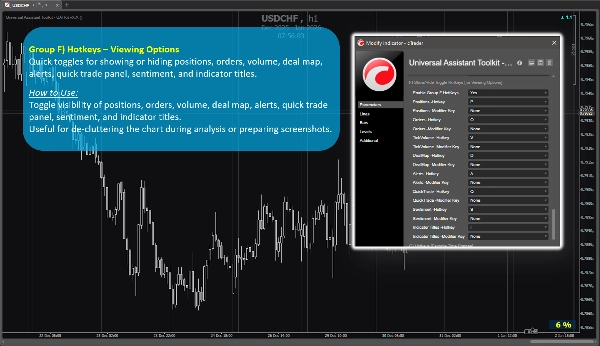
กลุ่มฟีเจอร์ F) 🔸 ปุ่มลัด – ตัวเลือกการดู
สลับเปิดปิดอย่างรวดเร็วสำหรับการแสดงหรือซ่อนตำแหน่ง คำสั่ง ปริมาณ แผนที่ดีล การแจ้งเตือน แผงเทรดด่วน ความรู้สึกตลาด และชื่ออินดิเคเตอร์
วิธีใช้:
สลับการมองเห็นของตำแหน่ง คำสั่ง ปริมาณ แผนที่ดีล การแจ้งเตือน แผงเทรดด่วน ความรู้สึกตลาด และชื่ออินดิเคเตอร์
มีประโยชน์สำหรับการลดความยุ่งเหยิงของกราฟระหว่างการวิเคราะห์หรือเตรียมภาพหน้าจอ
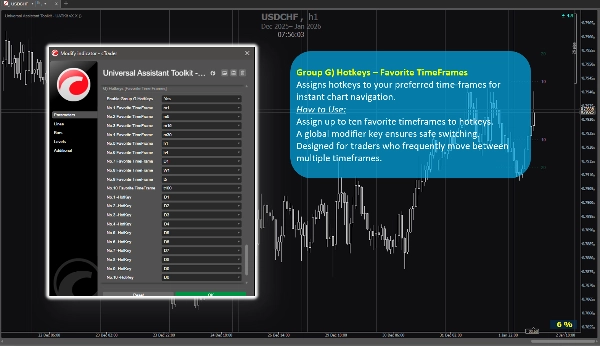
กลุ่มฟีเจอร์ G) 🔸 ปุ่มลัด – กรอบเวลาที่ชื่นชอบ
กำหนดปุ่มลัดสำหรับกรอบเวลาที่คุณชื่นชอบเพื่อการนำทางกราฟทันที
วิธีใช้:
กำหนดกรอบเวลาที่ชื่นชอบได้สูงสุดสิบกรอบเวลาให้กับปุ่มลัด
ปุ่มแก้ไขแบบทั่วโลกช่วยให้สลับได้อย่างปลอดภัย
ออกแบบมาสำหรับเทรดเดอร์ที่ย้ายไปมาระหว่างหลายกรอบเวลาอย่างบ่อยครั้ง
4. หมายเหตุเพิ่มเติมสำหรับผู้ใช้
- ฟีเจอร์ทั้งหมดเป็นตัวเลือกและสามารถเปิดหรือปิดใช้งานแยกกันได้
- ชุดเครื่องมือนี้ได้รับการปรับให้เหมาะสมสำหรับประสิทธิภาพและออกแบบมาเพื่อไม่รบกวนตัวชี้วัดอื่นๆ
- พารามิเตอร์ส่วนใหญ่มีคำอธิบายเครื่องมือในตัว เพียงแค่เลื่อนเมาส์ไปเหนือการตั้งค่าใดๆ เพื่อดูคำแนะนำและหมายเหตุการใช้งานเพิ่มเติม
- ไม่มีการใช้แหล่งข้อมูลภายนอก ข้อมูลทั้งหมดมาจากกราฟและแพลตฟอร์ม
- ชุดเครื่องมือนี้มีให้ฟรีเพื่อสนับสนุนชุมชน cTrader และปรับปรุงกระบวนการวาดกราฟในชีวิตประจำวัน
- การตั้งค่าเริ่มต้นมีความสมเหตุสมผล ดังนั้นผู้ใช้ที่ไม่ต้องการการกำหนดค่าพิเศษสามารถพึ่งพาพารามิเตอร์ที่ตั้งไว้ล่วงหน้าโดยไม่ต้องเสียเวลาเพิ่มเติมในการตั้งค่า
- ⭐️ ยินดีรับข้อเสนอแนะและคำแนะนำเพื่อช่วยปรับปรุงเวอร์ชันในอนาคต (ใช้ส่วนอภิปรายในหน้านี้)
- ⚠️โปรดตรวจสอบหน้าผลิตภัณฑ์เป็นระยะสำหรับการอัปเดต เนื่องจาก cTrader จะไม่แจ้งเตือนผู้ใช้เมื่อมีการปล่อยเวอร์ชันใหม่ของตัวชี้วัด
สรุป
Key features include:
- **Spread Monitor:** Displays live spread on the chart with customizable visuals and alerts for spread widening.
- **Dynamic Candle Timer:** Shows remaining or elapsed candle time in various formats, with optional alerts and flexible positioning.
- **InfoMark Watermark:** Configurable watermark displaying symbol info, timeframe, date range, server/user time, or custom text.
- **Dynamic Visual Chart Scales:** Price-distance guide lines around current price to estimate take-profit/stop-loss distances visually.
- **Hotkeys for Chart Types & Visibility:** Keyboard shortcuts for switching chart types, refreshing, zooming, and toggling drawing visibility.
- **Hotkeys for Viewing Options:** Quick toggles for positions, orders, volume, deal map, alerts, quick trade panel, sentiment, and indicator titles.
- **Hotkeys for Favorite TimeFrames:** Assign up to ten favorite timeframes to hotkeys for instant navigation.
All features are optional and configurable, optimized for performance without interfering with other indicators. UATKit supports various markets including Forex, indices, commodities, crypto, and stocks. It is intended for traders who seek a clean, customizable, and efficient charting environment with enhanced workflow controls.
รีวิวจากลูกค้า
5 | 100 % | |
4 | 0 % | |
3 | 0 % | |
2 | 0 % | |
1 | 0 % |