

Descrição
Bem-vindo ao Economic Calendar ChartAlert!
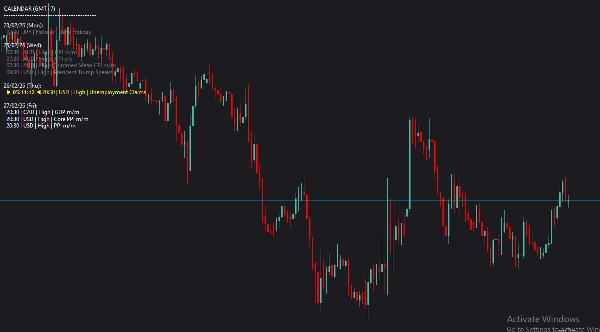
Cansado de ficar alternando constantemente entre sua plataforma de negociação e um navegador para verificar as notícias? O Economic Calendar ChartAlert traz o calendário econômico global diretamente para seus gráficos cTrader. Projetado tanto para day traders quanto para swing traders, este indicador garante que você nunca seja pego de surpresa por picos de notícias de alto impacto.
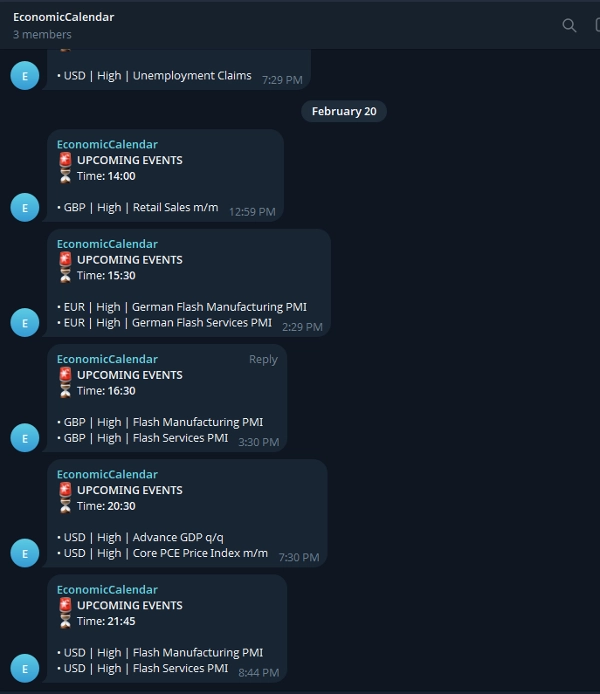
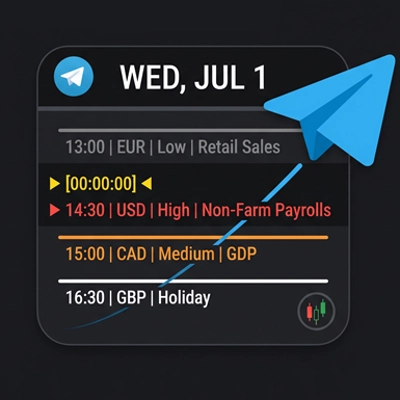
Ele não apenas exibe elegantemente os eventos futuros na sua tela, mas também possui uma integração embutida com o Telegram que envia uma notificação para seu telefone/desktop exatamente 1 hora antes dos eventos cruciais acontecerem.
Principais Recursos:
- 📊 Sobreposição no Gráfico: Exibição de texto limpa, moderna e não intrusiva usando a fonte Roboto.
- 🔔 Alertas Automáticos no Telegram: Receba notificações no seu chat pessoal ou grupo antes das notícias serem divulgadas.
- 🎯 Filtragem Inteligente: Veja apenas as notícias que importam para sua estratégia. Filtre por moedas específicas ou níveis de impacto.
- 🎨 Codificação Visual por Cores: Reconheça instantaneamente eventos passados, o evento futuro mais próximo (destacado) e eventos futuros.
⚙️ Guia de Configuração & Explicações dos Parâmetros
Assim que você anexar o indicador ao seu gráfico, poderá personalizar os seguintes parâmetros para adequá-los ao seu estilo de negociação:
Configurações Visuais:
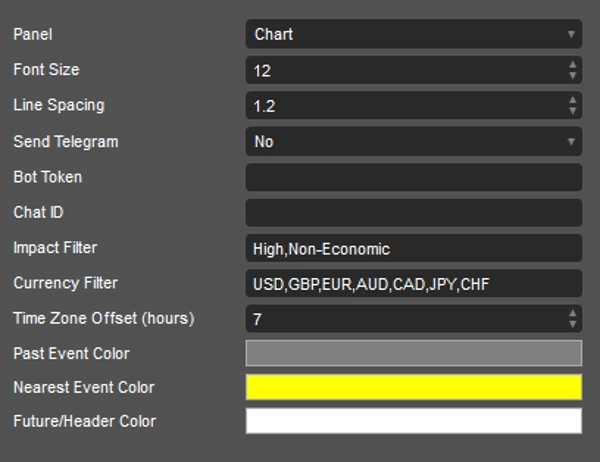
- Tamanho da Fonte & Espaçamento entre Linhas: Ajuste o tamanho e o espaçamento do texto para garantir que fique perfeito na resolução específica do seu monitor.
Configurações do Telegram:
- Enviar Telegram: Ative para
Simse quiser receber alertas. (Os alertas são enviados cerca de 1 hora antes do evento). - Token do Bot: Cole o token HTTP API do seu Bot do Telegram (criado via BotFather).
- ID do Chat: Insira seu ID de chat pessoal ou o ID do grupo/canal do Telegram onde deseja que os alertas sejam enviados.
Configurações de Filtro (Crucial para um gráfico limpo):
- Filtro de Impacto: Digite os níveis exatos de impacto que deseja ver, separados por vírgulas (Padrão:
High,Non-Economic). UseAllpara mostrar tudo. - Filtro de Moeda: Defina quais moedas você está negociando (Padrão:
USD,GBP,EUR,AUD,CAD,JPY,CHF). UseAllpara todas as moedas. - Deslocamento do Fuso Horário (horas): Ajuste para corresponder ao seu fuso horário local. Por exemplo, use
7para GMT+7.
Cores:
- Cor de Evento Passado: Cor para eventos que já ocorreram hoje (Padrão: Cinza).
- Cor do Evento Mais Próximo: Destaca o próximo evento futuro para chamar sua atenção (Padrão: Amarelo).
- Cor Futura/Cabeçalho: Cor para os cabeçalhos do calendário e eventos futuros (Padrão: Branco).
Negocie com inteligência, mantenha-se informado e deixe os gráficos fazerem o trabalho por você!
Resumo
The indicator features automated Telegram alerts, sending notifications approximately one hour before high-impact events to personal chats or groups via a configurable Telegram Bot. Visual settings allow adjustment of font size and line spacing for optimal display on various monitors. Time zone offset can be set to match local time.
Key functionalities include on-chart event display, smart filtering by currency and impact, color-coded event visualization, and Telegram integration for timely alerts. Supported markets and symbols include Forex, indices, commodities, and cryptocurrencies such as BTCUSD, EURUSD, GBPUSD, USDJPY, and XAUUSD. This tool aids traders in staying informed of critical economic news without leaving their trading platform.
Conversa
Avaliações de clientes
5 | 100 % | |
4 | 0 % | |
3 | 0 % | |
2 | 0 % | |
1 | 0 % |
Perguntas frequentes






Preço