


説明
Market Session BT — セッションボックスオーバーレイ(UTC)
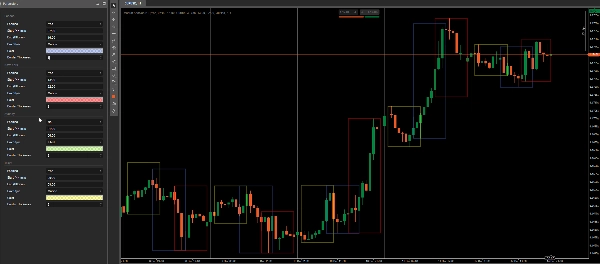
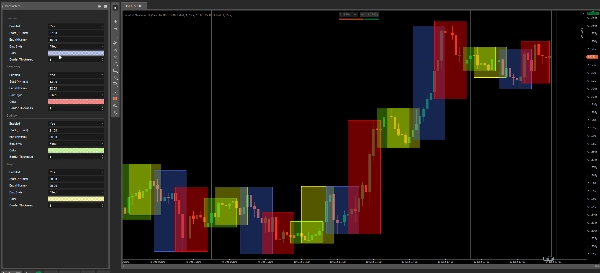
Market Session BT は、cTraderチャート上に直接クリーンでカスタマイズ可能な取引セッションボックスを描画します(オーバーレイ)。
各セッションは個別に有効/無効にでき、塗りつぶしゾーンまたは枠線のみのアウトラインとして表示できます。色はネイティブのcTraderカラーピッカーを使用しているため、パレット内の不透明度スライダーで透明度を調整できます。
デフォルトセッション時間(UTC)
- シドニー: 21:00 – 06:00 (UTC)
- 東京: 00:00 – 09:00 (UTC)
- ロンドン: 07:00 – 16:00 (UTC)
- ニューヨーク: 13:00 – 22:00 (UTC)
注意:FXの「セッション」は一般的な市場慣習(OTC)に基づいています。DSTのルールは地域によって異なるため、DSTの切り替え時にはセッション時間を手動で調整することをお勧めします。インジケーター自体は厳密にUTCに固定されています。
特徴
- ✅ セッションごとの設定: 有効化、開始/終了(HH:mm)、ボックススタイル、色、境界線の太さ
- ✅ ボックススタイルのオプション:
-
- 塗りつぶし: 透明な塗りつぶしと常に表示される境界線を描画
- アウトライン: セッション枠のみを描画(塗りつぶしなし)
- ✅ ネイティブカラーパレット: 任意の色を選択し、ピッカー内で透明度を直接設定可能
- ✅ 深夜をまたぐセッション対応(午前0時を跨ぐセッション)
利用例
- セッション範囲と重複を一目でマーク
- 高流動性時間帯(ロンドン/NY)と静かな時間帯(東京/シドニー)を強調表示
- セットアップ、エントリー、リスク管理のための一貫した時間ベースのルール構築
修正:更新モードが OnBar → OnTick(リアルタイム)に変更されました。セッションボックスはティックごとに更新され、履歴は読み込み時に一度だけ構築されます。
概要
AI summary
Market Session BT is an indicator for cTrader that overlays customizable trading session boxes on charts using UTC time. It visually marks major Forex market sessions—Sydney (21:00–06:00 UTC), Tokyo (00:00–09:00 UTC), London (07:00–16:00 UTC), and New York (13:00–22:00 UTC)—with options to enable or disable each session individually. Users can choose between filled zones with transparent color fills and visible borders or outline-only frames. Colors and opacity are adjustable via the native cTrader color picker. The indicator supports overnight sessions that span midnight and updates session boxes in real-time on each tick, with historical data loaded on chart initialization. Typical use cases include identifying session ranges and overlaps, highlighting periods of varying liquidity, and establishing time-based trading rules for entries and risk management. Session times can be manually adjusted to accommodate daylight saving time changes, as the indicator operates strictly on UTC. Key features include per-session settings for start/end times, box style, color, and border thickness.
インジケーターのプロフィール
カスタマーレビュー
4.3
レビュー: 3
5 | 67 % | |
4 | 0 % | |
3 | 33 % | |
2 | 0 % | |
1 | 0 % |
カスタマーレビュー

December 22, 2025
Market Session BT clearly visualizes trading sessions and helps track market activity. Works best on M15-H1. On M1 the chart becomes cluttered due to large colored zones, which hurts price readability. A lite or scalping mode would greatly improve usability.
ディスカッション
よくあるご質問
Forex
Signal
cTrader Storeで入手可能な取引ボット、インジケーター、プラグインなどの商品は、第三者の開発者が提供するものであり、情報と技術の取得のみを目的としてご利用いただけます。cTrader Storeはブローカーではなく、投資助言や個人的な推奨を行うことも、将来のパフォーマンスを保証することもありません。





これも好きかも





![「Gaussian Channel [Iridio Capital]」ロゴ](https://cdn.ctrader.com/image/webp/2c4f9ca9-4e9b-476d-b5a6-787c8095032b_61546)

価格
51
販売
1.43K
無料インストール