

Opis
Wskaźnik HIO Economic Calendar to Telegram został zaprojektowany, aby informować traderów o kluczowych wydarzeniach makroekonomicznych bezpośrednio w platformie cTrader. Nakładając przejrzysty, konfigurowalny kalendarz na wykres, pomaga śledzić fundamentalne dane i efektywnie zarządzać ryzykiem bez konieczności przełączania się między przeglądarką a terminalem handlowym.
Kluczowe funkcje:
- Synchronizacja danych w czasie rzeczywistym: Automatyczne pobieranie i aktualizacja danych kalendarza ekonomicznego.
- Inteligentny system filtrowania: Filtrowanie wydarzeń na podstawie waluty (automatyczne wykrywanie wykresu lub ręczne) oraz określonych poziomów wpływu.
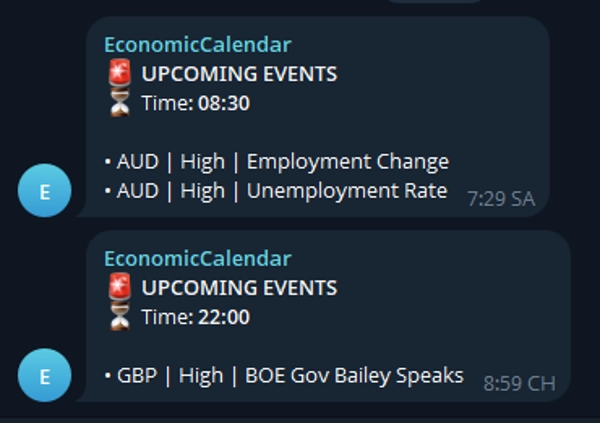
- Integracja z Telegramem: Wysyła powiadomienia o nadchodzących wydarzeniach bezpośrednio na urządzenie mobilne lub czat grupowy.
- W pełni konfigurowalny interfejs: Dostosuj pozycję panelu, rozmiar tekstu, liczbę slotów wydarzeń oraz kolory do swojego układu.
Konfiguracja i parametry:
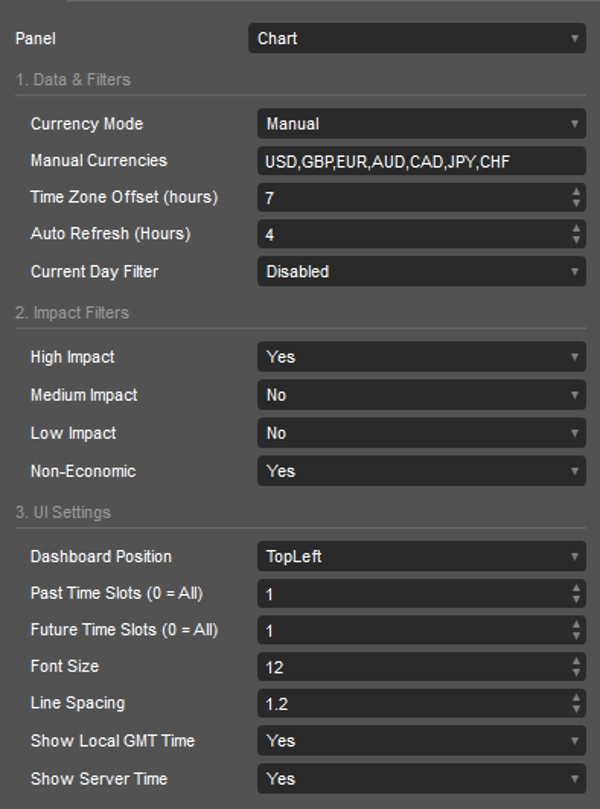
[1. Dane i filtry]
- Tryb waluty: Wybierz "AutoChart", aby śledzić waluty bieżącego symbolu, lub "Manual", aby użyć własnej listy.
- Waluty ręczne: Lista walut oddzielona przecinkami do śledzenia (np. USD,GBP,EUR).
- Przesunięcie strefy czasowej (godziny): Przesuń czas kalendarza, aby dopasować go do swojej lokalnej strefy czasowej.
- Automatyczne odświeżanie (godziny): Częstotliwość, z jaką wskaźnik pobiera nowe dane kalendarza.
- Filtr dnia bieżącego: Ogranicz wyświetlanie do wydarzeń z dzisiaj (Wyłączone, ByGmtOffset, ByServerTime).
[2. Filtry wpływu]
- Wysoki wpływ: Włącz/wyłącz widoczność wydarzeń o wysokim wpływie.
- Średni wpływ: Włącz/wyłącz widoczność wydarzeń o średnim wpływie.
- Niski wpływ: Włącz/wyłącz widoczność wydarzeń o niskim wpływie.
- Nieekonomiczne: Włącz/wyłącz widoczność świąt lub wydarzeń nieekonomicznych.
[3. Ustawienia UI]
- Pozycja panelu: Wybierz spośród 6 predefiniowanych narożników/środków wykresu (np. TopLeft, BottomRight).
- Sloty czasu przeszłego (0 = wszystkie): Ogranicz liczbę wyświetlanych przeszłych wydarzeń na panelu.
- Sloty czasu przyszłego (0 = wszystkie): Ogranicz liczbę wyświetlanych nadchodzących wydarzeń.
- Rozmiar czcionki: Dostosuj rozmiar tekstu panelu kalendarza.
- Odstęp między liniami: Dostosuj pionową odległość między liniami wydarzeń.
- Pokaż lokalny czas GMT: Wyświetl obliczony lokalny czas w nagłówku.
- Pokaż czas serwera: Wyświetl czas serwera brokera w nagłówku.
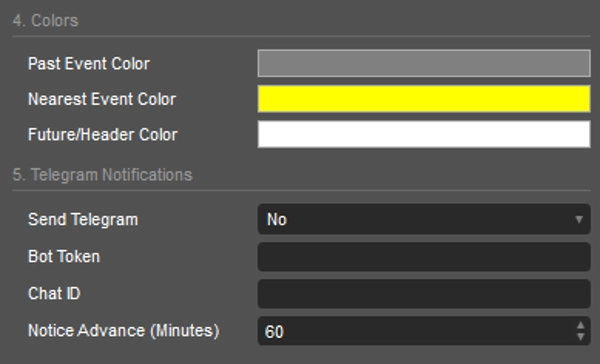
[4. Kolory]
- Kolor przeszłych wydarzeń: Kolor tekstu dla wydarzeń, które już miały miejsce.
- Kolor najbliższego wydarzenia: Kolor tekstu dla najbliższego nadchodzącego wydarzenia.
- Kolor przyszłych/w nagłówku: Kolor tekstu dla przyszłych wydarzeń i nagłówków panelu.
[5. Powiadomienia Telegram]
- Wysyłaj Telegram: Włącz lub wyłącz powiadomienia Telegram.
- Token bota: Twój unikalny token HTTP API bota Telegram.
- ID czatu: Docelowe ID czatu lub grupy, do której będą wysyłane wiadomości.
- Powiadomienie z wyprzedzeniem (minuty): Ile minut przed wydarzeniem ma zostać wyzwolone powiadomienie.
Wizualizacje, tekst i symbole:
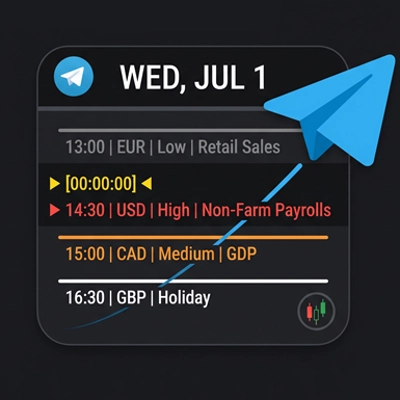
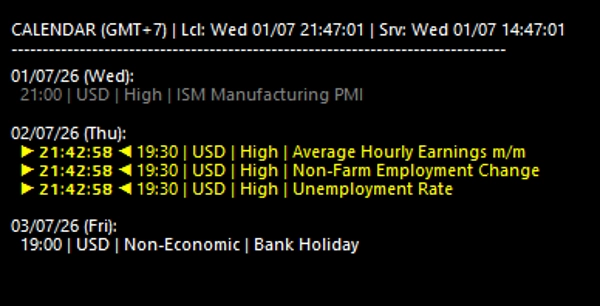
- ▶ [00:00:00] ◀ : Wskazuje odliczanie do najbliższego nadchodzącego wydarzenia.
- Kodowanie kolorami: Szary oznacza wydarzenia przeszłe, żółty podkreśla odliczanie do najbliższego wydarzenia, a biały pokazuje zaplanowane wydarzenia przyszłe.
Wyposaż swój wykres w HIO Economic Calendar, aby być na bieżąco z wiadomościami wpływającymi na rynek i udoskonalić swoją codzienną rutynę handlową.
Podsumowanie
Users can customize the calendar’s appearance, including dashboard position, font size, line spacing, and colors for past, nearest, and future events. Time settings allow adjustment for local time zones and server time display. The indicator also supports Telegram integration, sending advance notifications of upcoming events to a specified chat or group via a Telegram bot, with configurable alert timing.
Visual cues include a countdown timer for the nearest event and color-coded event statuses to distinguish past, current, and future events. This tool aids traders in tracking market-moving news efficiently and managing risk by integrating fundamental data seamlessly into their trading workflow.
Opinie klientów
Dyskusja
Częste pytania





Cena