


Açıklama
GÜNCELLENMİŞ HACİM PROFİLİ VERSİYONU
Önceki versiyona kıyasla, bu güncellenmiş versiyon kritik hata düzeltmeleri, yeni özellikler ve önemli performans iyileştirmeleri içerir:
Düzeltmeler
- Düzeltilmiş hacim dağılımı: tüm dokunulan seviyelere %100 yerine mum örtüşmesine göre orantılı tahsis
- Düzeltilmiş VAH/VAL tespiti: tolerans, sabit değer yerine seviye yüksekliği ile ölçeklenir
- Düzeltilmiş metin konumlandırması: sabit günler yerine dinamik zaman dilimine dayalı ofsetler
- Düzeltilmiş TarihSaat doğrulaması: boş bar kontrolü, aralık dışı doğrulama
Özellikler
- TarihSaat profilleri için Zaman Dilimi Ofset parametresi eklendi
- Geriye dönük mod için Metin Konumu parametresi (Sol/Sağ) eklendi
- TarihSaat modu etiketleri artık bar kenarlarını takip eder (değişken genişlik) veya profil kenarında hizalanır (tam genişlik)
Performans
- TarihSaat indeks araması için ikili arama (önceden O(n) lineer)
- Önbelleğe alınmış toplam hacim hesaplaması (önceden seviye başına yeniden hesaplanıyordu)
- Yeniden boyutlandırmayı önlemek için önceden boyutlandırılmış TPO sözlüğü
- Sözlük aramaları için TryGetValue deseni
- Sıcak yollar için foreach yerine indeks tabanlı döngüler
Temizlik
- ProfileWidth parametresi kaldırıldı (otomatik hesaplanan her zaman doğrudur)
- Mum kesişimi tek koşula basitleştirildi
__________________________________________________________________________________________
ÖNEMLİ NOTLAR - ÖNCE OKUYUN
Forex Hacmi Gerçek Hacim Değildir
Forex'teki hacim, tik hacmidir — fiyatın kaç kez değiştiğini sayar. Ne kadar para işlem gördüğünü SAYMAZ.
Tik Hacminin Gösteremediği Şeyler
- İşlem büyüklüğü. 100$'lık bir işlem ve 10.000.000$'lık bir işlem ikisi de 1 tik olarak sayılır.
- Gerçek para akışı. Fiyatı büyük para mı yoksa küçük para mı hareket ettirdiğini göremezsiniz.
- Gerçek likidite. Piyasada kaç emrin beklediğini göremezsiniz.
- Banka faaliyetleri. Bankalar gerçek hacim verilerini görür. Siz görmezsiniz.
Bunun Anlamı
Tik hacmi sadece fiyatın ne sıklıkla değiştiğini gösterir — arkasındaki parayı değil. Bu sorunlar yaratır:
- Bankaları veya kurumları takip edemezsiniz. Onlar sizin erişiminiz olmayan gerçek hacim verilerini kullanır.
- "Akıllı para" teorilerini kanıtlayamazsınız. Bu fikirler gerçek hacim, tik sayısı değil, gerektirir.
- Gerçek likiditeyi değerlendiremezsiniz. Tik aktivitesi emir derinliğini veya gerçek piyasa gücünü göstermez.
- Gerçek alım veya satım gücünü ölçemezsiniz. Birçok küçük işlem, büyük bir kurumsal işlemle aynı görünür.
- Hacim sıçramaları yanıltıcı olabilir. Bir sıçrama sadece algoritmik gürültü olabilir, gerçek işlem ilgisi olmayabilir.
Bu Göstergesi Doğru Kullanma Yolu
- Bunu para ölçer değil, aktivite ölçer olarak değerlendirin. Yüksek tik hacmi = piyasa meşgul. Düşük tik hacmi = piyasa sakin. Başka bir şey değil.
- Farklı zamanlar arasındaki aktiviteyi karşılaştırın. Şunu görmek için kullanın: Londra seansı New York'tan daha mı yoğun? Bugün dünle kıyaslandığında daha mı aktif? Trend dönemi konsolidasyondan daha mı yoğun?
- Bunu fiyat yapısıyla birleştirin. Destek/direnç, salınım noktaları veya BOS/ChoCH'u hacimle birlikte kullanın. Fiyat bağlamı, gürültülü hacim sıçramalarından kaynaklanan yanlış sinyalleri önler.
- Önemli fiyat seviyelerindeki aktiviteyi izleyin. Fiyat kritik bir seviyeyi test ettiğinde ve tik hacmi arttığında, daha fazla trader aktif demektir. Bu, büyük oyuncuların dahil olduğu anlamına GELMEZ.
- Bunun kurumsal aktiviteyi gösterdiğini varsaymayın. Tik hacmi birikim, büyük emirler veya "akıllı para" gösteremez. Sadece ritim ve tempo ölçmek için kullanın.
__________________________________________________________________________________________
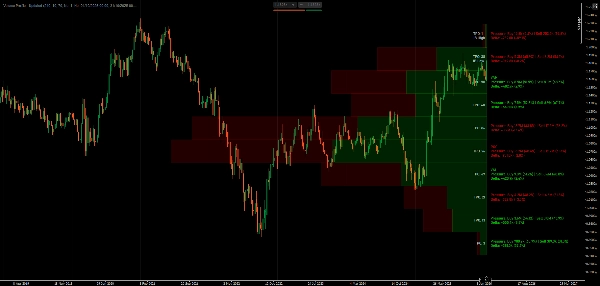
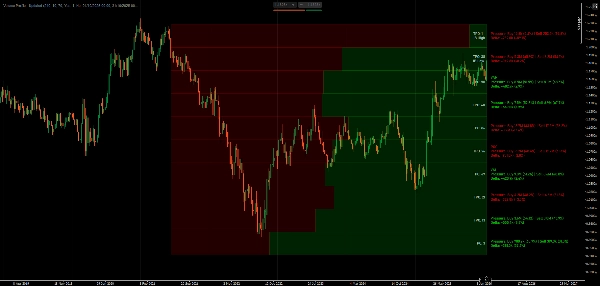
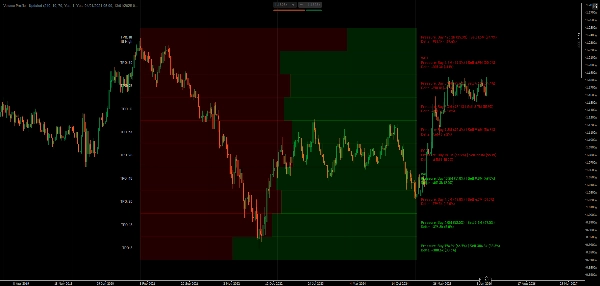
POC, Değer Alanı ve Piyasa Profili TPO takibi ile hacim dağılımını ve fiyat başında geçirilen zamanı görselleştirin.
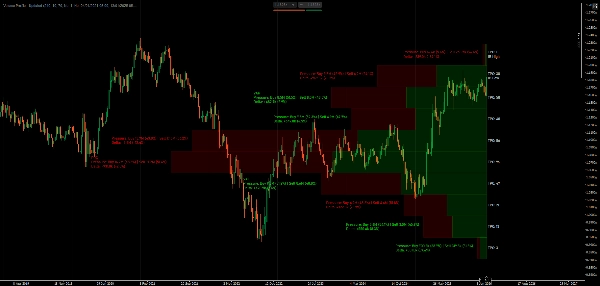
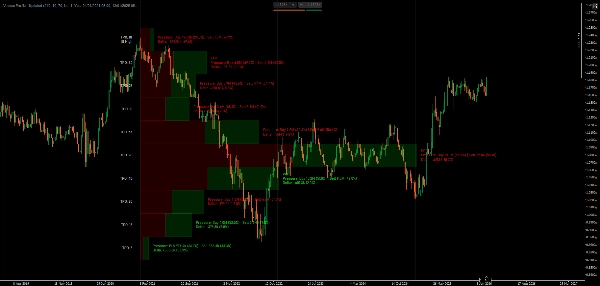
Bu gösterge, Piyasa Profili kavramlarını kullanarak hacim dağılımını gösterir. Kontrol Noktasını (en yüksek tik aktivitesi seviyesi), Değer Alanı sınırlarını (en çok işlem yapılan yer), TPO harf dizilerini (her fiyat başında geçirilen zaman) ve mum yönüne göre tik aktivitesini ayıran delta görselleştirmesini gösterir.
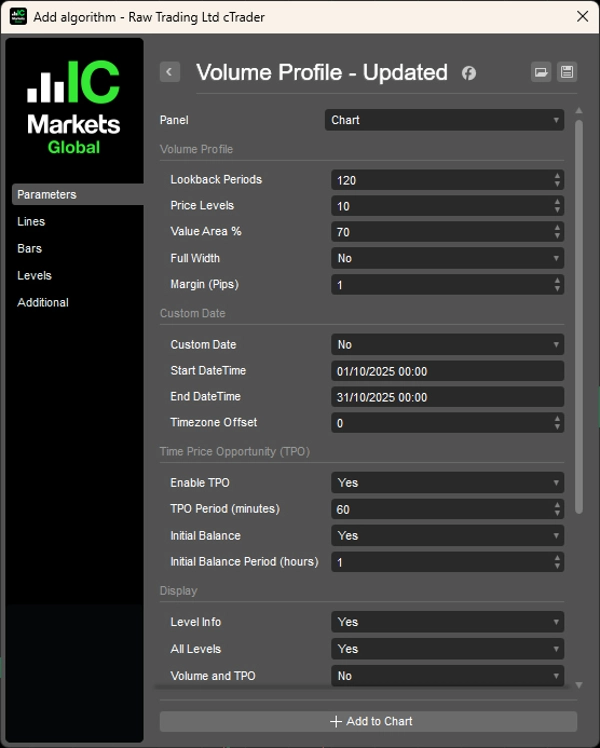
Geriye dönük dönemleri seçebilir veya belirli tarih aralıkları ayarlayabilir, hacim çubuklarını orantılı veya tam genişlikte gösterebilir, tüm seviyeler veya sadece ana seviyeler arasında geçiş yapabilir ve boğa/ayı aktivitesi için renkleri özelleştirebilirsiniz.
ÖZELLİKLER
Hacim Dağılımı Analizi
- Kontrol Noktası (POC): En yüksek aktiviteye sahip fiyat seviyesi—fiyatın en çok zaman geçirdiği yer
- Değer Alanı (VA): Özelleştirilebilir aktivite yoğunluk bölgesi (varsayılan %70)—en çok işlem yapılan alan
- VAH/VAL: Değer Alanı Yüksek/Düşük sınırları—potansiyel destek/direnç seviyeleri
- Delta Görselleştirme: Bölünmüş çubuklar her fiyat seviyesinde mum yönünü gösterir
Piyasa Profili TPO
- Zaman Fiyat Fırsatı takibi: Her fiyatta işlem gören zaman dilimlerinin sayısı
- TPO harfleri: Fiyatta geçirilen zamanın görsel temsili (A-Z dizisi)
- İlk Denge (IB): İlk saatin aralığı—gün içi işlem yapısı için önemli
- IB Yüksek/Düşük işaretleri: Açılış aralığı uçları
Esnek Geriye Dönük Seçenekler
- Dönem bazlı: Analiz edilecek bar sayısını ayarlayın (örneğin, son 120 bar)
- TarihSaat aralığı: Profilinizi belirli tarih/saatler arasında sabitleyin, olay analizi için
- Dinamik genişlik: Otomatik ölçeklendirme veya sabit genişlik profilleri
Görüntüleme Seçenekleri
- Hacim Çubukları: Orantılı genişlik (aktivite ölçekli) veya tam genişlikte uniform çubuklar
- Her çubuk içinde mum yönü ayrımı
- Yüzdelerle delta hesaplamaları
- Tüm seviyeler veya sadece ana seviyeler (POC, VAH, VAL) arasında geçiş
- Hacim/TPO detay görünürlüğü kontrolü
- Yüzdelerle yönsel dağılım
- Ayarlanabilir yazı tipi boyutu ve pip bazlı kenar boşlukları
Renk Özelleştirmesi
- Boğa/ayı yönlü çubuklar için bağımsız renkler
- Pozitif/negatif delta için ayrı metin renkleri
- TPO'ya özgü metin rengi
Performans Optimizasyonu
- Önbelleğe alınmış zaman aramaları ve verimli dikdörtgen çizimi
- Akıcı performans için minimum yeniden hesaplama
- Mum yapısına dayalı profesyonel düzeyde delta hesaplaması
__________________________________________________________________________________________
DAHA FAZLA ÜCRETSİZ GÖSTERGE
Yapı ve hacimden regresyon, volatilite ve özel zaman dilimlerine kadar geniş bir piyasa analiz araçları yelpazesini keşfedin.
Kaynak kodu GitHub deposunda mevcuttur.
Kullanımı tamamen ücretsizdir. Ancak kahve desteği göndermek isterseniz, bunu buradan yapabilirsiniz.
Destek/Direnç
Hacim
- Hacim Aktivite Profili
- Hacim Verimlilik Analizörü
- Hacim Profili Analitiği
- Hacim Profili - Güncellenmiş
- Hacim Yayılım Analizi
- VWAP (Hacim Ağırlıklı Ortalama Fiyat)
Hareketli Ortalamalar
- SSL Kanalı
- Çapa Hareketli Ortalaması
- Sapma Ölçekli Hareketli Ortalama
- Gann Yüksek Düşük Aktivatörü
- Anlık Trend Çizgisi
- Trend Vizyonlu Kaufman Adaptif MA
- Hareketli Ortalama Kanalı
- Hareketli Ortalamalar Paketi
- Trend Kanalı Hareketli Ortalaması
Araçlar/Özel
Regresyon Bazlı
Volatilite
Osilatörler
__________________________________________________________________________________________
FERAGATNAME
Ticaret risk içerir. Bu gösterge sadece teknik analiz amaçlıdır — her zaman uygun risk yönetimi uygulayın ve sorumlu şekilde işlem yapın.
GERİ BİLDİRİM & GELİŞTİRMELER
Önerileriniz, özellik talepleriniz veya geliştirme fikirleriniz varsa, lütfen Tartışma sekmesinde yorum bırakın. Geri bildiriminiz göstergenin herkes için iyileştirilmesine yardımcı olur.
Özet
Key features include customizable lookback periods based on bar count or specific date/time ranges, dynamic or fixed profile widths, and display options for proportional or full-width volume bars. Users can toggle visibility of all levels or key levels (POC, VAH, VAL) and adjust colors independently for bullish/bearish bars and delta text. The indicator tracks Initial Balance (IB) ranges and marks IB High/Low for day trading structure.
Performance optimizations include binary search for DateTime lookups, cached volume calculations, and efficient data structures to minimize recalculations. The indicator uses tick volume, which counts price changes rather than actual traded volume, making it suitable as a market activity meter rather than a measure of real money flow or liquidity.
Supported markets include Forex, Indices, Commodities, Crypto, and Stocks. The indicator is intended for technical analysis and includes parameters for timezone offset and text positioning.
Müşteri değerlendirmeleri
5 | 100 % | |
4 | 0 % | |
3 | 0 % | |
2 | 0 % | |
1 | 0 % |

Tartışma
SSS
Bu oluşturanın diğer ürünleri














Fiyat