

説明
概要
ボリューム効率アナライザーは、ボリューム(努力)と価格変動(結果)の関係をバーごとに測定する包括的な分析ツールです。元々は個人的な使用のために作られ、特定の質問に答えるためのものでした:「市場は効率的に動いているのか、それとも意味のある進展なしに多くの活動があるのか?」
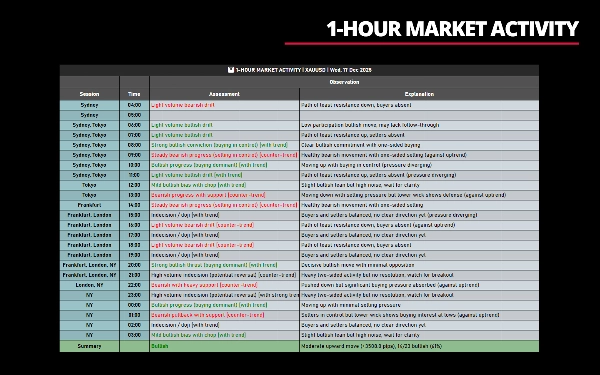
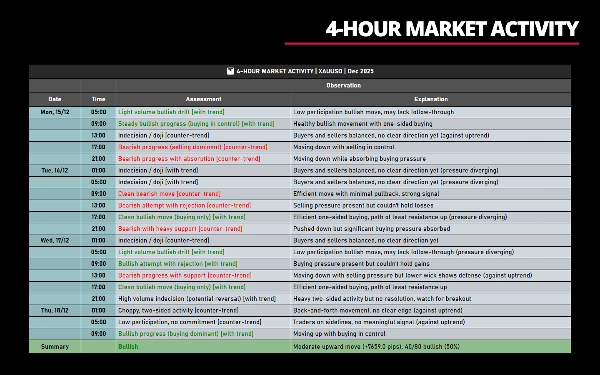
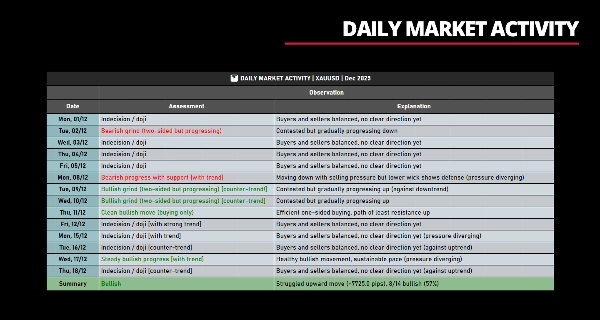
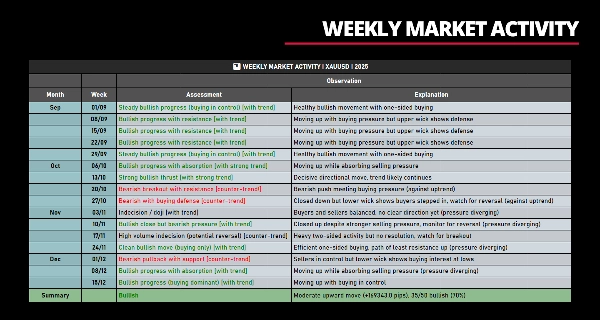
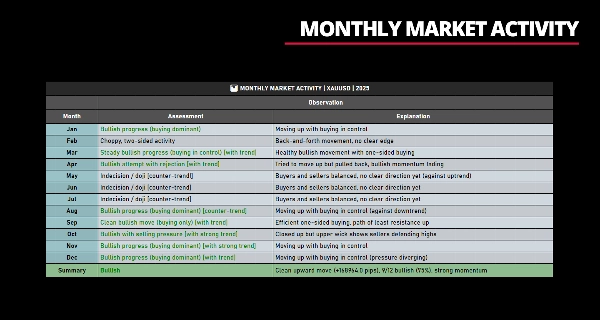
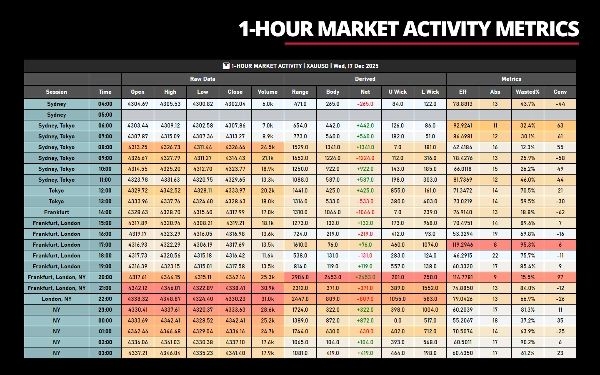
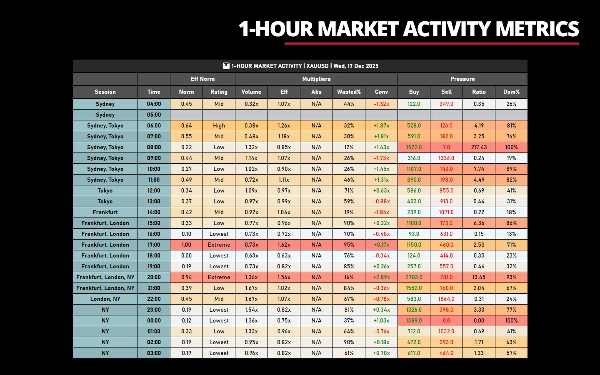
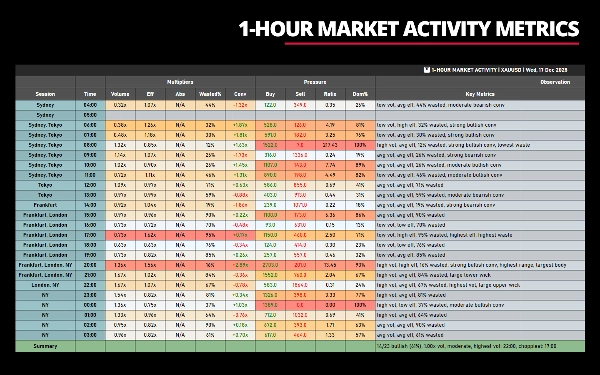
このインジケーターはチャート出力を一切生成しません。統計分析と指標を表形式でのみ表示し、ライン、シグナル、価格のオーバーレイはありません。これらの指標は価格の動きと市場の挙動の質と特徴を測定・定量化し、動きが決定的か、疲弊しているか、争われているか、または優柔不断かを理解するのに役立ちます—発生後に。
__________________________________________________________________________________________
一目でわかる特徴
出力: 統計データ(チャートプロットなし)
表示形式: 表形式
時間軸: サブデイリーから月次まで
指標: 20以上の効率/圧力指標
最適用途: ボリューム分析、品質評価
__________________________________________________________________________________________
コアコンセプト:努力対結果
基本的な前提はシンプルです:
- 努力 = ティックボリューム(取引活動)
- 結果 = 価格変動(レンジ、ボディ、純変動)
効率的な市場は合理的なボリュームで大きな価格変動を生み出し、動きは明確で決定的です。
非効率的な市場は高いボリュームを示すものの純進展は限られ、動きは不安定で争われたり吸収されたりします。
個々のバーや集計期間でこの関係を測定することで、以下を識別できます:
- トレンド状態とレンジ状態
- コミットメントと優柔不断
- 疲弊と継続
- 一方的市場と両面市場
__________________________________________________________________________________________
主要パラメータ設定
これら5つのパラメータは表示するデータを制御します。効果的に使うためにはそれらの動作を理解することが重要です。
1. 日付パラメータ
目的:分析する日付/期間を定義します。
フォーマット例:
""(空)– 最新の取引日"18/12/2025"– 特定の日付(DD/MM/YYYY)"12/2025"– 月全体(MM/YYYY)"2025"– 年全体(YYYY)
2. 時間範囲パラメータ
目的:サブデイリー時間軸で表示する時間帯をフィルターします。
適用範囲:サブデイリー時間軸のみ(1分〜1時間)
フォーマット例:
""(空)– 24時間の取引日全体"8-16"– 午前8時から午後4時"08:00-16:30"– 午前8時から午後4時30分"14"– 午後2時から現在時刻まで
3. 週範囲パラメータ
目的:表示する月の週をフィルターします。
適用範囲:マルチアワー時間軸のみ(2時間〜12時間)
フォーマット例:
""(空)– 月内のすべての週"1"– 第1週のみ"1,3"– 第1週と第3週"2,3,4"– 第2、3、4週
4. 月範囲パラメータ
目的:表示する年の月をフィルターします。
適用範囲:週次時間軸のみ
フォーマット例:
""(空)– 年内のすべての月"1"– 1月のみ"1,6,12"– 1月、6月、12月"3,4,5,9,10,11"– 第1四半期(春)と第4四半期(秋)
5. 最大データ行数パラメータ
目的:表に表示される行数(バー数)を制限します。
適用範囲:すべての時間軸
デフォルト値:24
フォーマット:
-1または0– 利用可能なすべてのデータを表示(制限なし)- 任意の正の数 – 最大その行数まで表示
__________________________________________________________________________________________
特徴
柔軟性
- 8つのカラムグループ:生データ、派生、指標、効率正規化、乗数、圧力、主要観察、主要指標の表示切替
- 複数時間軸対応:サブデイリー(1分〜1時間)、マルチアワー(2時間〜12時間)、日次、週次、月次チャートで動作
- フィルタリング:時間範囲フィルター(例:"8:00-16:00")、週フィルター(例:"1,3")、月フィルター(例:"1,6,12")
- 最大行数:最新N期間に制限、または形成中バーを中心に表示
- カラー強調表示:選択した指標に基づく任意のカラムグループのグラデーション強調表示
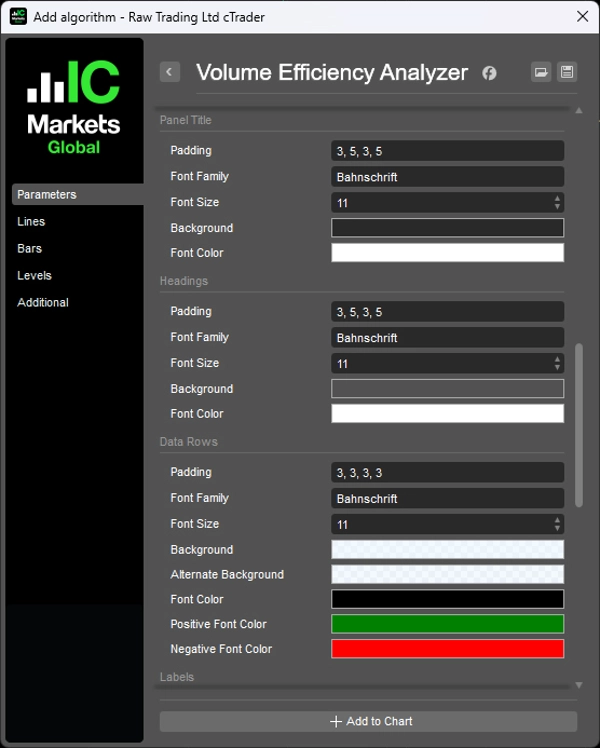
- カスタマイズ可能なスタイル:フォント、色、パディング、カラム幅を完全制御
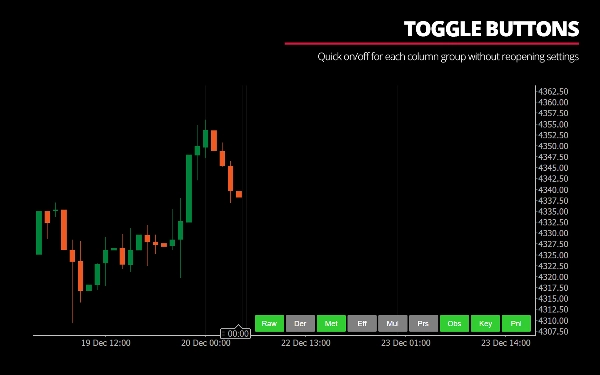
- トグルボタン:設定を再度開かずに各カラムグループの表示切替が可能
タイムゾーンサポート
- ブローカーサーバー時間とローカル時間の調整
- セッション開始時間の設定可能(シドニー、東京、フランクフルト、ロンドン、NY)
- 時間単位の取引日開始(例:アジアセッションのトレーダー向けに午前4時)
パフォーマンス最適化
- 効率的なバー検索のための二分探索
- 強調表示のための単一パスの最小/最大計算
- ラグ防止のためのリアルタイム更新の500msスロットル
- 冗長な検索を避けるための検索ヒント
__________________________________________________________________________________________
指標の理解
良い動きとは?
- 高効率:少ないボリュームで遠くまで移動
- 低無駄率%:最小限のヒゲ、きれいな方向性のボディ
- 整合した圧力:強気の終値で買い圧力が優勢(またはその逆)
- 強い確信:高い方向性のコミットメント
悪い動きとは?
- 低効率:少し動くのに多くのボリュームが必要
- 高無駄率%:大きなヒゲ、小さなボディ(もみ合い)
- 矛盾する圧力:強気の終値だが売り圧力が優勢
- 弱い確信:ボリュームがあっても方向性のコミットメントなし
吸収とは何か?
価格が高いボリュームにもかかわらず動きにくい場合、市場はそのボリュームを「吸収」していることを意味します。これは以下を示します:
- 高い吸収:抵抗/支持が存在し、価格を動かしにくい
- 低い吸収:容易な動き、ほとんど抵抗なし
解釈例:
「強い強気の推進(買い優勢)」
- 高ボリューム + 高効率 + 低無駄 + 強気の純増 + 買い圧力優勢
「高ボリュームの優柔不断(反転の可能性)」
- 高ボリューム + 極端な無駄 + 小さなボディ + バランスの取れた圧力
「弱気圧力にもかかわらず強気の終値」
- 上昇クローズだが売り圧力が買い圧力を上回った(ダイバージェンス、潜在的な罠)
「低参加、コミットメントなし」
- 低ボリューム + 平均効率 + 明確な圧力優勢なし
__________________________________________________________________________________________
利点とメリット
1. 直感の定量化
- 「ここはもみ合いに見える」や「この動きは弱そうだ」と感じたことがあるなら、このインジケーターはそれらの観察を定量化します
- 主観的評価に客観的指標を提供します
2. 多次元分析
- ほとんどのツールはボリュームか価格パターンのどちらかを表示しますが、これは両者の関係を示します
- ボリューム、価格構造、方向性バイアス、圧力ダイナミクスを一つのビューで組み合わせます
3. コンテキスト認識
- 個々のバーの評価はトレンドのコンテキストを考慮します
- 「上昇トレンドの調整」と「下降トレンドの調整」を区別します
- 罠となりうる逆トレンドの動きをフラグ付けします
4. 教育的
- 自然言語の解釈が市場のダイナミクスの学習を助けます
- 時間が経つにつれてインジケーターなしで効率パターンを認識できるようになります
5. 多用途な応用
- トレンドトレーダー:トレンドが強いか疲弊しているかを識別
- レンジトレーダー:高無駄の調整ゾーンを特定
- ブレイクアウトトレーダー:高ボリュームの決定的なブレイクと偽のブレイクを検出
- ボリュームトレーダー:達成した内容の文脈でボリュームを見る
6. ラグなし
- すべての計算は完了したバー(または現在形成中のバー)に基づいています
- 平滑化なし、移動平均なし、再描画なし
__________________________________________________________________________________________
課題と懸念
このインジケーターを使用する前に、以下の重要な考慮事項を理解してください:
このインジケーターはすべての人向けではありません:
1. 高い複雑性
- 8つのカラムグループにわたる20以上の指標
- ボリューム分析、価格アクション、市場のマイクロストラクチャーの理解が必要
- 学習曲線は急で、パターンが明確になるまで1〜2週間の観察が必要
2. 情報過多
- デフォルトの「すべて表示」ビューは圧倒されることがあります
- 取引の焦点に合わせてカスタマイズする必要があります
- すべての指標を一度に使おうとすると意思決定麻痺が起こる可能性があります
3. 取引システムではない
- このインジケーターは買い時や売り時を教えません
- 市場が何をしているかを示すものであり、あなたが何をすべきかを示すものではありません
- 自身のエントリー/エグジットルールと統合する必要があります
4. 解釈が必要
- 「高ボリュームの優柔不断」はブレイクアウト前か疲弊の可能性があります
- 「効率的な強気の動き」が継続を保証するわけではありません
- インジケーターが示すもの以上の市場コンテキストが必要です
5. ボリュームの制限
- FXは実際のボリュームではなくティックボリューム(取引回数)を使用します
- 流動性の低い銘柄は効率の読み取りが不安定になることがあります
- ニュースイベントは一時的に指標を歪めるボリュームスパイクを生み出すことがあります
6. 低時間軸でのパフォーマンス
- 1分チャートで100本以上のバーが表示されるとUIが遅く感じることがあります
- バー数が多いほど更新ごとの計算が増えます
- 推奨:リアルタイム監視には5分以上のチャートを使用してください
7. アラートなし
- 現在、特定条件のアラートは生成しません
- 表示を手動で監視する必要があります
8. 主観的な閾値
- 「高い」ボリュームは1.25倍の平均と定義—これは私の個人的な閾値です
- 「極端な」無駄は80%以上—これも主観的です
- これらの定義に異議があるかもしれませんが、ハードコードされています
__________________________________________________________________________________________
動作の仕組み
1. データ収集
- 分析期間(日付/時間範囲)を定義
- 期間内の各バーについて、チャートのOHLCVデータを収集
- 各バーの派生指標と効率指標を計算
- 指標を集計して平均値と極値を算出
2. 解釈ロジック
自然言語による評価は優先順位に基づく意思決定マトリックスに従います:
優先度1:優柔不断パターン
- 極端な無駄率(80%以上)または小さなボディと高いヒゲ → ドジ/拒否シグナル
- 高ボリューム + 極端な無駄 → 疲弊の可能性
優先度2:高ボリュームシナリオ
- 高ボリューム + 高効率 + 低無駄 → 決定的な推進
- 高ボリューム + 高効率 + 高無駄 → 抵抗を伴うブレイクアウト
- 高ボリューム + 低効率 + 高無駄 → 吸収/争われた動き
優先度3:効率駆動シグナル
- ボリュームに関係なく高効率 → クリーン/効率的な動き
- 低効率 → ドリフト、グラインド、または弱い動き
優先度4:ボリュームレベルのフォールバック
- 低ボリューム → ドリフト、コミットメントなし
- 平均ボリューム → 確信度、ボディ%、無駄レベルで評価
3. 洗練:
- 圧力分析は矛盾を検出(例:「強気の終値だが売り圧力が優勢」)
- ヒゲ分析は拒否を特定(強気バーの上ヒゲ=売り手が高値を守った)
- トレンドコンテキストは「[トレンドあり]」または「[逆トレンド]」マーカーを追加
4. 集計計算
- 強気バーと弱気バーの数をカウント
- 方向性効率(強気の動き対弱気の動き)を計算
- 吸収比率(各側が直面した抵抗の量)を測定
- 累積純移動とトレンドコンテキストを計算
- カウント、規模、トレンド方向を組み合わせた統一バイアスを生成
__________________________________________________________________________________________
技術的注意事項
計算方法
- 各期間内での累積バー分析を使用
- すべてのサブバーのボリューム、ヒゲ、ボディを合計
- 累積データから方向性バイアスを計算
- 単純なOHLC分析よりも正確
正規化
- 可視データセットの最小/最大に対して効率を正規化
- 評価がコンテキストに適したものになるように保証
- 評価スケール:極端(80-100%)→ 高(60-80%)→ 中(40-60%)→ 低(20-40%)→ 最低(0-20%)
トレンドコンテキスト
- すべての前期間の累積純ピップスを計算
- 連続する方向性期間を識別
- 最近の効率と圧力を過去と比較
- ラベル:「上昇トレンド(強い)」、「下降トレンド(弱い)」、「レンジ」
__________________________________________________________________________________________
最終ノート
このインジケーターは、市場の質を理解することが方向性を予測するよりも価値があるという信念で作られました。
「価格は上がるか?」と問う代わりに、以下を問います:
- 「この動きは高品質か?」
- 「買い手/売り手は苦戦しているか効率的か?」
- 「このブレイクアウトは持続可能か弱いか?」
- 「現在のダイナミクスは整合しているか、それとも乖離しているか?」
質を予測より重視することで、トレーダーは:
- 低確率のセットアップを避ける
- コミットメントのある動きに参加する
- 努力が結果を超えたときに退出する
- 質の悪い環境では参加を控える
透明性、教育、市場がなぜそのように動くのかを理解したいなら、このインジケーターはあなたに価値があるかもしれません。
シンプルさや迅速なシグナルを好むなら、他のツールの方が適しています。
__________________________________________________________________________________________
その他の無料インジケーター
構造やボリュームから回帰、ボラティリティ、カスタム時間軸まで幅広い市場分析ツールを探索してください。
ソースコードはGitHubのリポジトリで利用可能です。
すべて無料で使用できますが、コーヒーサポートを送りたい場合はこちらからどうぞ。
サポート/レジスタンス
ボリューム
移動平均
- SSLチャネル
- アンカード移動平均
- 偏差スケール移動平均
- ギャンハイローアクティベーター
- 瞬時トレンドライン
- カウフマン適応MAとトレンドビジョン
- 移動平均チャネル
- 移動平均スイート
- トレンドチャネル移動平均
ユーティリティ/カスタム
回帰ベース
ボラティリティ
オシレーター
__________________________________________________________________________________________
免責事項
取引にはリスクが伴います。このインジケーターはテクニカル分析専用であり、常に適切なリスク管理を行い、責任を持って取引してください。
フィードバックと改善
ご提案、機能リクエスト、改善アイデアがあれば、ディスカッションタブにコメントを残してください。皆様のフィードバックはインジケーターの改善に役立ちます。
概要
Key features include customizable column groups, color highlighting, and time zone adjustments for various trading sessions. The indicator quantifies market conditions by identifying efficient versus inefficient moves, absorption levels, and directional pressure, helping traders distinguish between decisive, exhausted, or indecisive price actions after they occur. It incorporates trend context and natural language interpretations to aid understanding of market dynamics.
Volume Efficiency Analyzer does not generate buy/sell signals or alerts; it is intended to complement traders’ own strategies by providing objective metrics that quantify market quality rather than predict direction. It requires familiarity with volume analysis and market microstructure due to its complexity and information density. The indicator is suitable for trend, range, breakout, and volume-focused traders seeking a comprehensive, multi-dimensional view of market behavior.
カスタマーレビュー
5 | 100 % | |
4 | 0 % | |
3 | 0 % | |
2 | 0 % | |
1 | 0 % |
ディスカッション
よくあるご質問
この作成者の他の商品


















価格